 Alberto Gonzalez
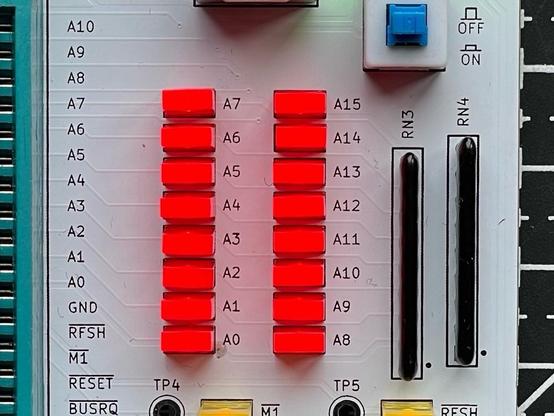
Here's something interesting about the Z80 NOP Tester:
Once we reach address A7, from A7 and beyond, their LEDs flash twice as fast as the A0–A6 LEDs.
This is because of the refresh cycles. (Cont.)
[1]
From this point on, the A7 LED starts flashing twice as fast: The CPU reads from address 128 (A0-A6=Low, A7=High), followed by the refresh for line 0 (A0-A6=Low, A7=Low). This makes it look as if the A7 LED is flashing twice as fast. This is simply because the memory accesses and the creation of the refresh lines run synchronously. This would only change after a jump command.
I found this effect documented on the 8bit-museum: https://8bit-museum.de/projekte/hardware-projekte-cpu-nop-tester/#Z80
The CPU performs a refresh in every T3/T4 cycle by applying an address to A0-A6 (128 lines). When the CPU is started, it reads a NOP from address 0 and performs a refresh for line 0, followed by address 1 and line 1, and so on until address 127 and line 127. (Cont.)
[2]
Here's something interesting about the Z80 NOP Tester:
Once we reach address A7, from A7 and beyond, their LEDs flash twice as fast as the A0–A6 LEDs.
This is because of the refresh cycles. (Cont.)
[1]