 Swift Dev Journal
Are you interested in finding the SwiftUI views in your app that update the most? The following article shows how to use the SwiftUI instrument to find the views that update the most:
https://swiftdevjournal.com/posts/swiftui-frequent-view-updates/
Are you interested in finding the SwiftUI views in your app that update the most? The following article shows how to use the SwiftUI instrument to find the views that update the most:
https://swiftdevjournal.com/posts/swiftui-frequent-view-updates/
I should try to get a #FuckingXcode tag going. Because fucking #Xcode.
Run a test suite, all the tests get green checkmarks next to them. Then write a test that fails. To debug the test, run just that one test. All checkmarks remain while you run that one test, despite others not running. If you break another test, it looks like it still passes. If you use cmd-opt-ctrl-g to rerun the last test set run, it LOOKS like they all pass, but they don't. Xcode keeps stale pass icons instead of removing or greying them out. If don't remember you're not running the entire suite… ¯\_(ツ)_/¯
Fucking Xcode.
In #Xcode, is there a way to configure how the debugger shows a type of variable?
Specifically, I'm using `Duration`, which is basically unreadable in the variables panel. However, I created an extension for Duration that adds a ` timeInterval` property that returns a TimeInterval (which is a type alias for Double).
How do I get Xcode to always render Duration using the `timeInterval` property I added to it?
[Edit] IntelliJ IDEA calls this “Java Type Renderers”, so if you know what that is that's basically what I'm looking for.
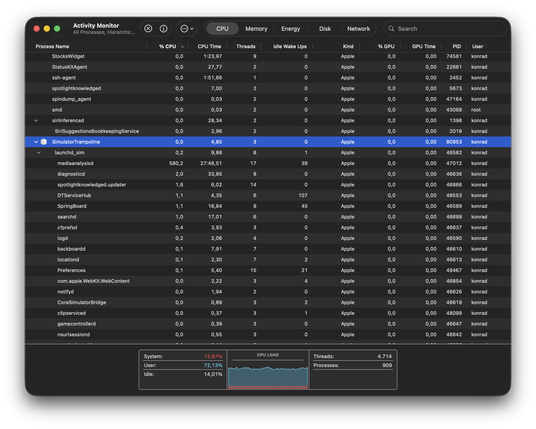
Apple, please fix medianalysisd CPU eater in simulator 😭
This makes your simulators (along with Xcode previews or even interface builder) to eat all your cores for many minutes - consuming tons of energy.
What this even analyze inside simulators? Is it a bug? It was introduced somewhere in #Xcode 26.4 or .3 but still is present in 26.5 😌
📰 XCSSET Malware Detailed: A Supply Chain Attack on macOS Developers via Xcode Projects
macOS developers targeted by XCSSET malware, which spreads via infected Xcode projects. The malware steals AWS tokens, SSH keys, hijacks crypto payments, and can self-propagate through developer teams. 🍎💻 #macOS #Malware #SupplyChain #Xcode
🌐 cyber[.]netsecops[.]io

 David Somers
 Gregatron5
 Konrad Kołakowski
 Patrick McConnell
 Uphill
 Mark Whybird
 Rick
Rick CyberNetsecIO