Aptivi
Fixing WinGetCreate fork synchronization issue when submitting a WinGet manifest
WinGet is a package manager that is made by Microsoft for modern Windows systems. It simplifies application installation by downloading it from official sources without having to manually search the web. There are also helpers that make installation using WinGet much easier, such as UniGetUI.
When you are an application developer and you are submitting WinGet manifests using WinGetCreate, it uses the GitHub API to fork the winget-pkgs repository to your GitHub account to make submission faster. However, one day, you might run into this error message when you’re trying to submit a manifest:
PS C:\Users\aptiv\manifests\a\Aptivi\BassBoom\1.0.0> wingetcreate submit C:\Users\aptiv\manifests\a\Aptivi\BassBoom\1.0.0 Manifest validation succeeded: True Submitting pull request for manifest... The forked repository could not be synced with the upstream commits. Sync your fork manually and try again. This message means that your fork has become so outdated that WinGetCreate couldn’t safely submit your manifest to create a pull requests for inclusion to the WinGet repository. This is clearly indicated in the message: The forked repository could not be synced with the upstream commits. Sync your fork manually and try again.
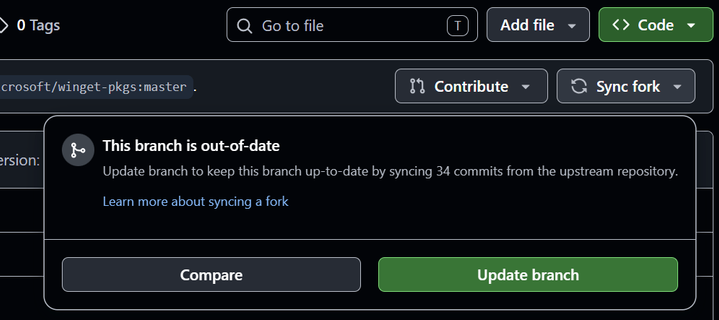
In order to fix this, you’ll have to manually synchronize your fork. Follow the below steps:
- You can search your fork with this URL:
https://github.com/<ACCOUNT>?tab=repositories&q=winget-pkgs&type=&language=&sort=
PS C:\Users\aptiv\manifests\a\Aptivi\BassBoom\1.0.0> wingetcreate submit C:\Users\aptiv\manifests\a\Aptivi\BassBoom\1.0.0 Manifest validation succeeded: True Submitting pull request for manifest... Pull request can be found here: https://github.com/microsoft/winget-pkgs/pull/367938 If you are still experiencing failures when pushing manifests to WinGet’s official repository using WinGetCreate, let us know!
#news #Tech #Technology #update #winget #Wingetcreate

 Aptivi