 Axel Le Pennec
I'm trying to run the basic widgets extension template from Xcode on a physical device (iOS 18.7.9) but it fails. I tried rebooting my device twice. I tried using Xcode 26.6 too, same issue. I don't know what to do to get it work...

I'm trying to run the basic widgets extension template from Xcode on a physical device (iOS 18.7.9) but it fails. I tried rebooting my device twice. I tried using Xcode 26.6 too, same issue. I don't know what to do to get it work...
Книга про разработку под iOS на русском: разбираем единственный актуальный учебник по SwiftUI
Если набрать в поиске «книга по SwiftUI на русском», результаты будут неожиданно скромными. Такие издания есть, но они либо выпущены уже довольно давно (как, например, наша книга Александра Казанцева , либо представлены на английском, либо доступны в формате он-лайн курсов разной степени полноты. Печатная книга по актуальной разработке под iOS - явление нынче редкое. Месяц назад мы выпустили перевод книги «iOS 18 App Development Essentials» Нила Смита — автора, которого англоязычное сообщество знает по многолетней серии учебников по разработке приложений под платформы Apple и Android. Книга вышла под названием « Что внутри?
https://habr.com/ru/companies/bhv_publishing/articles/1022756/
#iOS #SwiftUI #Swift #Xcode #мобильная_разработка #App_Store #WidgetKit #мобильная_разработка_и_дизайн
Khởi tạo ScriptWidget – tạo widget cho iOS/macOS bằng JavaScript + JSX! Dùng SwiftUI + WidgetKit, hỗ trợ Live Activities và Dynamic Island, mã nguồn mở (MIT), một codebase cho cả iOS/iPadOS/macOS. Nhận phản hồi về kiến trúc và API. #ScriptWidget #WidgetKit #SwiftUI #JavaScript #JSX #OpenSource #CôngCụLậpTrình #iOSDev #MãNguồnMở
Introducing Jewel Case: Spotify Album Art for Your Mac Desktop
Remember when music was physical? You’d flip through a stack of CDs, admiring the album art before deciding what to spin. The jewel case was part of the experience—the artwork set the mood before the first note played.
Streaming killed that ritual. Spotify buried album art behind tiny thumbnails, and unless you’re staring at your phone, you never see it. I wanted that back.
The Problem
I spend most of my day looking at my Mac, not my phone. When music is playing, I want to see what’s playing—really see it. The big, beautiful album artwork. Not hunt for a browser tab or pull out my phone.
macOS widgets seemed like the obvious solution. A glanceable “Now Playing” widget right on my desktop. But Spotify doesn’t offer one. Third-party apps either wanted too many permissions or looked like afterthoughts.
So I built my own.
Jewel Case
Jewel Case is a simple Mac app that does one thing well: shows you what’s playing on Spotify.
The menu bar shows the current track. Click it, and you get the full album art with playback controls. But the real magic is the widget—drop it on your desktop, and your currently playing album art is always visible. It’s like having a tiny record player on your desk.
Features:
The Technical Bits
Built with SwiftUI and WidgetKit. The trickiest part was getting the widget to update reliably—widgets don’t have continuous network access, so the main app caches the current track data to a shared App Group container. The widget reads from there instead of hitting Spotify’s API directly.
OAuth was the usual dance. If you’ve ever implemented Spotify auth, you know.
Get It
Jewel Case is available on the Mac App Store — free to download.
#Apple #development #MacOS #NerdyStuff #Swift #SwuiftUI #WidgetKit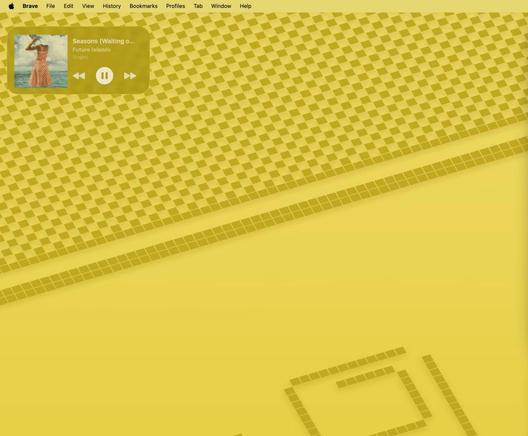
I’ve been exploring WidgetKit in iOS 26 by building a Step Counter widget and documenting what I learned.
This isn’t an App Store release. It’s an intentional build used to understand system surfaces, constraints, and tradeoffs.
New post in my iOS 26 micro-app series, Step Counter Widget.
Built with WidgetKit + SwiftUI, it tracks daily steps with a progress ring, optional HealthKit integration, and MV + services architecture. I also cover how Live Activity could extend this project, even though it’s not part of the MVP implementation.
👉 Read here: https://medium.com/shift-bydesign/step-counter-widget-interactive-system-surfaces-in-ios-26-0d2d0664b108
#iOSDev #Swift #SwiftUI #WidgetKit #HealthKit
A few details on supporting rendering mode in visionOS widgets
https://stepinto.vision/example-code/widgets-adapting-content-to-rendering-modes/
Our apps can trigger widgets to update by asking WidgetCenter to reload timelines.
#visionOS #SwiftUI #WidgetKit #AppleVisionPro
https://stepinto.vision/example-code/widgets-reloading-a-widget-from-an-app-scene/
FlutterアプリによるGlanceとWidgetKitで実現する両OS対応ウィジェット機能実装
https://developers.cyberagent.co.jp/blog/archives/58077/
#developers #エンジニア #Fanbase #FanTech #Flutter #Glance #WidgetKit
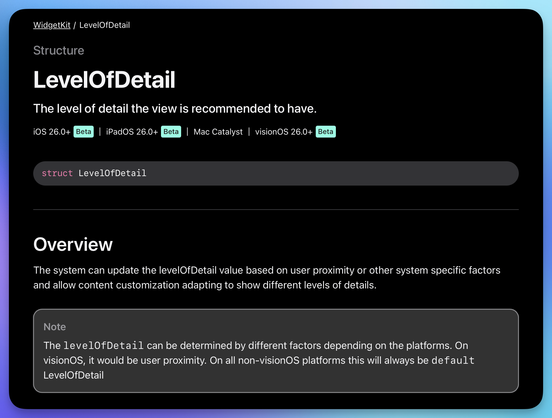
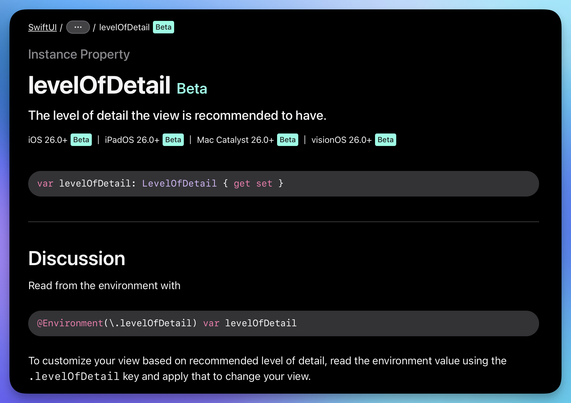
Level of detail for widgets in #WidgetKit + #SwiftUI environment value. Can be default or simplified.
Documentation: https://developer.apple.com/documentation/widgetkit/levelofdetail
 Habr
Habr
 Reddit Tech VN Bot
 Jake Spurlock
 Moin
Moin
 iamshift.dev
 Joseph Simpson
 CyberAgent Developers Bl