Did you request an ACVREP credit certificate for attending the live webinar: Six JAWS Features for Mastering Complex Documents and Web Pages? Please check your inbox; these have all been sent.

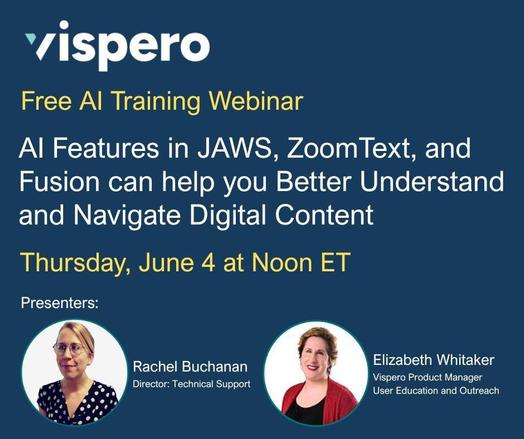
We hope you can join us on June 4 at Noon ET for our next live webinar: Use AI Features in JAWS, ZoomText, and Fusion to Better Understand and Navigate Digital Content. Register today: https://us06web.zoom.us/webinar/register/WN_IQmbJUKXSoGd8pNwUdUHIQ#/registration

#ACVREP #JAWS #VisperoTraining

Welcome! You are invited to join a webinar: Use AI Features in JAWS, ZoomText, and Fusion to Better Understand and Navigate Digital Content. After registering, you will receive a confirmation email about joining the webinar.

Learn how the built-in AI features in JAWS, ZoomText, and Fusion can help you work more efficiently and independently. This session will highlight practical tools that provide insight into your digital environment, enhance navigation, and make it easier to understand and interact with content across applications and on web pages. In this session, we'll demonstrate how to: • Use Vispero Companion to get help with JAWS, ZoomText, Fusion, and other applications • Describe images, charts, and graphics using Picture Smart AI in applications, documents, and on web pages • Identify unlabeled buttons and controls using AI Labeler • Explore and understand complex web pages using Page Explorer Vispero Presenters: Elizabeth Whitaker and Rachel Buchanan ACVREP Credits: ACVREP credits will be available for those who attend the live webinar. Help Us Spread the Word: Please feel free to share this with someone you think might benefit from attending.
Zoom

Join us Thursday, June 4th at noon ET to learn how AI Features in JAWS, ZoomText, and Fusion can help you Better Understand and Navigate Digital Content. ACVREP credits available during the live presentation. Register today:
https://us06web.zoom.us/webinar/register/WN_IQmbJUKXSoGd8pNwUdUHIQ#/registration

#ACVREP #VisperoTraining #JAWS

Check out this week's JAWS Power Tip: How To Use JAWS Smart Glance Highlights to Quickly Locate Important Text on a Web Page: https://toptechtidbits.com/using-jaws-smart-glance/

#VisperoTraining #JAWS #ScreenReader

JAWS Power Tip: How To Use JAWS Smart Glance Highlights to Quickly Locate Important Text on a Web Page

Smart Glance highlights in JAWS are visually distinctive pieces of text on a web page, such as bold, colored, or uniquely formatted content that stands out from the rest. JAWS detects these highlights to help you quickly find important information that might not be marked as a heading or link. This feature is especially useful for catching key points, warnings, or visually emphasized content that could otherwise be missed.

Top Tech Tidbits

Join us in one hour to celebrate Global Accessibility Awareness Day and learn how to simplify busy or cluttered web pages using JAWS: https://us06web.zoom.us/webinar/register/WN_LkAZzu8AQyyMkubC8Yoy3w#/registration

#ACVREP #JAWS #VisperoTraining #GAAD

Welcome! You are invited to join a webinar: Six JAWS Features for Mastering Complex Documents and Web Pages. After registering, you will receive a confirmation email about joining the webinar.

Complex documents and web pages can be difficult to navigate because they often contain cluttered layouts, inconsistent structure, and multiple layers of information. With a mix of text, images, tables, forms, and other complex elements, interacting with and fully understanding the content can be challenging. In this session, we’ll explore six powerful JAWS features that make it easier to navigate and interact with documents and web pages with challenging layouts and structure. Whether you’re working in Word, PDFs, PowerPoint, or browsing the web, these tools help you move more efficiently and understand content more clearly. You’ll learn how to: - Navigate tables in Word, PDFs, and web pages using the JAWS Table Layer. - Interpret images, charts, and PowerPoint slide visuals with Picture Smart AI. - Simplify busy or cluttered web pages with Page Explorer. - Label web page and PDF elements using the JAWS AI Labeler. - Complete and review complex forms on a web page using JAWS-specific keyboard commands. - Navigate tables and controls on the web more efficiently using JAWS Smart Navigation. Vispero Presenters: Elizabeth Whitaker and Rachel Buchanan ACVREP Credits: ACVREP credits will be available for those who attend the live webinar. Help Us Spread the Word: Please feel free to share this with someone you think might benefit from attending.
Zoom

Join us tomorrow at noon ET to celebrate Global Accessibility Awareness Day to learn how Picture Smart AI can help you interpret images, charts, and PowerPoint slide visuals in complex documents and on web pages.
ACVREP credits available during the live webinar.

Register today: https://us06web.zoom.us/webinar/register/WN_LkAZzu8AQyyMkubC8Yoy3w#/registration

#ACVREP #JAWS #VisperoTraining #GAAD

Welcome! You are invited to join a webinar: Six JAWS Features for Mastering Complex Documents and Web Pages. After registering, you will receive a confirmation email about joining the webinar.

Complex documents and web pages can be difficult to navigate because they often contain cluttered layouts, inconsistent structure, and multiple layers of information. With a mix of text, images, tables, forms, and other complex elements, interacting with and fully understanding the content can be challenging. In this session, we’ll explore six powerful JAWS features that make it easier to navigate and interact with documents and web pages with challenging layouts and structure. Whether you’re working in Word, PDFs, PowerPoint, or browsing the web, these tools help you move more efficiently and understand content more clearly. You’ll learn how to: - Navigate tables in Word, PDFs, and web pages using the JAWS Table Layer. - Interpret images, charts, and PowerPoint slide visuals with Picture Smart AI. - Simplify busy or cluttered web pages with Page Explorer. - Label web page and PDF elements using the JAWS AI Labeler. - Complete and review complex forms on a web page using JAWS-specific keyboard commands. - Navigate tables and controls on the web more efficiently using JAWS Smart Navigation. Vispero Presenters: Elizabeth Whitaker and Rachel Buchanan ACVREP Credits: ACVREP credits will be available for those who attend the live webinar. Help Us Spread the Word: Please feel free to share this with someone you think might benefit from attending.
Zoom

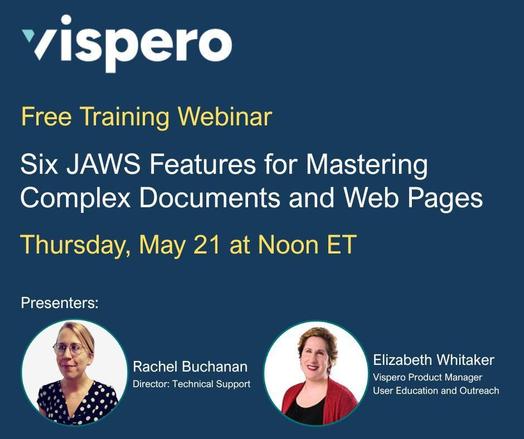
Have you registered? Learn which JAWS features can help you better understand and interact with challenging layouts in Word, PDFs, PowerPoint, and on the web. Join us on Thursday, May 21 at Noon ET for the webinar "Six JAWS Features for Mastering Complex Documents and Web Pages." ACVREP credits available during the live webinar.

Register today: https://us06web.zoom.us/webinar/register/WN_LkAZzu8AQyyMkubC8Yoy3w#/registration

#ACVREP #JAWS #VisperoTraining

Did you miss a previous AI webinar? Would you like to review previous lessons in our AI series? Visit our Learn AI page to access lessons, practice exercises, and additional AI resources. https://www.freedomscientific.com/training/learnai/

#AITraining #VisperoTraining

Learn AI - Freedom Scientific

    Unlock the Power of AI in the Workplace and discover how Artificial Intelligence (AI) can increase your productivity and independence. AI is reshaping how we work, from automating routine tasks to generating content and streamlining data. In this interactive training series, you will learn to use tools like ChatGPT, Gemini, and Microsoft Copilot […]

Freedom Scientific

Check out this week's JAWS Power Tip: How to Use JAWS Page Explorer to Provide Tips on Navigating Busy or Complex Web Pages: https://toptechtidbits.com/jaws-page-explorer/

#JAWS #ScreenReader #VisperoTraining

JAWS Power Tip: How To Use JAWS Page Explorer To Provide Tips On Navigating Busy or Complex Web Pages

Page Explorer is a JAWS feature that provides a quick summary of any web page. It tells you about the page’s layout, main content, important links, and gives you tips for navigating the page efficiently.

Top Tech Tidbits

Subscribe to the Freedom Scientific Training Podcast to access training content on your smart speaker or mobile device.
https://www.freedomscientific.com/training/podcast/

#VisperoTraining #Podcast

Training Podcast

Freedom Scientific’s audio training content is now available for download on your smartphone or tablet, and for streaming on your Amazon Echo or Google Home Assistant!

Freedom Scientific

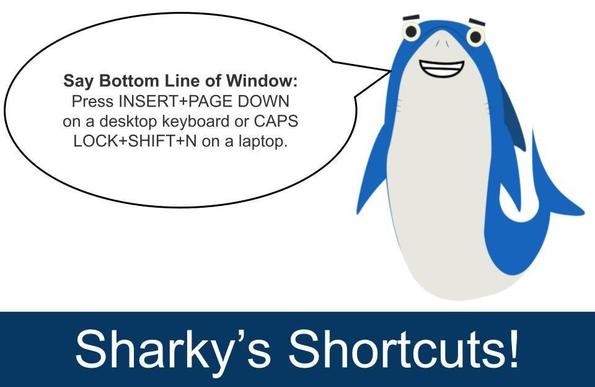
The "Say Bottom Line of Window" command in JAWS is used to read the bottom line of the active window. In most cases, this bottom line is the status bar. The status bar often contains important information, such as the current page number in a document, the position of the cursor, or other status messages that are not always spoken automatically.

To use this command, press: INSERT+PAGE DOWN on a desktop keyboard or CAPS LOCK+SHIFT+N on a laptop.

#JAWS #ScreenReader #VisperoTraining