 Kinetix
User activity graphs is one of these really cool little Misskey/Sharkey features that made me want to put together this series of posts. When I first saw this, I knew it was worth sharing - I have not seen this super useful feature elsewhere.
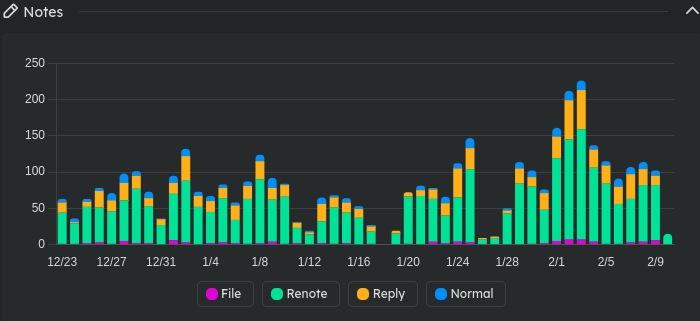
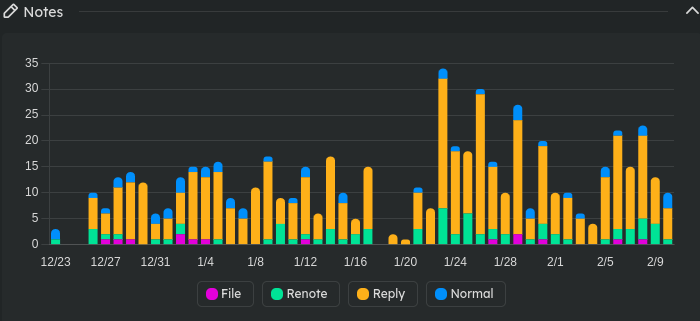
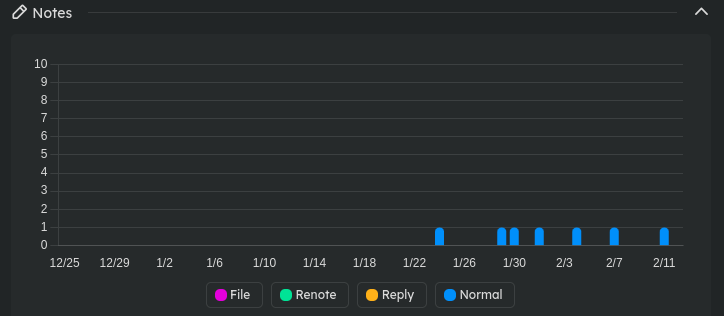
Have a look at the graphs attached to this post. It's pretty easy to get an idea of what the person's posting history looks like, and whether or not they are mostly reposting things, replying to people, posting their own words, or even posting with attachments (pictures, etc.). (In the UI you can click on "File", "Renote", etc. at the bottom of the graph to remove/add those portions of the graph.)
One of the users, for me, could possibly be too noisy for my timeline in general, although that user does actually engage with others, which helps with my assessing 'suitability' for me. Since I have a couple of soft word filters set up to help cut back on what I would consider noise that I don't want to see in my timeline, I can still engage with the user on some topics and handle the frequency of their posting.
The next user is not a big news repeater and appears to be only interested in engagement, which fits in my timeline pretty easily.
The last user is quite quiet, and appears to only be posting their own words. Easy to have them added in.
It's so nice to have this data so accessible as it's helpful to know more about what to expect when adding an account to your timeline. You may want to do further checking in to the user to see if you'd instead prefer to follow hashtags they use, or add them to a llist or antenna instead (special ways of creating alternate timelines/feeds in Sharkey).
Come see for yourself! Our instance at https://humanwords.cc is open for new registrations, and a list of Sharkey instances can be found at https://sharkey.fediverse.observer/list
This post is part of a series of Sharkey posts I'm doing. The introduction and index post of these "Sharkey is awesome" posts is at: https://humanwords.cc/notes/a4k2kap4hbgs2kko
#Sharkey #misskey #Fediverse #userresearch #useractivity #userguides
Have a look at the graphs attached to this post. It's pretty easy to get an idea of what the person's posting history looks like, and whether or not they are mostly reposting things, replying to people, posting their own words, or even posting with attachments (pictures, etc.). (In the UI you can click on "File", "Renote", etc. at the bottom of the graph to remove/add those portions of the graph.)
One of the users, for me, could possibly be too noisy for my timeline in general, although that user does actually engage with others, which helps with my assessing 'suitability' for me. Since I have a couple of soft word filters set up to help cut back on what I would consider noise that I don't want to see in my timeline, I can still engage with the user on some topics and handle the frequency of their posting.
The next user is not a big news repeater and appears to be only interested in engagement, which fits in my timeline pretty easily.
The last user is quite quiet, and appears to only be posting their own words. Easy to have them added in.
It's so nice to have this data so accessible as it's helpful to know more about what to expect when adding an account to your timeline. You may want to do further checking in to the user to see if you'd instead prefer to follow hashtags they use, or add them to a llist or antenna instead (special ways of creating alternate timelines/feeds in Sharkey).
Come see for yourself! Our instance at https://humanwords.cc is open for new registrations, and a list of Sharkey instances can be found at https://sharkey.fediverse.observer/list
This post is part of a series of Sharkey posts I'm doing. The introduction and index post of these "Sharkey is awesome" posts is at: https://humanwords.cc/notes/a4k2kap4hbgs2kko
#Sharkey #misskey #Fediverse #userresearch #useractivity #userguides
 PPC Land
 ITHussl3