What are everybody's favourite simple #TUI libraries.

I've been looking at #npyscreen and #urwid or maybe #textual or #picotui ?

Basically, I want to design a #cyberdeck sort of thing, but I want the interface to be more like a Gameboy or an old fashioned purpose-built device.

#urwid is really nice for fast hacking neat terminal interfaces. gave it a go, much fun :) you won't feel cursed.
https://urwid.org
Overview — Urwid 2.1.2

#urwid does support overriding each LineBox character. So I should be able to plug in the existing config I wrote at least.
Unfortunately it also suffers from width miscalculations when the label contains more complex emoji, especially for ones that aren't rendered properly by the terminal... I guess that'll end up being an issue that will depend on upstream fixes.
All I could perhaps do is offer a way to specify padding/width offsets for certain glyphs or buttons, but that might only work for my own box implementation rather than LineBox.

That feeling when you find out that the function you've been #coding to add some functionality to a library, is actually already sort of implemented (and better?) in the library itself...

I guess I can simplify the box-drawing code for #TUILauncher as #urwid has urwid.LineBox().
(Though I might miss out on the custom box-drawing glyphs (unless that's also implemented already))

@kelbot maybe something to do with the way I calculate width, and/or the way #urwid handles multibyte characters.

Can you paste the characters you are using so I can test it myself tomorrow?

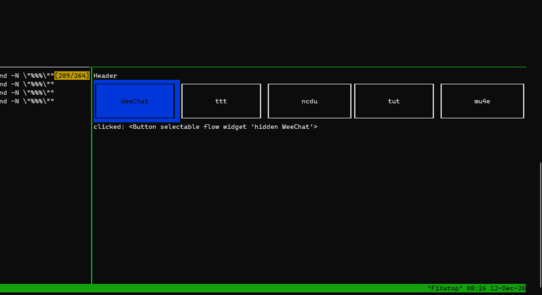
@kelbot I think I actually have something working with #urwid too, though some terminals might have issues with mouse coords beyond a certain amount of columns.
What exactly do you want it to do after clicking on a button? Do you want it to end the button application and launch it in the same pane/window?
Open a new tmux/screen window and launch it in that? Switch to a specific tmux pane, and launch it in that? (And what happens then if that pane is already running an app? Should it SIGSUSPEND?)
Ugh... #urwid is frustrating...
@kelbot alternatively you can probably write a simple #TUI in #Python with #Urwid, which seems to support mouse input: http://urwid.org/manual/userinput.html
User Input — Urwid 2.1.2

Finally decided to draw the line and #release #toot v0.23.0.

The TUI has been rewritten from scratch using #urwid, and it's feeling much nicer to use, as well as being more feature rich.

Check out the demo:
https://asciinema.org/a/fTq6pzFOIrPzaIt1ralRM86wE

It's taken the better part of two months to ge there. Thanks to everyone who helped! \o/

Toot v0.23.0 TUI Demo

Newly released text based user interface for interacting with your favourite Mastodon instance. https://toot.readthedocs.io/en/latest/

Which #Python interface toolkit is best?

#urwid, #npyscreen, or #prompt_toolkit?

Urwid has the coolest screenshots, but the other two both have better #documentation.