🧩 [TIP] Pipelines reproducibles con {targets}

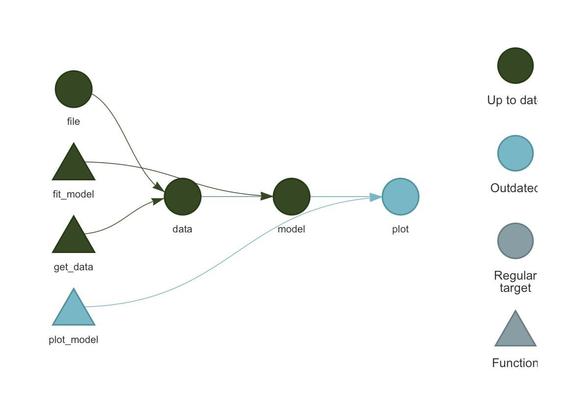
Orquestá análisis en R: {targets} detecta cambios, recomputa solo lo necesario y usa paralelo.

Cómo empezar:
• funciones en R/
• _targets.R
• ver DAG: tar_visnetwork()
• correr: tar_make()
• leer: tar_read()

Ideal para modelado y reportes automáticos. 🔗 docs.ropensci.org/targets/
✍🏽 Will Landau

#rstats #Rtips #targets @rstats

🧩 [r_tip] - ¿Querés que tus visualizaciones cobren vida?

Con el paquete {gganimate} podés crear animaciones sobre gráficos ggplot2 y mostrar transiciones, evolución temporal o cambios por categoría.

✔️ Extiende ggplot2 con funciones intuitivas (transition_*, enter_*, exit_*)
✔️ Ideal para storytelling con datos en presentaciones o redes
✔️ Compatible con gifski, transformr y temas personalizados

🔗 https://gganimate.com/
✍️ @thomasp85

#RStats #Rtips #gganimate #DataViz

🧩 [R-TIP] – ¿Te gusta la magia? Acá va un truco con {janitor} 🧼

Con clean_names() podés limpiar todos los nombres de columnas de tu dataset en un paso:

✔️ minúsculas + guiones bajos
✔️ sin acentos ni símbolos raros
✔️ listo para usar con dplyr y ggplot2

🔗 https://sfirke.github.io/janitor/reference/clean_names.html
✍️ Sam Firke

#RStats #Rtips #DataCleaning #janitor #cienciadedatos

Cleans names of an object (usually a data.frame). — clean_names

Resulting names are unique and consist only of the _ character, numbers, and letters. Capitalization preferences can be specified using the case parameter. Accented characters are transliterated to ASCII. For example, an "o" with a German umlaut over it becomes "o", and the Spanish character "enye" becomes "n". This function takes and returns a data.frame, for ease of piping with %>%. For the underlying function that works on a character vector of names, see make_clean_names(). clean_names relies on the versatile function snakecase::to_any_case(), which accepts many arguments. See that function's documentation for ideas on getting the most out of clean_names. A few examples are included below. A common issue is that the micro/mu symbol is replaced by "m" instead of "u". The replacement with "m" is more correct when doing Greek-to-ASCII transliteration but less correct when doing scientific data-to-ASCII transliteration. A warning will be generated if the "m" replacement occurs. To replace with "u", please add the argument replace=janitor:::mu_to_u which is a character vector mapping all known mu or micro Unicode code points (characters) to "u".

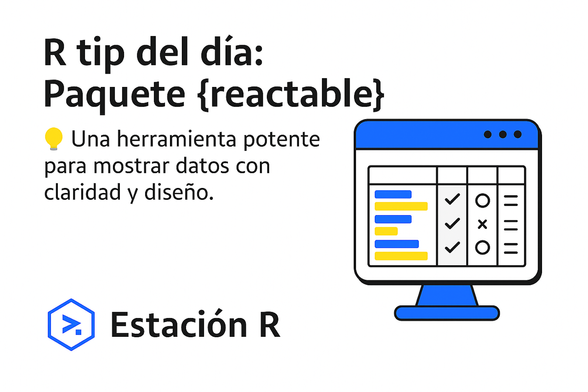
🧩 [R-TIP] – Tablas interactivas en R con {reactable}

Crea tablas HTML dinámicas, ordenables y visuales en pocas líneas.
✔️ Ideal para dashboards con Shiny o Quarto
✔️ Personalizá estilos, agregá barras, tooltips y más.

🔗 https://glin.github.io/reactable/

#RStats #DataViz #Rtips

[PAQUETE] - 🧹 ¿Querés que tu código en R sea más limpio y profesional?

Te dejamos dos paquetes que no podés dejar de revisar:

🔍 {lintr} analiza tu código y detecta errores de sintaxis o estilo según la guía tidyverse.
🎨 {styler} lo reformatea automáticamente para que siga esas buenas prácticas.
• Info:
https://lintr.r-lib.org
https://styler.r-lib.org

#RStats #DataScience #CódigoLimpio #EstiloR #lintr #styler #rtips @rstats

A Linter for R Code

Checks adherence to a given style, syntax errors and possible semantic issues. Supports on the fly checking of R code edited with RStudio IDE, Emacs, Vim, Sublime Text, Atom and Visual Studio Code.

For years I used #R and struggled with Windows path issues—turns out there’s a built-in function I never knew about: normalizePath() in base R! It converts file paths to canonical form & handles slash/backslash confusion.
https://www.rdocumentation.org/packages/base/versions/3.6.2/topics/normalizePath
#rstats #Rtips #Windows
normalizePath function - RDocumentation

<p>Convert file paths to canonical form for the platform, to display them in a user-understandable form and so that relative and absolute paths can be compared.</p>

[PAQUETE 📦] - 🧠 {ellmer}: Lleva los LLMs a R

Integra modelos como OpenAI, Claude y Gemini en R de forma fácil

✨ Características:
• 🔗 Compatible con múltiples proveedores
• 🛠️ Llama funciones dinámicas
• 📊 Extrae datos estructurados
• 💬 Conversaciones contextuales

➕ellmer.tidyverse.org

#RStats @rstats #rtips

[PAQUETE 📦] - {parabar}: Tareas paralelas en R con barra de progreso ⚡

Simplifica procesos intensivos con {parabar}: ejecuta tareas en paralelo y monitorea el progreso fácilmente.

🚀 Tareas paralelas sin complicaciones.
📊 Barra de progreso intuitiva.

🌐 parabar.mihaiconstantin.com

#RStats #Rtips

[PAQUETE 📦] - 🌱 {agroclimatico}: Análisis climático para la agricultura

🌦️ Convierte datos climáticos en información útil para la agricultura con {agroclimatico}.

✨ Características:
📉 Indicadores agroclimáticos clave.
📊 Visualización de datos históricos y proyecciones.
🚜 Para agricultura sostenible.

Potencia decisiones agrícolas con R. 🍃

🔗 docs.ropensci.org/agroclimatico/
@paocorrales | @eliocamp | @natigattinoni

#RStats #RStatsES #Rtips @rstats

[PAQUETE 📦] - 📝 {todor}:

Gestiona tus tareas en tu código R. 🔍

📌 Identifica automáticamente etiquetas como TODO y FIXME en tu código.

📂 Genera listas centralizadas de pendientes para una mejor organización.

🌐 github.com/dokato/todor
✍🏼 Dominik Krzemiński

#RStats #Rtips #DataScience
@rstats