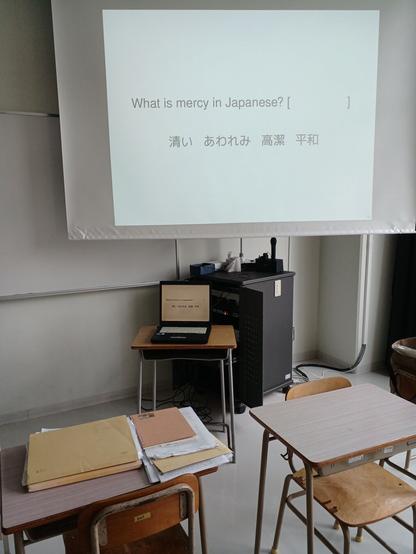
Slideshow quizes (animated simply!) are possible with a 32bit Fujitsu machine that used to work through Windows Vista.

Now the machine works (much better probably) through Debian 12. The Gnome Window Manager was OK (maybe slow) until the other projector screen was connected. Then it froze up a bit and I couldn't figure out how to configure the display.

So another try with the LXDE Window Manager and configuring the projector display (VGA monitor) to be 1024×768 like the laptop (LCD monitor) and I'm set!!

Now that I think of it all the old Fujitsu PCs I've dealt with have been reliable.. They've all been 32 bit so maybe it's unfair to compare them with the little Panasonic machines that won't take electricity anymore: one was running Debian12 Gnome and the other had the Win11 OS it came with but both just used up both batteries than refused to start up again even while plugged in. It's irritating. For years and old NEC laptop with no battery served to show movies but these more modern PCs are becoming a pain in the butt. It was probably a mistake to get another little Panasonic machine. The BIOS won't show from pressing F2 during start up. One has to work through the irritating Win11 screen and find settings to completely power down the PC. Then go through the big distraction OS again to get the machine to boot from a DVd or USB stick..

It must be the "Invisible Foot" principle of the economy at work again. Any little thing that is more wasteful and irritating for others somehow enriches and further empowers corporate billionaire types like Bill Gates.. I hoe he can't ruin Africa's farming and chickens the way he ruins PCs for me..

#FreedomSoftware #RacketSlideshow #LXDE #WindowManagers #OldPCs
Freedom Learning Racket...
Easy text->slideshow conversion for quiz style workshops... I hope, gotta try it with people who agree to the experiment first.. But it should work... I can make it work...
https://codeberg.org/bsmall2/quiz-slide-racket
#RacketLang #RacketSlideshow #Slideshow #SlideshowQuizes
(Maybe I should learn MegaParsack for all the stuff I want to do with org-mode-inspired mark up. The markdown package replaced regexps's. Elsewhere I used a calmer convention for html's ruby-like Furigana effects)
quiz-slide-racket

Racket scripts for making slideshows. Experiments with text file conventions to generate slideshows.

Codeberg.org

Racket Slideshow

Have you considered slideshow?

https://docs.racket-lang.org/slideshow/index.html

Slideshow is a library for creating presentation slides. Unlike Powerpoint, Slideshow provides no WYSIWYG interface for constructing slides. Instead, like Beamer, a presentation is generated by a program.

To get started, run the slideshow executable, and click the Run Tutorial link.

Slideshow is included in the standard Racket distribution from https://racket-lang.org/ so you will already have it installed. 🤩

To learn more about Slideshow, see “Slideshow: Functional Presentations” :

Robert Bruce Findler and Matthew Flatt, “Slideshow: Functional Presentations,” Journal of Functional Programming, 16(4-5), pp. 583–619, 2006. http://www.cs.utah.edu/plt/publications/jfp05-ff.pdf

Slideshow is extensible! In addition to sharing amazing presentations users have also published extensions as Racket packages. See more on the Racket Wiki at https://github.com/racket/racket/wiki/Artifacts:-Slideshow

#slideshow chat or questions are welcome on Racket Discord https://discord.gg/PnwqWFCsyR or Discourse https://racket.discourse.group/

#Presentations #beamer #Racket #RacketLang #RacketLanguage #PowerPoint #RacketSlideshow

Slideshow: Figure and Presentation Tools

@Gopiandcode Have you considered doing your presentation slides in Racket Slideshow?

https://docs.racket-lang.org/slideshow/index.html

Slideshow is a library for creating presentation slides. Unlike Powerpoint, Slideshow provides no WYSIWYG interface for constructing slides. Instead, like Beamer, a presentation is generated by a program.

To get started, run the slideshow executable, and click the Run Tutorial link.

To learn more about Slideshow, see also “Slideshow: Functional Presentations” [Findler06].

Some resources are collected in the Racket Wiki at https://github.com/racket/racket/wiki/Artifacts:-Slideshow

@racketlang #Presentations #beamer #Racket #RacketLang #RacketLanguage #RacketSlideshow

Slideshow: Figure and Presentation Tools

.> Strand a computer scientist at an airport, and the poor soul would probably survive for days with only a network-connected computer and five applications: an e-mail client, a web browser, a general-purpose text editor, a typesetting system, and a slide-presentation application. More specifically, while most any mail client or browser would satisfy the stranded scientist, probably only Emacs or vi would do for editing, LATEX for typesetting, and Microsoft PowerPoint(TM) for preparing slides....> The typical business traveler would more likely insist on Microsoft Word TM for both text editing and typesetting. Computer scientists may prefer Emacs and LATEX because text editing has little to do with typesetting, and these different tasks are best handled by different, specialized applications. More importantly, though, tools such as Emacs, vi, and LATEX are programmable. Through the power of programming abstractions, a skilled user of these tools becomes even more efficient and effective....> Shockingly, many computer scientists give up the power of abstraction when faced with the task of preparing slides for a talk. PowerPoint is famously easy to learn and use, it produces results that are aesthetically pleasing to most audience members, and it enables users to produce generic slides in minutes. Like most GUI-/WYSIWYG-oriented applications, however, PowerPoint does not lend itself easily to extension and abstraction. PowerPoint provides certain pre-defined parameters—the background, the default font and color, etc.---but no ability to create new abstractions.... - Slideshow: Functional Presentations, pdf
#RobertBruceFindler #RobertFindler #MatthewFlatt #MattFlatt #ComputerScience #ComputerScientist #RacketLang #RacketSlideshow #Slideshow #Presentations

I'm sitting in on a class on
#MicroOrganisms #MicroOrganismBiology #微生物学 in Japanese. I started reworking the presentation slides into Racket slideshow. It's empowering! The time spent re-learning and learning Slideshow is also getting me to remember the biology. Going back to my 1988 Biology textbook I see that Whittaker's Five Kingdom classification scheme has been replaced by Woesse's Domains. But the basic chemistry with photosynthesis and glucose is the same..

> 正式名称を超募集中... もう「もんたメソッド」で。…いいのか? プレゼンの偉い人が使うときはそれなりの名前で呼んで下さい。^1

間抜け(内容がない? 芯がない?と解釈していい?)の名前を変えましょう!
もともと「空欄を埋める」(Fill in the blanks)問題ですので

「空欄埋めメソッド」はどうですか。直接(みのもんたみたいな)間抜けを埋めなくてもいいと思いますけど、 Bullshitウンコな議論を無視して、 価値のあることに集中(注意を払うこと)できたらいいなぁぁ。

やっぱり RacketのSlideshowとslideshow/playですぐ#クイズ形式プレゼン できます。^2

^1 https://d.hatena.ne.jp/keyword/%E3%82%82%E3%82%93%E3%81%9F%E3%83%A1%E3%82%BD%E3%83%83%E3%83%89?kid=113456
^2 https://docs.racket-lang.org/slideshow/play.html#%28def._%28%28lib._slideshow%2Fplay..rkt%29._play-n%29%29

#プレゼン #プレゼン方法 #プレゼンメソッド #RacketSlideshow

もんたメソッドとは コンピュータの人気・最新記事を集めました - はてな

「もんたメソッド」とは - プレゼンテーション手法の一つ。 初出は2005年 5月27日 Blog Hackers Confer…

はてなブログ タグ
高橋メソッド と もんたメソッド ^1 は #DrRacket#Racket, #RacketSlideshow でするのが楽しいそうです。 友達が中学校を卒業した人達に挨拶するとき、 素朴なメッソッドでスライドを見せたいらしい。#Slideshow ^2 ですぐ#高橋メソッド できた、 簡単な #もんたメソッド もDRY理念を虫したら簡単にできそうけどplay-n ^3使った関数を作ったら繰り返しのない、ちょっと派手なスライドできそう。時間を作って、集中力の訓練としてやってみようかな。
ところで、#みのもんた は10何年前テレビで見たときに本能的にきらいだった。 最近「#ウンコな議論」を読みだしたら、その気持を説明できるようになりつつある。 ビジネスCMの影響が強すぎる社会になると、 ありそうな顔だけで、 見せかけのことで通せる感じ。 似ったような居眠り権力者、化石頭、があちこち決定権を握てしまっているじゃないかな?
^1 https://note.com/yumi_nomo/n/ndde9a3ee5cd0
^2 https://docs.racket-lang.org/slideshow/Creating_Slide_Presentations.html#%28part._.Slide_.Basics%29
^3 https://docs.racket-lang.org/slideshow/play.html#%28def._%28%28lib._slideshow%2Fplay..rkt%29._play-n%29%29
高橋メソッド・もんたメソッド|YUMI | デザイナー・心理学|note

こんにちは。 今日は、タイトルにある2つのメソッドを調べたり 自分で実際にPowerpointで体験したりして、感じたことを書きます。 高橋メソッドとは? 文字だけ(巨大)で構成されるプレゼン方式のことです。 日本Rubyの会の高橋征義によって考案されたプレゼンテーション技法。2001年に高橋が講演するにあたり、あいにくプレゼンテーションツールを持ち合わせていなかったことから、巨大な文字だけで構成されたHTMLによるプレゼンテーションを行ったことが始まりとされる。 引用:Wikipedia もんたメソッドとは? 「午後は○○おもいッきりテレビ」でみのもんたが行うように、文章の

note(ノート)