Dans le dernier épisode du #podacast #velotaf sa pratique est approchée en fonction du #genre

Et soudain, cela me questionne en dehors du monde du #Velo

Je participe à la définition de l'offre #Ferroviaire en Belgique
Quelle est la place du genre dans nos réflexions?

Je dois bien avouer que c'est un angle absent. Mauvaise excuse : il n'y a pas grand monde qui aborde cela avec cet angle d'approche

Je suis incapable de me souvenir dans tous mon parcours, dans toutes mes lectures avoir rencontré une analyse de l'offre ferroviaire prenant en compte la question du genre

Et vous, auriez-vous des références à partager sur le sujet?

https://velotaf.studiomano.fr/podcast/94-genre-et-velo-une-perspective-feministe-avec-melodie-de-lasbl-la-ville-a-velo
#94 – Genre et vélo : une perspective féministe avec Mélodie de l’asbl La Ville à Vélo

Dans cet épisode, Mélodie, co-présidente de La Ville à Vélo, explore les freins spécifiques à la pratique du vélo chez les femmes. À travers son mémoire et ses engagements, elle met en lumière une mobilité genrée encore trop méconnue. On y parle sécurité, injonctions corporelles, et mobilité domestique. Un échange passionnant pour mieux comprendre les...

Vélotaf par Bleen.be

Wieder eine hervorragende #podacast Folge #PiratensenderPowerplay mit @samelou und @friedemann

Letzterer spricht mir in der zweiten Hälfte so tief aus dem Herzen bzgl. der Ansprache von bisher unangesprochenen oder verlorenen Wählergruppen der #Grünen durch #Habeck4Kanzler.

https://shows.acast.com/piratensender-powerplay/episodes/e190-warum-trump-und-wie-weiter-habeck

#DieGrünen #Bundnis90DieGrünen

E190: Warum Trump? Und was macht Habeck dagegen? | Piratensender Powerplay

豊島ミホのポッドキャストおもしろい2004年くらいの早稲田の2部の学生生活 / “聖なる欲望ラジオ - #48 ぼっちすぎる大学生活は授業が友達” (1 user) https://podcasts.google.com/feed/aHR0cHM6Ly9hbmNob3IuZm0vcy9iZGRmOGYyOC9wb2RjYXN0L3Jzcw/episode/MGZjMzIxYTgtMDJkOC00ZmU5LTkxOWItMWMwZTFiZGU5NTgx?ep=14 #豊島ミホ #Podacast
聖なる欲望ラジオ - #48 ぼっちすぎる大学生活は授業が友達

大学、それは自由な場所。ゆえに大学生活は十人十色…。今回は「大学の卒論、テーマは何でしたか?」というお便りを元ネタに、大学生活についてお話しします。彼氏なし、サークルなし、アルバイトは誰にも会わない内職。私の思い出は授業が9割! そんな生活を後悔した時期もあったけど、大学生の2倍の歳になった今では、授業の思い出がキラキラしています😄もちろん、すごくパーソナルなテーマだった卒論についても語りました。人の大学生活や卒論などを覗いてみたい方はぜひ✨▽免許更新を早めに済ませた話(途中謎の雑音が入っていてすみません🙇‍♀️)0:00〜▽私が夜間の文学部に入った理由 12:26〜▽自由すぎる科目選択の罠と、それでも残る授業の思い出 30:54〜▽卒論のテーマにたどり着くまで・口頭論述試験でのやらかし 48:34〜▽お便りありがとうございます! 1:07:53〜 坊主と金髪について(※他に、角田光代さんのエッセイについてのお便りを本題の最初のほうでお読みしています)▽曲紹介コーナー 1:13:24〜 ASIAN KUNG-FU GENERATION『サイレン#』(2004年)☆ブログ「流れるままのミホ」https://toshimamiho.me/更新は稀ですが一応存在してます…🙇🏻‍♀️☆BGM:zukisuzukiさんhttps://www.youtube.com/c/zukisuzukiBGM=================番組へのご感想・トークテーマのご希望など絶賛募集中!こちらの投稿フォームへお願いします↓https://form.run/@yokubouradio

Google Podcasts
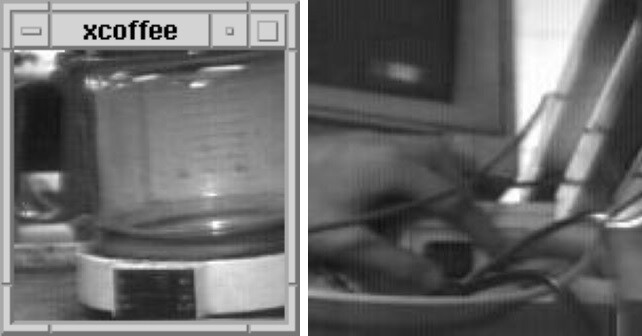
#Funfact zum zweiten Frühstück: die berühmteste #Kaffeemaschine der Welt ist als Dauerleihgabe Teil der Sammlung des Heinz Nixdorf MuseumsForums #HNF
Weitere spannende Details liefert der #Podacast von @sch0chi: https://digitaleanomalien.de/die-beruehmteste-kaffeemaschine-der-welt/ #Webcam @museum
Die berühmteste Kaffeemaschine der Welt

Was hat eigentlich die erste Webcam der Welt mit der berühmtesten Kaffeemaschine der Welt zu tun? Anfang der 90er Jahre hatte die Fakultät für Informatik der Universität Cambridge ein großes Problem. In dem weitläufigen Gebäude waren die Wege sehr lang. Unter anderem auch zur Kaffeemaschine. Und wenn man sich auf den Weg machte, konnte es gut sein, dass man eine leere Kaffeekanne vorfand. Um diese ständigen Enttäuschungen zu vermeiden, entwickelten zwei Informatiker Ende 1991 eine pragmatische Lösung. Sie richteten eine Videokamera auf die Kaffeemaschine und schickten die Bilder über das Netzwerk der Universität. Mit dem Aufkommen des World Wide Web wurde 1993 auf das Internet umgestellt. Und plötzlich waren die Bilder der Kaffeemaschine in der ganzen Welt zu sehen. Die erste Webcam war geboren. Und die Trojan Room Coffee Pot genannte Maschine wurde eines der ersten Netzphänomene. Heute steht die Kaffeemaschine im Museum. Und diese Folge der Digitalen Anomalien erzählt ihre Geschichte. Sprecher & Produktion: Wolfgang Schoch Musik: BACKPLATE von https://josephmcdade.com

Digitale Anomalien

In case you missed it, my latest podcast is all about heritage skills. Those skills that your grandparents had, but you maybe haven't.

Listen in the normal places or here ;
https://www.podomatic.com/podcasts/raylovegrove/episodes/2023-01-23T07_22_45-08_00

#SimpleLiving #RadicalChange #Skills #Podacast

Heritage Skills - things that your grandparents could do, but you can not !

We all use skills every day, but radical simple living needs us to reach back in time and pick up some of those skills from the past. We don't know what the future holds, so we need to be ready for anything! 

Podomatic

We are listening to the new BBC adaptation of The Dark is Rising. May I recommend it?

https://www.bbc.co.uk/sounds/brand/w13xtvp7

#Podacast #SusanCooper #TheDarkIsRising

BBC Sounds - The Dark Is Rising - Available Episodes

Listen to the latest episodes of The Dark Is Rising on BBC Sounds.

BBC
Ardour 6 Quickstart (recording, editing, mixing and exporting)

--- SUPPORT MY WORK: https://patreon.com/unfa https://liberapay.com/unfa https://paypal.me/unfa --- CHECK OUT MY MUSIC: http://unfa.bandcamp.com http://soundcloud.com/unfa --- ORDER OR PRINT YOUR OWN MERCH: https://teespring.com/stores/unfa https://github.com/unfa/merch --- GET IN TOUCH: https://mastodon.social/@unfa https://discord.gg/tgZSvht https://facebook.com/unfamusic --- LIVESTREAMS: - Next event: https://www.youtube.com/unfa000/live - Past events: https://www.youtube.com/playlist?list=PLi2LbJnGR-482eAAihWd6exqyp0bQMfPX - Submit music: https://forms.gle/pLDetJM2WZf8eTRt5 --- TIMESTAMPS (contributed by Wepache): 0:00 Intro 0:42 Initial Configuration 2:47 Adding a Track 3:34 Track Inputs 4:40 Recording Audio 5:09 Importing Audio 6:07 Basic Audio Editing Intro 7:46 Moving Audio Regions 8:12 Cutting and Splitting 9:02 Delete a Region 9:23 Cropping a Region 10:16 Cross-Fades 11:28 Gain Automation 14:13 Audio Effects Intro 14:18 Adding Reverb 15:56 Adding a Compressor 17:53 Adding a MIDI Track 18:28 Recording MIDI 20:56 * 20:12 Muting an Audio Region 24:49 Exporting your Project 26:07 Adding a Limiter before Export 27:18 Exporting Continued 30:11 Outro --- DOWNLOADS: - The full Ardour 6 session created during this video: https://is.gd/vFMiKs --- LINKS: - My Patreon blog post about this video: https://www.patreon.com/posts/38192332 - Official Ardour website: https://ardour.org --- OTHER INFO: This video was produced exclusively with open-source software and GNU/Linux. - Software used in the creation of this video: https://manjaro.org https://www.kde.org/plasma-desktop https://www.olivevideoeditor.org/ https://obsproject.com/ https://www.blender.org/ https://inkscape.org/ https://www.audacityteam.org/ --- Now go, make some music!

Ardour 6 Quickstart (recording, editing, mixing and exporting)

--- SUPPORT MY WORK: https://patreon.com/unfa https://liberapay.com/unfa https://paypal.me/unfa --- CHECK OUT MY MUSIC: http://unfa.bandcamp.com http://soundcloud.com/unfa --- ORDER OR PRINT YOUR OWN MERCH: https://teespring.com/stores/unfa https://github.com/unfa/merch --- GET IN TOUCH: https://mastodon.social/@unfa https://discord.gg/tgZSvht https://facebook.com/unfamusic --- LIVESTREAMS: - Next event: https://www.youtube.com/unfa000/live - Past events: https://www.youtube.com/playlist?list=PLi2LbJnGR-482eAAihWd6exqyp0bQMfPX - Submit music: https://forms.gle/pLDetJM2WZf8eTRt5 --- TIMESTAMPS (contributed by Wepache): 0:00 Intro 0:42 Initial Configuration 2:47 Adding a Track 3:34 Track Inputs 4:40 Recording Audio 5:09 Importing Audio 6:07 Basic Audio Editing Intro 7:46 Moving Audio Regions 8:12 Cutting and Splitting 9:02 Delete a Region 9:23 Cropping a Region 10:16 Cross-Fades 11:28 Gain Automation 14:13 Audio Effects Intro 14:18 Adding Reverb 15:56 Adding a Compressor 17:53 Adding a MIDI Track 18:28 Recording MIDI 20:56 * 20:12 Muting an Audio Region 24:49 Exporting your Project 26:07 Adding a Limiter before Export 27:18 Exporting Continued 30:11 Outro --- DOWNLOADS: - The full Ardour 6 session created during this video: https://is.gd/vFMiKs --- LINKS: - My Patreon blog post about this video: https://www.patreon.com/posts/38192332 - Official Ardour website: https://ardour.org --- OTHER INFO: This video was produced exclusively with open-source software and GNU/Linux. - Software used in the creation of this video: https://manjaro.org https://www.kde.org/plasma-desktop https://www.olivevideoeditor.org/ https://obsproject.com/ https://www.blender.org/ https://inkscape.org/ https://www.audacityteam.org/ --- Now go, make some music!

Ardour 6 Quickstart (recording, editing, mixing and exporting)

--- SUPPORT MY WORK: https://patreon.com/unfa https://liberapay.com/unfa https://paypal.me/unfa --- CHECK OUT MY MUSIC: http://unfa.bandcamp.com http://soundcloud.com/unfa --- ORDER OR PRINT YOUR OWN MERCH: https://teespring.com/stores/unfa https://github.com/unfa/merch --- GET IN TOUCH: https://mastodon.social/@unfa https://discord.gg/tgZSvht https://facebook.com/unfamusic --- LIVESTREAMS: - Next event: https://www.youtube.com/unfa000/live - Past events: https://www.youtube.com/playlist?list=PLi2LbJnGR-482eAAihWd6exqyp0bQMfPX - Submit music: https://forms.gle/pLDetJM2WZf8eTRt5 --- TIMESTAMPS (contributed by Wepache): 0:00 Intro 0:42 Initial Configuration 2:47 Adding a Track 3:34 Track Inputs 4:40 Recording Audio 5:09 Importing Audio 6:07 Basic Audio Editing Intro 7:46 Moving Audio Regions 8:12 Cutting and Splitting 9:02 Delete a Region 9:23 Cropping a Region 10:16 Cross-Fades 11:28 Gain Automation 14:13 Audio Effects Intro 14:18 Adding Reverb 15:56 Adding a Compressor 17:53 Adding a MIDI Track 18:28 Recording MIDI 20:56 * 20:12 Muting an Audio Region 24:49 Exporting your Project 26:07 Adding a Limiter before Export 27:18 Exporting Continued 30:11 Outro --- DOWNLOADS: - The full Ardour 6 session created during this video: https://is.gd/vFMiKs --- LINKS: - My Patreon blog post about this video: https://www.patreon.com/posts/38192332 - Official Ardour website: https://ardour.org --- OTHER INFO: This video was produced exclusively with open-source software and GNU/Linux. - Software used in the creation of this video: https://manjaro.org https://www.kde.org/plasma-desktop https://www.olivevideoeditor.org/ https://obsproject.com/ https://www.blender.org/ https://inkscape.org/ https://www.audacityteam.org/ --- Now go, make some music!

Heute Abend um 19:00 Uhr: »#Podcasting für Kreative« #Launchday-Live-#Podacast mit @meet_judith , @Schaarsen und @martinruetzler! Schickt uns gerne noch mehr Eurer Fragen rund ums #Podcasten von der Idee bis zur Veröffentlichung! Es gibt für die besten Fragen drei signierte Printexemplare zu gewinnen! Wir freuen uns auf Euch! Die Stream-URL folgt heute Abend hier, auf Twitter und im Blog.