 زويل تيك
25 ways to fix oppo phone not receiving calls
oppo phone not receiving calls.Many people face the issue of oppo phone not receiving calls, and that’s what we’ll discuss.
Why is my oppo phone not ringing when someone calls me?
The solutions for oppo phone not receiving calls vary depending on the source of the issue. Therefore, it’s crucial to identify the cause. Here’s how you can do it: Insert the SIM card into another phone and make a call. If the call is received, the problem is with your phone. If not, the issue may lie with the SIM card or the network.
To determine the cause, check the signal bars at the top of the screen. If you don’t see any bars, there might be no network coverage. If there is coverage, ask people around you using the same network if their phones are also not receiving calls.
If they’re facing the same issue, it could be a temporary network problem. Contact customer service to confirm. If there’s no network issue, the SIM card may be damaged or restricted for some reason.
How do I fix my phone not receiving calls?
1. Remove Phone Cover
Metal or magnetic phone covers might interfere with signal reception. Remove such covers and any accessories on the back of your phone.
2. Restart the Phone
Turn off the phone for a few minutes and then turn it back on. This can resolve temporary software issues causing call reception problems.
3. Turn off Airplane Mode
Disable Airplane Mode to re-establish connections. Go to “Settings” > “Airplane Mode” and turn it off. If it’s already off, turn it on for 5 minutes and then turn it off.
4. Unblock Calls
If certain numbers are blocked, unblock them by going to “Settings” > “System Apps” > “Call” > “Block” > “Blacklist.” Remove the number from the blacklist.
5. Disable Call Forwarding
Turn off call forwarding, as it might redirect calls. Open the “Phone” app > Tap the three dots > “Settings” > “Carrier Call Settings” > “Call Forwarding.” Turn off all forwarding options.
6. Disable Call Barring on SIM
Open “Phone” > Tap three dots > “Settings” > “Carrier Call Settings” > “Call Barring.” If the switch next to options like “Reject All Incoming Calls” is green, tap it to disable and enter the default password (usually “0000”).
7. Check Call Waiting
Verify if call waiting is active. Open “Phone” > Tap three dots > “Settings” > “Carrier Call Settings” > “Additional Settings” > If the switch next to “Call Waiting” is green, it’s enabled.
8. Select Network Provider manually
If calls aren’t coming through, manually select your network provider. Go to “Settings” > “Dual SIM & Cellular” > “Network Operator” > Turn off “Select Automatically” and choose your network provider.
9. Switching Network Mode
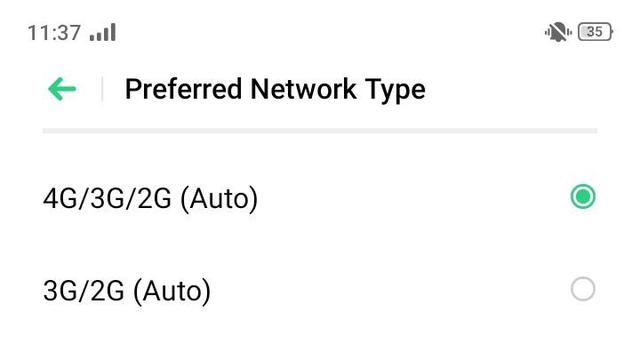
Android phones, like Oppo, allow you to choose your preferred network type, whether it’s 4G or 3G.
You may have selected a mode not supported by the SIM card or still unavailable in your area.
To fix oppo phone not receiving calls, go to “Settings” > “Dual SIM & Cellular Network” > select the problematic SIM card > “Preferred Network Type” > choose “2G only.” After receiving a call, you can switch back to automatic and avoid the 4G-only mode.
10. Check SIM Card Activation
Accidentally deactivating the SIM card from settings can occur. To reactivate it, go to “Settings” > “Dual SIM & Cellular Network.” If your phone has two SIM cards, select the one with the issue and ensure it’s enabled.
11. Turn On Mobile Data
Try turning on mobile data by navigating to “Settings” > “Dual SIM & Cellular Network” > “Turn on Mobile Data”.
12. Reset Access Point Names (APN)
Incorrect APN settings can lead to oppo phone not receiving calls. Correct this by going to “Settings” > “Dual SIM & Cellular Network” > select the SIM card with the problem > Access Point Names >Reset > Reset access points.
13. Disable Wi-Fi Calling
Wi-Fi calling may interfere with the phone’s ability to receive calls. Go to “Settings” > “SIM Card & Mobile Data” > choose one SIM card > “Wi-Fi Calls” > disable “Wi-Fi Calls.
14. Deactivate Do Not Disturb
The “Do Not Disturb” function can disable sound and vibration alerts for incoming calls. Turn it off by going to “Settings” > “Do Not Disturb” > make sure it’s turned off. Also, check for any scheduled DND times
15. Turn Off Silent Mode
If the silent mode is activated, your phone may not ring. Check and turn off silent mode in “Settings” > “Sound & Vibration”.
16. Clear Phone App Cache
In “Settings,” choose “App Management” > “App List” > “Phone App” > “Storage Usage” > “Clear Cache” > “Clear Data.” Note: Clearing data will erase the call log.
17. Remove Recently Installed Apps
Fix oppo phone not receiving calls by uninstalling apps one by one, especially “Contact Apps,” “Call Blocker,” and “Launchers.” After each removal, restart your phone and check for call reception.
18. System Update
To fix oppo cannot receive calls, update your phone by going to “Settings” > “Software Update” > download and install the available update > restart your phone.
Note: Avoid installing beta updates as they may contain errors.
19. Check SIM Card Integrity
A dirty or damaged mobile SIM card can lead to call reception issues. To confirm, remove and inspect the metal part. If damaged, replace it; if in good condition, gently clean it with a soft, dry cloth to remove dust.
Reinsert it correctly according to the manufacturer’s instructions.
20. Reset Network Settings
Messing with network settings may result in call reception problems. Fix this by going to “Settings” > “Additional Settings” > “Backup & Reset” > “Erase All Data” > “Reset Network Settings” > press “Reset” again.
Note: This action resets all network settings, including phone data, Bluetooth, and Wi-Fi.
21. Factory Reset
A factory reset may help solve oppo not receiving calls, but it will delete your data. Avoid data loss by creating a backup. To perform a reset, go to “Settings” > “Additional Settings” > “Backup & Reset” > “Factory Data Reset” > “Clear Apps and App Data”.
22. Visit a Phone Service Center
If the previous methods don’t work, the issue might be a component failure, like a swollen battery or water damage. Visit a phone service center for professional assistance.
23. Move Closer to a Window
Reception issues might arise if you’re in an area with poor network coverage. Solve this by moving to a higher place or getting closer to a window.
24. Check for SIM Blocking
Mobile carriers may block your SIM if you’re late on bill payments, preventing calls. Contact customer service through phone or social media to check for any blocks. If the solution is a recharge, proceed with that.
25. Report Number Transfer Issues
If you recently switched carriers while keeping the same phone number, the transfer process can take around 24 hours to complete. If you notice continued redirection of calls and texts to the old SIM, contact your new carrier to resolve the issue.
26.Buying a new phone
If the problem recurs even after visiting the service center, it may be time to buy a new phone. Discover the latest phones of this year at discounted prices.
Note:“I may earn a commission if you visit or make a purchase through the links provided.”
Sources