Galaxy Watch6 One UI 8 Beta Changelogs

Samsung has recently opened the beta program for the Galaxy Watch6 in Korea and in the USA as of September 24th, and you can find the official changelogs for the beta version here:

One UI 8 Watch Upgrade

Get things done

Stay on top of important tasks with the Now bar
Check the information you need right now and start essential features straight from your watch face. Ongoing tasks will appear in the Now bar at the bottom of your watch face so you can check key information quickly.

Do more with double pinch
Just pinch your thumb and index finger together twice to scroll through notifications, control music, take pictures, and more. You can also customize what happens when you double pinch on the watch face, music controller, as well as alarm, calendar, and reminder alerts. Choose the actions you need most in each situation.

Mark reminders as important
Mark reminders as important by tapping the Star icon. Important reminders will appear at the top of your reminder list to make sure you notice them.

Get reminders at specific places
You can now set location-based reminders on your watch. For example, you can make your watch remind you to do the laundry when you arrive at home.

New charging effects
When your watch is charging, the new screen layout and animations make it easier to check the current battery level and remaining charging time.

Stay connected

Easily respond to notifications and alerts
Use gestures to quickly respond to notifications and alerts. When a notification appears, you can double pinch to view the details or send a reply. You can also shake your wrist to return to the watch face.

Enhanced notification view
Notifications on your watch are now easier to use with an attractive new design. Notifications from the same app are stacked vertically, allowing you to view more notifications with fewer swipes.

Smarter notification settings
It’s now easier to decide how to receive notifications from your phone on your watch. If you choose Smart device selection, notifications will appear on your phone only when you’re using it and on your watch when you’re not using your phone. If you choose Always show on both, notifications will always appear on both your phone and watch.

Upgrade your health

Bedtime guidance
Get to sleep at the right time so you wake up feeling refreshed. The new Bedtime guidance feature analyzes your sleep data and recommends the best time to go to sleep each night.

Mindfulness
Manage stress and anxiety in your daily life with the new Mindfulness feature in Samsung Health. You can keep track of your moods and emotions and practice breathing exercises to reduce stress.

Tailored to you

Find the perfect watch face
It’s now easier to find the watch face that’s right for you. Just choose a few keywords such as your preferred style, color, and information to show. The best matches will be suggested from our collection of more than 300 watch faces.

Recommended watch faces
Discover new watch faces that you might like. Watch faces with colors, style, or information similar to your current watch face will be recommended on the watch face selection screen.

Create your own tiles
Create your own custom tiles that show the information you need. You can even combine information from different apps into a single tile. You can include weather information, calendar events, reminders, and more.

Personalized Apps screen
Featured apps now appear at the top of your Apps screen to give you quick access to the apps you need the most. Apps will be featured based on how often you use them and other usage patterns. You can also view your apps as a list with names instead of only icons.

Choose calendars to show on your watch
You can now choose which calendars to show in the Calendar app on your watch. You can show all of the same calendars that are on your phone or customize to show only the calendars you need.

In order to participate, follow these steps:

  • Ensure that your Galaxy Watch and your phone are both from the USA (XAA) or Korea (KOO) to ensure maximum compatibility
    • On your phone, open Settings > About phone > Software information, and look for “Service provider software version”. Make sure it contains XAA or KOO.
    • On your watch, unlock Developer settings by opening Settings > About > Software information and tapping “Software version” 4 times, and refer to the second line that contains your watch’s CSC. Make sure it contains XAA or KOO.
    • If you’re using the Galaxy Watch in the USA, make sure that you are on the active plan with T-Mobile.
  • Open Samsung Members
  • Scroll down to Beta Program
  • Search for entries like “One UI 8 Watch6 Beta”
  • Read the description and follow the steps on the screen
  • Press “Join”
  • Check for software updates
  • Please note that this Beta Program is for users to test all aspects of One UI 8 Watch and to report all bugs found.

    Make sure that you have stable internet connectivity when downloading the update, as it can be large in size. When installing the update, make sure that your watch is fully charged and in a cold environment to avoid interruptions caused by heat and by low battery. Never interrupt the update installation in any way during the process, or you may face problems later.

    #Android #news #oneUi #OneUI8 #OneUI8Beta #OneUI8Watch #Samsung #Tech #Technology #update

    One UI 8 Beta 1 for Galaxy S24 Misses Two Key Features from Galaxy S25

    Samsung Galaxy S24 Series with One UI 8 Beta 1 lacks two of the most expected features: the Now Brief and Instant Audio Eraser.

    Sam Lover

    📲 Correte! One UI 8 beta ora disponibile per Galaxy S24 e Z Fold6! Esplorate un nuovo mondo di funzionalità ed efficienza. #GalaxyUpdate #OneUI8Beta

    🔗 https://www.tomshw.it/smartphone/one-ui-8-beta-in-arrivo-per-galaxy-s24-e-z-fold-6-2025-08-13

    Correte, One UI 8 beta disponibile per Galaxy S24 e Z Fold6!

    Samsung mantiene la promessa e rilascia la prima beta di One UI 8 per Galaxy S24, Z Fold6 e Flip6. Scopri le novità dell'aggiornamento software.

    Tom's Hardware
    Breaking: One UI 8 Beta Program for Galaxy Z Fold 6 and Flip 6 Now Available

    Samsung has now released the Android 16-based One UI 8 beta program for the Galaxy Z Fold 6 and Galaxy Z Flip 6 smartphones.

    Sam Lover
    Breaking: One UI 8 Beta Now Live for Galaxy S24 Series

    Samsung has officially released the One UI 8 Beta program for the Galaxy S24 series, marking a significant software step for its last year

    Sam Lover
    Before One UI 8 Beta, Galaxy S24, Fold 6 & Flip 6 Get August 2025 Security Update

    Samsung has started focusing on delivering the latest August 2025 security update for its Galaxy devices; meanwhile, the Galaxy Z Fold 6 and Flip 6, alongside the Galaxy S24 series, have been receiving the update. First up, the Galaxy S24, Galaxy S24+, and Galaxy S24 Ultra units are getting a new software update, while unfortunately the …

    Sam Lover

    One UI 8 Beta 4 is coming soon!

    It’s been more than two weeks since the third beta was released for those who participated in the beta program. Samsung is still working on stabilizing the final version to ensure that all bugs are eliminated.

    For Galaxy S25 Edge users, this article doesn’t apply to you, because the device was very new at the time the first beta was released. You’ll have to wait for the stable version.

    Today, a reliable tipster on X has spotted a new One UI 8 Beta 4 build for the Galaxy S25 series, called ZYG5. This beta build will bring bug fixes and other improvements to make sure that your experience becomes smoother. For second-phase countries like India, this is the third beta version that you’ll receive.

    Once the fourth beta gets released, you can update to that version using the normal software update procedure. In order to update to Beta 4, follow these steps:

  • Open the Settings app
  • Navigate to Software Update
  • Press Download and Install
  • Wait for the One UI 8 Beta 4 update to appear, then press Download and Install.
  • Make sure that your phone is charged fully and that your network is stable before performing this update. Don’t interrupt the update in any way, or problems will surface later. The installation and verification may take time, depending on the size of the update.

    #Android #Android16 #AndroidB #AndroidBaklava #news #oneUi #OneUI8 #OneUI8Beta #OneUI80 #Samsung #smartphone #Tech #Technology #update

    Samsung Galaxy A55 5G spotted on Geekbench using Android 16; may receive one UI 8 beta update soon
    https://newstainmentora.blogspot.com/2025/06/samsung-galaxy-a55-5g-spotted-on.html
    #Samsung #galaxya55 #android16 #OneUI8beta
    Samsung Galaxy A55 5G spotted on Geekbench using Android 16; may receive one UI 8 beta update soon

      Samsung Galaxy A55 5G was released in India in March 2024, with the Galaxy A35 5G. The smartphone ships with One UI 6.1, which is based on...

    NewsTainmentOra

    One UI 8 Now Brief “Morning Brief” Fixed in Beta 2

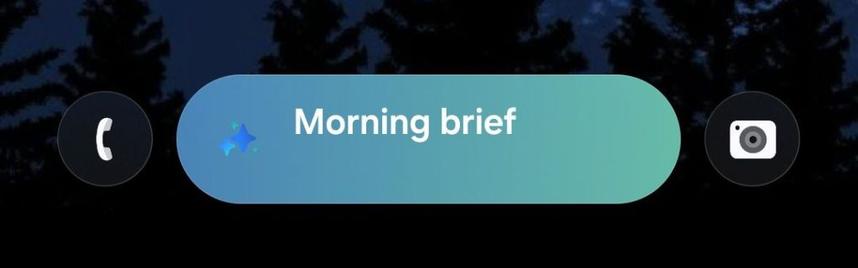
    Now Brief (or Daily Brief) was introduced to the Galaxy S25 series as a new feature that shows you brief summary of your morning, your evening, and your night. It looks like that Samsung may have broken the Now Brief feature in the first One UI 8 Beta (build ZYER released on May 28th).

    How was it broken? Now Brief works, but it shows “Morning Brief” at all times, even when it’s midnight. Reports like this had surfaced in the Beta forums since Beta 1, and it appears that the issue is widespread. The picture below demonstrates this issue, and note that it was 9:34 PM when it was taken.

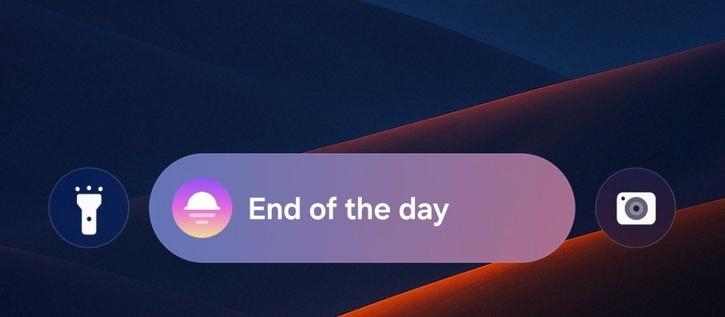
    In the second beta version of One UI 8, it appears that this bug has been fixed according to a post on X. Now, this feature works correctly in times other than the morning. Every night, you’ll now see “Tonight brief” or “End of the Day” instead of “Morning brief”.

    One UI 8 Beta 2 will be released as early as next week or two (our speculation), when stability proves. This will be the first beta version of One UI 8 for India and for Poland.

    In order to update to One UI 8 Beta 2 once it gets released, navigate to Settings > Software update > Download and Install. Your Now Brief will be fixed so that it functions properly, and improvements in some areas will be made.

    #Android #news #oneUi #OneUI8 #OneUI8Beta #OneUI80 #Samsung #smartphone #Tech #Technology #update