 Christian Tietze
Did #moom for Mac just decide to publish an update that removed all my muscle-memorized hotkeys in favor of a new selector that's more convoluted?

Did #moom for Mac just decide to publish an update that removed all my muscle-memorized hotkeys in favor of a new selector that's more convoluted?

OMG! I just discovered an #Automation solution using #ManyTricks #Moom and #SteerMouse to fix a regression in #macOS that was introduced in 10.13 High Sierra, and has been getting worse with each OS update. Bliss! A major workflow I used was broken, and now I can work in my preferred way again.
Documentation tomorrow.
Moom for macOS, by Many Tricks Software, is a game changer when it comes to remembering my application window layouts. It's more than just window management.
Within 10 minutes of using the trial version, I had to buy it. #macOS #moom #productivity
This is cool
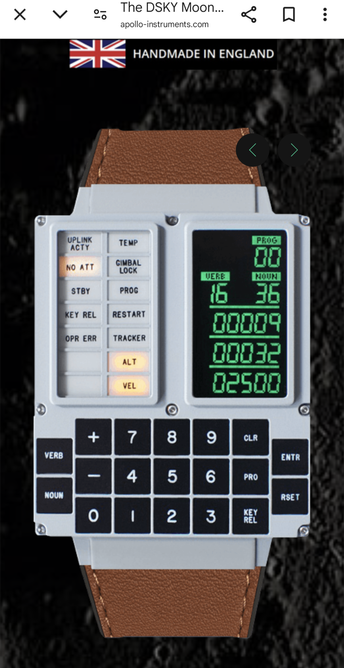
https://apollo-instruments.com/
A watch that looks like the Apollo flight computer
Running late this month thanks to some fairly heavy work commitments and rapidly approaching deadlines, but my round up for last month is now up. Probably a little lighter than usual, but there’s at least a few nuggets in there for folks. Top tips for #Alfred & #Drafts, #Moom & #Bunch, a dash of #homeautomation, a podcast (#mpu #relayfm), and a sprinkling of other good stuff.
Check it out for free at https://buymeacoffee.com/sylumer/october-2024-3206287

Does anyone know a tool or trick how to save and restore the position of applications (windows) on the connected screens?
When I'm switching between office and home setup with each multiple monitors, the apps seem to move between screens (randomly). I'd like the browser always to be on screen A at home and Screen B in the office ... etc.
Good tip on using #moom with #bunch from @sylumer (cc: @[email protected] )
https://www.thoughtasylum.com/2024/10/05/a-quick-tip-for-using-moom-in-bunch/

I was posting a reply to a forum post about Moom (the macOS Window Manager by Many Tricks) this morning and was about to make a reference about using it with Bunch (the automation tool by Brett Terpstra). As I was composing the reply I realised I was using a small modification to the standard set up that I don’t think I’d shared before; and so I figured I’d share it out in a quick post.
 Andrés
 Matt Godden
 Philipp Sommer
 Krishna Draws✏️
 Bob Harvey
 Ian K Tindale
 Stephen Millard
 Uckermark MacGyver
 Lenin
Lenin