 OldCoder
Topic: Linux distro development
I've just completed a full rebuild of my Linux distro, Laclin, and I thought I'd comment on a worthwhile point.
Today, the vast majority of 64-bit #Linux #distros support 32-bit mode primarily as a set of 32-bit libraries, referred to as "multilibs", that are used to permit the builds of 32-bit components.
Relatively few 64-bit distros permit the user to boot into a true 32-bit desktop, 32-bit kernel plus 32-bit applications, that might run on 32-bit boxes that are decades old.
I haven't seen a reason to drop support for true 32-bit mode. It's only a little more work compared to "multilibs" to build a complete tree of 32-bit executables. So, my distro does precisely that.
#Laclin is able to boot into any of the following modes: 64-bit kernel plus 64-bit programs, 64-bit kernel plus 32-bit programs [this mode is useful for 32-bit cross-compiles as compilers are able to use more RAM], and 32-bit kernel plus 32-bit programs [true 32-bit mode].
In true 32-bit mode, most things work normally. You can read email using Thunderbird, edit documents using LibreOffice, play videos and music, edit images using The GIMP, and browse the Web using the WebKitGTK mini-browser [which works even with modern websites].
The main things that are missing are support for Chromium and Firefox derivatives and all programs written in Rust.
So, why not support this mode?
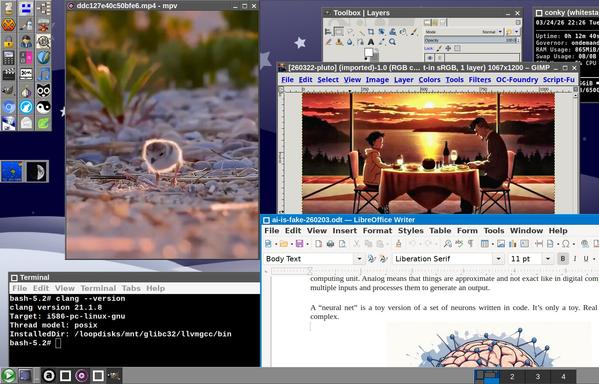
Illustration: The attached JPEG is a screenshot of Laclin Linux booted into true 32-bit mode. The applications shown are 32-bit versions that will run, in some cases, on boxes that are decades old.
I've just completed a full rebuild of my Linux distro, Laclin, and I thought I'd comment on a worthwhile point.
Today, the vast majority of 64-bit #Linux #distros support 32-bit mode primarily as a set of 32-bit libraries, referred to as "multilibs", that are used to permit the builds of 32-bit components.
Relatively few 64-bit distros permit the user to boot into a true 32-bit desktop, 32-bit kernel plus 32-bit applications, that might run on 32-bit boxes that are decades old.
I haven't seen a reason to drop support for true 32-bit mode. It's only a little more work compared to "multilibs" to build a complete tree of 32-bit executables. So, my distro does precisely that.
#Laclin is able to boot into any of the following modes: 64-bit kernel plus 64-bit programs, 64-bit kernel plus 32-bit programs [this mode is useful for 32-bit cross-compiles as compilers are able to use more RAM], and 32-bit kernel plus 32-bit programs [true 32-bit mode].
In true 32-bit mode, most things work normally. You can read email using Thunderbird, edit documents using LibreOffice, play videos and music, edit images using The GIMP, and browse the Web using the WebKitGTK mini-browser [which works even with modern websites].
The main things that are missing are support for Chromium and Firefox derivatives and all programs written in Rust.
So, why not support this mode?
Illustration: The attached JPEG is a screenshot of Laclin Linux booted into true 32-bit mode. The applications shown are 32-bit versions that will run, in some cases, on boxes that are decades old.