 OldCoder
Subject: Accessibility for visually impaired Linux CLI users
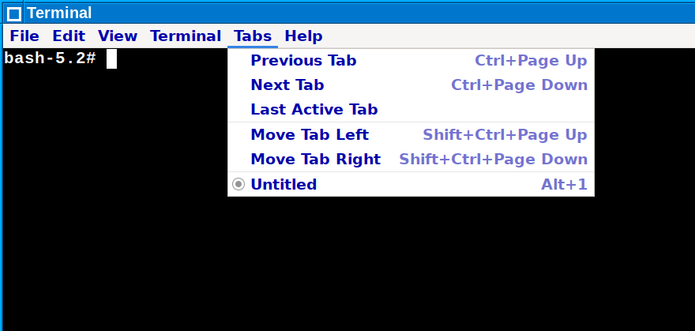
Illustration: XFCE Terminal running in #Laclin #Linux with the change described below.
This article may be of interest to Linux users with slight visual impairment. It assumes basic knowledge of CLI [middle school level and up].
The following change will make the menus for Gtk3 programs more readable in some cases. In other cases, it won't make a difference as menus have been properly configured in other ways.
Gtk4 programs are addressed further down. Note: superuser isn't required to make the change.
First, execute:
mkdir -p $HOME/.config/gtk-3.0Next, edit the following text file: [create the file if it doesn't exist]
$HOME/.config/gtk-3.0/gtk.cssAdd the following settings or modify existing settings to match:
menubar > menuitem label {
    color: #0000aa;
    font-size: 5mm;
    font-weight: bold;
}
menu menuitem label {
    color: #0000aa;
    font-size: 5mm;
    font-weight: bold;
}
Save the file and restart Gtk3 programs.
A similar change should work for Gtk4 programs. To address those programs, substitute "gtk-4.0" for "gtk-3.0" in the instructions.
Easy to overlook: If you're running programs in Firejail, remember to create and/or modify "gtk.css" files in the appropriate Firejail directories. For example, if you're running "hexchat" in Firejail, the "gtk.css" file to create and/or modify for that program might be:
$HOME/.firejail/hexchat/.config/gtk-3.0/gtk.cssFor readers who have LinkedIn accounts, a LinkedIn version of this post is online at: