Is there any way to configure the system to handle those situations a little more gracefully?
#Linux #OpenSUSE #Kalpa #KDE

#archlinux #AUR pkgs installed, then cross-match them to pkg availability in say
#Debian #Sid n
#Fedora #Rawhide . if i get a reasonably high correlation, i then be gonna install such pkgs in Sid or Rawhide #Distroboxes, & uninstall them from AUR.
#Kinoite |
#ArchLinux #KDEPlasma
#SparkyLinux |
#Kalpa |
#KDELinux
#FirefoxNightly #FirefoxSecondSidebar #TreeStyleTab #Sidebery@kalpa thanks Shawn. that wall of konsole text was quite intimidating, but i just kept picking option 1 for the three questions / problems as you suggested, & it went well
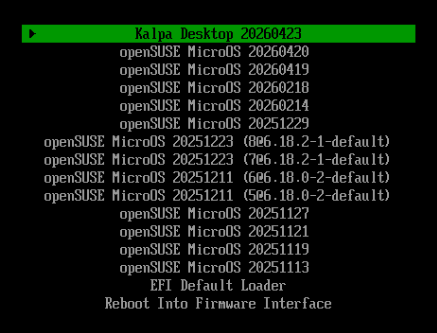
so the good news is i love that now the boot menu finally identifies the system as #kalpa instead of the upstream base, pic 1
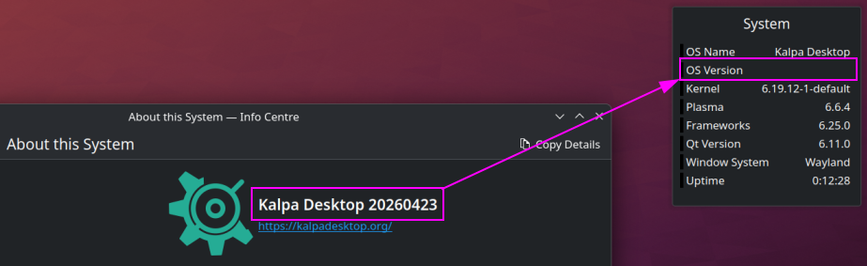
but the bad news is, unfortunately... the desktop widget still does not show the kalpa version, pic 2
my objective, hope, was that purely from the widget alone, not needing me to launch the plasma info centre, i'd be able to see at a glance what version i'm running. yes, i agree, this is very far from being any kind of serious problem, just a little functional tweak i would have enjoyed
thank you
@kalpa hello. continuing to enjoy your nice :linuxopensuse: #Kalpa project, ta.
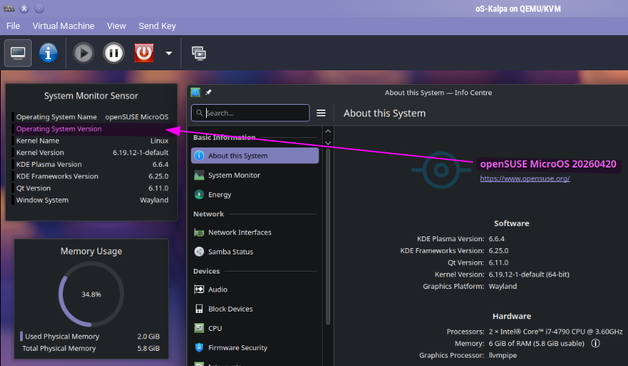
wrt my pic, is it possible, pls, to expose the variable that describes your system version, to the standard Plasma system-info widget?
#AltText
a Kalpa virtual desktop, in a QEMU VM, with three Plasma desktop widgets applied. the top one is a text listing of various system specs. one row has a blank instead of the actual "Operating System Version", whereas to the rhs of said widgets is the open "About This System" app, showing the current version is in fact "20260420".