@kalpa hello. continuing to enjoy your nice :linuxopensuse: #Kalpa project, ta.

wrt my pic, is it possible, pls, to expose the variable that describes your system version, to the standard Plasma system-info widget?

#AltText
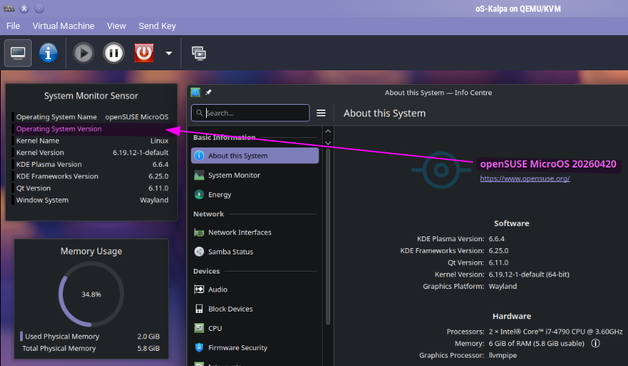
a Kalpa virtual desktop, in a QEMU VM, with three Plasma desktop widgets applied. the top one is a text listing of various system specs. one row has a blank instead of the actual "Operating System Version", whereas to the rhs of said widgets is the open "About This System" app, showing the current version is in fact "20260420".

@msdropbear42 there is, there is just a little manual faffery that you have to do. When I’m not at a conference and sitting in a brewpub typing on a phone, I’ll tell you how
@msdropbear42 `sudo transactional-update pkg in Kalpa-release patterns-kalpa-base` Then you'll need to select option 1 to the questions, to uninstall/replace the MicroOS equivalents.

@kalpa thanks Shawn. that wall of konsole text was quite intimidating, but i just kept picking option 1 for the three questions / problems as you suggested, & it went well

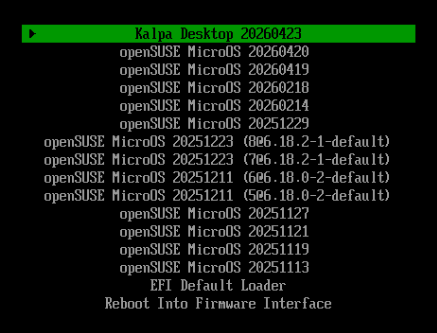
so the good news is i love that now the boot menu finally identifies the system as #kalpa instead of the upstream base, pic 1

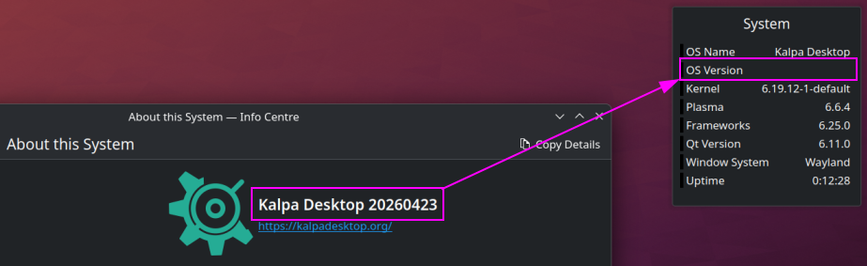
but the bad news is, unfortunately... the desktop widget still does not show the kalpa version, pic 2

my objective, hope, was that purely from the widget alone, not needing me to launch the plasma info centre, i'd be able to see at a glance what version i'm running. yes, i agree, this is very far from being any kind of serious problem, just a little functional tweak i would have enjoyed

thank you

@msdropbear42 I’ve actually never used that desktop widget before, I’d need to have a look at where it’s trying to pull that information from, was it giving you a version there when the MicroOS branding was still there?

@kalpa no, like in the marked up pic in my OP, even before running your "magic command", that field in the widget was blank... not a wrong value, just no value. same story after your command.

to be clear though, i very much do appreciate you giving me that command, coz of the nice other benefits it has provided.

@msdropbear42 what’s the name of that desktop widget, I’m just curious where they’re trying g to pull that version info from
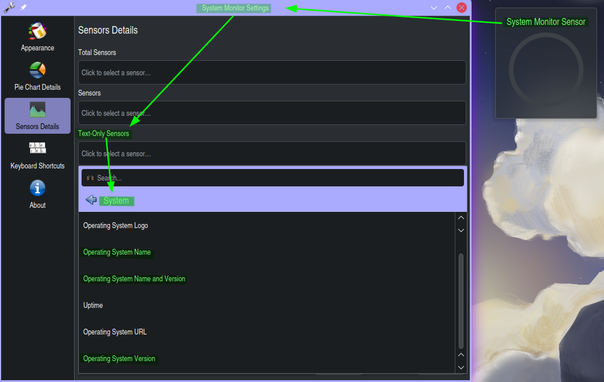
@kalpa it's System Monitor Sensor

@msdropbear42 I don't entirely understand why, but openSUSE comments out the VERSION field in /etc/os-release, that's why it doesn't get populated in your widget.

I'll have to look and see if I can fix that. I'd guess that's going to happen on any openSUSE based system, other than *maybe* Aeon?

@kalpa @[email protected] just making this mock reply, to bring this thread into my alternative fedi account, so i can continue to follow it here.

#kalpa #dropbearpooterising