Windows at work, always a fresh inconvenience:

C:\>python -m pip install ipython
Requirement already satisfied: ipython in c:\users\[...]

C:\>ipython
'ipython' is not recognized [...]

#ipython #windows #python

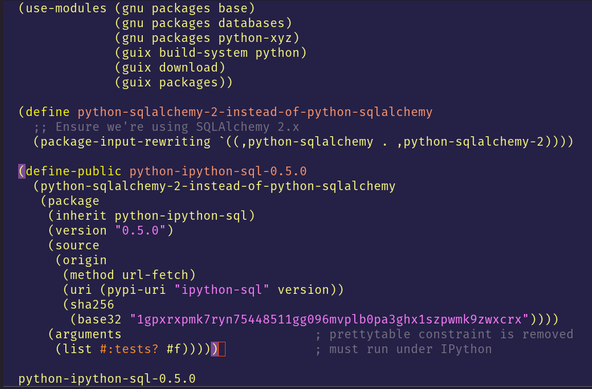
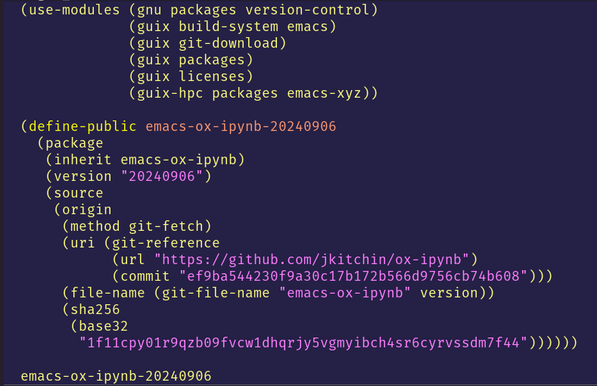
I'm still learning how to submit a patch or pull request to Guix to propose updated definitions of some packages... but---while I figure things out---here's a general guide on how to get new packages installed by defining package variants and rewriting package inputs. In short, the steps to do so are:

1. Get the sha256sum hash in the nix-base-32 format (either via `guix download` or `guix hash` of a repository)
2. Prepare the package variant Scheme file (see images; e.g. "package-variant.scm")
3. Run `guix build -f ./package-variant.scm` to build the new package in the store
4. (Optional, but recommended) Test that things work by running `git shell -f ./package-variant.scm`
5. Install the package by running `guix package -f ./package-variant.scm`

#guix #python #emacs #JupyterNotebook #ipython #sql #package #variants

Curious about #VIM but don't want to install anything?

We've got you covered with two great options: a web-based Vimulator and an embedded #Ipython console in #JupyterLite. Dive in and start exploring VIM today!
https://tessarinseve.pythonanywhere.com/vimulator/index.html

Vimulator

The site has a handful of "synthetic users" that serve to hold items from external sources like #Django debug pages and the #iPython "%pastebin" magic. Their profile pages recently got a little revamp, with a bot icon and more account info.

If you'd like a similar setup for your public dpaste.com integration, drop a line!

* https://dpaste.com/profile/2
* https://dpaste.com/profile/1003

dpaste.com: user profile for django-dpaste-agent

dpaste.com is a pastebin site for easily sharing and storing code snippets. Syntax highlighting, clean interface, markup preview, quick sharing options.

How to best create, maintain and archive custom environments from within Jupyter? .. just updated the documentation for Carto-Lab Docker with examples for Python [1] and R [2].

The tricky part is linking Kernels from custom envs with a Jupyter kernelspec (specifically if the Jupyter server and the Kernel are in two different environments). However, most of this can be stored in Jupyter notebook cells, for reproducibility.

There's also a section on archival of package versions with Conda's `env export` (yml approach) and `conda list --explicit` (full archival).

[1]: https://cartolab.theplink.org/use-cases/#create-your-own-environment-in-a-bind-mount-and-install-the-ipkernel
[2]: https://cartolab.theplink.org/use-cases/#example-create-an-environment-with-a-specific-r-version

#jupyter #R #ipython # #reproducibility #Notebooks #conda

User Workflows - Carto-Lab Docker Documentation

anyone else found #jupyter notebook not very useful ? I think I can cover all my magic inside #ipython instead. Yes, I know, this is a base for #jupyter notebooks.
Feedback loops in Python

How fast can we get useful feedback on the Python code we write?

Do you use pg.ConsoleWidget and have some preference for it over #IPython ‘s QtConsole? If so I’d like to hear from you. We’re considering deprecating ConsoleWidget and directing users to use the Jupyter/IPython QtConsole instead.
That's a nice little surprise!
Happy #TransDayOfVisibility to you too #IPython

Apparently ipython has a special tip if launched today!

#Python #IPython