Jake ❤️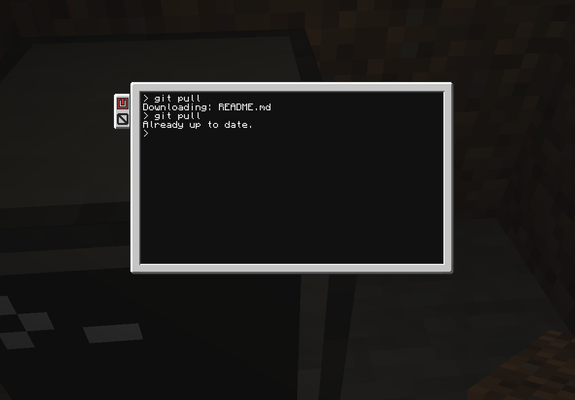
 Tomodachi94
libunicornpkg v1.3.1 is out now, featuring a new provider for Sourcehut, a `rel.conflicts` field, and a little bit more. Here's the changelog: https://unicornpkg.github.io/libunicornpkg/changelog.html#v1-3-1
unicornpkg 1.3.0 was released a few days ago: https://unicornpkg.github.io/libunicornpkg/changelog.html#v1-3-0
Unicornpkg is a package manager for ComputerCraft. https://unicornpkg.madefor.cc
 Baa 🐑
Baa 🐑Big fan of this one, Chat. Made this cute kiosk program that tells you the in-game time, the day of your world, says Hi, and the current Weather.
This uses the mods CC: Tweaked, for the computer and Advanced Peripherals for the Environment Detector which reports on the weather.
Technically, it's possible to tell the current weather using the Daylight Detector because the computer can measure the redstone strength based on the light level. But it was complicated, required a lot of space, I found it difficult to calculate the sine wave of light level compared to current weather while also calculating the daylight compared to the time of day and somehow calculating that.
It's possible for sure but I'm not good enough at maths to understand it.
Anyway here's the code:
local monitor = peripheral.find("monitor")

function flash_line(text, background_colour, text_colour)
    local line_length, _ = monitor.getSize()
    local current_text_colour = monitor.getTextColour()
    local current_background_colour = monitor.getBackgroundColour()
    local current_x, current_y = monitor.getCursorPos()
    monitor.clearLine()
    monitor.setTextColour(text_colour)
    for i = 1, 3
    do
        -- Flash half
        monitor.setBackgroundColour(background_colour)
        monitor.setCursorPos(1, current_y)
        for cursor_x = 1, line_length
        do
            monitor.write(text)
        end
        os.sleep(0.5)
        -- Flash second-half
        monitor.setBackgroundColour(current_background_colour)
        monitor.setCursorPos(1, current_y)
        for cursor_x = 1, line_length
        do
            monitor.write(text)
        end
        os.sleep(0.5)
    end
    monitor.setTextColour(current_text_colour)
    monitor.setBackgroundColour(current_background_colour)
    monitor.setCursorPos(current_x, current_y)
    monitor.clearLine()
end

if not monitor
then
    print("Could not find monitor.")
    return
end

local is_raining = false
local raining_start = 0
local is_sunny = false
local sunny_start = 0
local is_thunder = false
local thunder_start = 0

monitor.setBackgroundColour(colours.blue)
monitor.setTextColour(colours.lime)
monitor.clear()
while(true)
do
    local env = peripheral.find("environment_detector")
    local time = os.time()
    local day = os.day()
    local greeting
    local day_stat = "Day: " .. day
    local screen_width, screen_height = monitor.getSize()

    local distance_from_right = screen_width - day_stat:len() + 1
    monitor.setBackgroundColour(colours.blue)
    monitor.setTextColour(colours.lime)
    monitor.setCursorPos(1,1)
    monitor.clearLine()
    monitor.write(textutils.formatTime(time))
    monitor.setCursorPos(distance_from_right,1)
    monitor.write(day_stat)
    monitor.setCursorPos(1,2)
    monitor.clearLine()
    if time < 12.0
    then
        monitor.write("Good ")
        monitor.setTextColour(colours.magenta)
        monitor.write("morning.")
    elseif time < 19.0
    then
        monitor.write("Good ")
        monitor.setTextColour(colours.yellow)
        monitor.write("afternoon.")
    else
        monitor.write("Good ")
        monitor.setTextColour(colours.orange)
        monitor.write("evening.")
    end

    if env
    then
        monitor.setCursorPos(1,4)
        monitor.clearLine()
        monitor.setTextColour(colours.lime)
        monitor.write("Today's Weather:")
        monitor.setCursorPos(1,5)
        -- It just started sunny.
        if env.isSunny() and not is_sunny
        then
            -- The timer is the computer uptime.
            sunny_start = os.epoch("utc")
            is_sunny = true
            flash_line("!", colours.white, colours.black)
        elseif not env.isSunny()
        then
            -- Set state to false and reset start time.
            is_sunny = false
            sunny_start = 0
        end

        -- It just started raining.
        if env.isRaining() and not is_raining
        then
            -- The timer is the computer uptime.
            raining_start = os.epoch("utc")
            is_raining = true
            flash_line("!", colours.yellow, colours.black)
        elseif not env.isRaining()
        then
            -- Set state to false and reset start time.
            is_raining = false
            raining_start = 0
        end

        -- It just started thundering.
        if env.isThunder() and not is_thunder
        then
            -- The timer is the computer uptime.
            thunder_start = os.epoch("utc")
            is_thunder = true
            flash_line("!", colours.red, colours.black)
        elseif not env.isThunder()
        then
            -- Set state to false and reset start time.
            is_thunder = false
            thunder_start = 0
        end
        if is_thunder
        then
            local thunder_time = (os.epoch("utc") - thunder_start) / 1000
            local weather_report = "Thundering for: " .. os.date("!%T", thunder_time)
            --local distance_from_right = screen_width - weather_report:len() + 1
            --monitor.setCursorPos(distance_from_right,3)
            monitor.clearLine()
            monitor.write(weather_report)
        elseif is_raining
        then
            local raining_time = (os.epoch("utc") - raining_start) / 1000
            local weather_report = "Raining for: " .. os.date("!%T", raining_time)
            --local distance_from_right = screen_width - weather_report:len() + 1
            --monitor.setCursorPos(distance_from_right,3)
            monitor.clearLine()
            monitor.write(weather_report)
        elseif is_sunny
        then
            local sunny_time = (os.epoch("utc") - sunny_start) / 1000
            local weather_report = "Sunny for: " .. os.date("!%T", sunny_time)
            --local distance_from_right = screen_width - weather_report:len() + 1
            --monitor.setCursorPos(distance_from_right,3)
            monitor.clearLine()
            monitor.write(weather_report)
        end
    end


    sleep(0.1)
end
#minecraft #ComputerCraft #CCtweaked
Unit testing with ComputerCraft, McFly, and CraftOS-PC
https://tomodachi94.github.io/blog/computercraft-mcfly-testing/
Unit testing with ComputerCraft, McFly, and CraftOS-PC
Unit testing is awesome . It helps you catch bugs early by ensuring all of the components of your program work as expected. Note: This guide is targeted towards experts who have advanced knowledge of ComputerCraft and know a few things about unit tests. Experience with unit tests in another language is helpful too, but isn’t required. CC: Tweaked contains a little-known unit testing framework called McFly, which describes itself as “a very basic test framework for ComputerCraft” drawing inspiration from the Busted framework for Lua. This post will function as an introduction to McFly, in the process providing instructions for running the tests inside of the CraftOS-PC emulator, suitable for running in a continuous integration pipeline.
 SirEdvin
New #UnlimitedPeripheralWorks, addon for #ComputerCraft release! Version 1.4.5 for minecraft 1.20.1 released!
You can find more details by github release notes: https://github.com/siredvin/unlimitedperipheralworks/releases/tag/v1.20.1-1.4.5

Also, the #ComputerCraft version for Fabric 1.19 is just broken for some unknown reason. https://jitpack.io/com/github/cc-tweaked/cc-restitched/v1.19.1-1.101.2-ccr/build.log
Nobody touched this code for years, but jitpack decided to rebuild it and broke it completely.
Nobody touched this code for years, but jitpack decided to rebuild it and broke it completely.
 Krutonium://
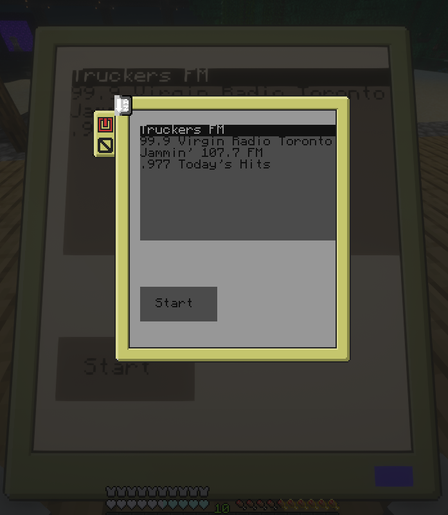
I just realized my Internet Radio program for ComputerCraft also works on the Noisy Pocket Computer lol
https://github.com/Krutonium/InternetRadio2Computercraft
https://social.treehouse.systems/@krutonium/113795044727771103
#Minecraft
#Computercraft
#opencomputers
#InternetRadio
#ffmpeg
#csharp