 Prof. Rachel Thorn 🍉🇺🇦🏳️⚧️🏳️
 Tomi
TomiTL;DR
Webcams (at least 2 Logitech’s I tested) just work under Linux Mint (plug&play). I was looking for a software to adjust the angle of the webcam and Cameractrls just work, too.
What was the issue – the angle
The built-in webcam in my Lenovo Yoga is just … garbage, so I was using / occasionally borrowing my sons Logitech Streamcam for videoconferencing. While Streamcam works just great for videoconferencing, I received strong hints from him: just buy your own webcam, old man.
So I did. I didn’t research much, I just choose Logitech Brio MX. I was a bit skeptical because of some forum posts that it has issues under Linux.
But it worked right away as I plugged it in. Nice picture, even a bit better as Streamcam’s, but there was an issue. The angle of the picture was too wide. It captured me and half of the room. I didn’t want that.
I read the cam allows adjusting the view angle, but only using Logitech’s software, which does not run under Linux.
After a bit of searching, I found 2 programs that can be used to adjust webcam settings: Guvcview and Cameractrls. The picture below shows them side-by-side:
As you can see in the right window, Cameractrls allow adjusting the view angle (60-78-90 for my cam).
Great.
What’s even better, the settings persist across the OS – when I fired up Element, Teams (yeah, I know) or Meet video conferencing program, it kept the settings from CameraCtrls.
The best thing is I didn’t need to mess with drivers or Logitech’s bloatware. Another win for Linux.
https://blog.rozman.info/webcam-angle-control-under-linux-mint/ #cameractrls #guvcview #Linux #logitech #Mint #webcam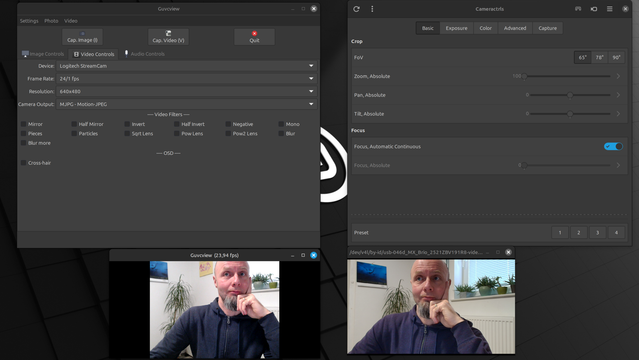
 Jill Bryant Ryniker
 Linux ✅

 Pierre-Luc Daoust - MonsieurPL