How to Use Custom Metadata Types in Flow
How do you use Custom Metadata in Screen Flows?
Salesforce Custom Metadata Types (CMDT) are a type of metadata in Salesforce that allow you to define, deploy, and manage application configurations and settings as metadata. Unlike custom objects, the data stored in custom metadata types can be deployed from one Salesforce environment to another using deployment tools like change sets, Salesforce CLI, or packages. This makes them particularly useful for configuration data that needs to be consistent across environments.
Key Features of Custom Metadata Types
1. Metadata Deployment:
• Both the structure (fields, relationships) and the records (data) of custom metadata types can be included in deployments.
• Records are treated as metadata, making them deployable and version-controlled.
2. Declarative Configuration:
• Define fields, relationships, and records directly in the Salesforce UI or using tools like Metadata API and Salesforce CLI.
3. Programmatic Access:
• Accessible through SOQL queries, Apex, and APIs.
• Example: SELECT DeveloperName, FieldName__c FROM Custom_Metadata_Type__mdt
4. Relationships:
• Support for lookups to other custom metadata types and standard objects.
5. Integration with Packages:
• Custom metadata types can be included in managed and unmanaged packages for easy distribution.
🚨 Use case 👇🏼
Build a screen flow for a survey where the admin can change the questions and choices without modifying the flow. Let’s say you have a screen flow with survey questions.
By leveraging custom metadata types, you can provide a way for the admin to change the questions and choices without modifying the screen flow.
Here is how you can build your solution:
1. Create a Custom Metadata Type
Navigate to Setup → Custom Metadata Types → New Custom Metadata Type to define the CMDT. Specify the label, object name, and optional description. Like with custom objects, you can define custom fields for your metadata type, such as Question 1, Choice 1, etc. Create Records: Go to the custom metadata type detail page and create records for your configuration. Each record will represent one question in the survey.
2. Build your flow
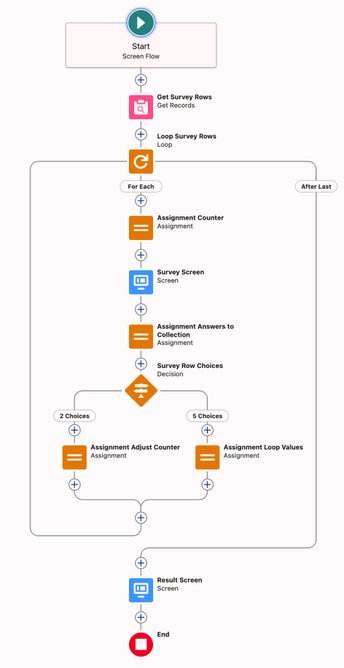
Get the CMDT in your screen flow and use them in read-only screen components. Loop through screens in your flow and record the answers using a slider. You can even drive the weighted average calculation using the Custom Metadata.
3. Debug, test and deploy
Ensure that your flow runs well. Deploy the CMDT structure and records along with your flow. Remember all these configurations and data are deployable between environments. You don’t need to export and import them.
4. Maintain the CMDT records
Change the CMDT records when you need to modify the survey.
Notice that we have a get inside the loop in this flow. This is not a big concern for several reasons:
- Each screen in the screen flow splits a transaction.
- As the flow builder, you determine how many times the flow will loop through the number of CMDT records.
Conclusion
Salesforce Custom Metadata Types offer a powerful and flexible way to manage application configurations across multiple environments without hardcoding values within your Flows. By utilizing CMDTs, admins and developers can enhance the process of updating and maintaining dynamic data sets like survey questions in Screen Flows, thereby improving adaptability and efficiency. This approach not only saves time but also maintains consistency and reliability across deployments, making it an invaluable tool for any Salesforce implementation.
What are some other ways you leverage CMDT in flow?
Explore related content:
Using Custom Metadata Types in Flows Without Get
How to Use the Action Button Component in Screen Flow
Enhance UX in Flow with Custom LWC Icon Selector
Can You After-Save When You Can Before-Save?
#Apex #API #CMDT #CustomMetadata #Salesforce #ScreenFlow #SOQL #useCase
 REDES A.C.

 Saheltribune
 Andy Engin Utkan


 31brinfmec