
<CENTER><FONT FACE="Comic Sans MS" SIZE=+3><FONT COLOR="#FF0000">L<FONT COLOR="#FF8429">i<FONT COLOR="#FFFF10">s<FONT COLOR="#D6EF39">a<FONT COLOR=#7BC618">'<FONT COLOR="#299C39">s<FONT COLOR="#089494"> G<FONT COLOR="#00A5C6">r<FONT COLOR="#949CCE">a<FONT COLOR="#9C7BBD">p<FONT COLOR="#CE84C6">h<FONT COLOR="#E78CC6">i<FONT COLOR="#FFAADD">c<FONT COLOR="#BFBFBF">s<FONT COLOR="#FFFFFF">!</FONT></FONT></CENTER></FONT></FONT></FONT></FONT></FONT></FONT></FONT></FONT></FONT></FONT></FONT></FONT>

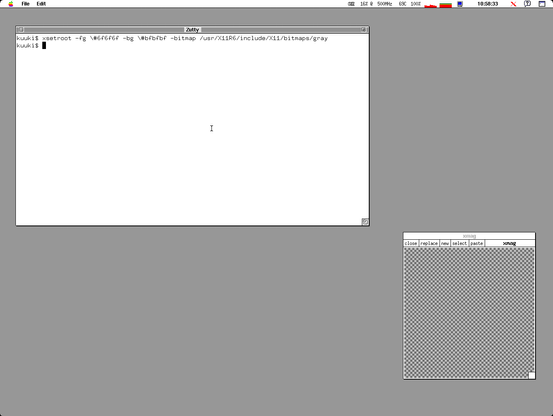
@daneharrigan That said, now that I've thought to try #OpenBSD #xenodm's default light & dark grey colors with the 'gray' pattern, I really like the effect:

`xsetroot -fg \#6f6f6f -bg \#bfbfbf -bitmap /usr/X11R6/include/X11/bitmaps/gray`
@daneharrigan As demonstrated, the difference between `xsetroot -default` and #OpenBSD xenodm's default `xsetroot -fg \#6f6f6f -bg \#bfbfbf -bitmap /usr/X11R6/include/X11/bitmaps/root_weave` is that the latter applied the same pattern using a dark gray and a light gray instead of black and white. I just find it easier on my eyes.

Naturally, `xsetroot -default` isn't right either. So, I poked around and found the correct incantation in `/etc/X11/xenodm/Xsetup_0`:

`xsetroot -fg \#6f6f6f -bg \#bfbfbf -bitmap /usr/X11R6/include/X11/bitmaps/root_weave`

Ah, much better! 2/2

Base Color : D1886D
Mode : monochrome-dark
#8E4A30
#A75637
#C0613F
#C97555
#D1886D
#AFAFAF
#BFBFBF
#CFCFCF
Base Color : 768FBB
Mode : monochrome-dark
#3D5174
#4E6897
#6681B2
#A5A5A5
#BFBFBF
Base Color : 8ABCC9
Mode : monochrome-dark
#457F8E
#5299AC
#6EABBB
#8ABCC9
#BFBFBF
#D4D4D4
Base Color : 7AEC3D
Mode : monochrome-dark
#409812
#50BF15
#60E619
#7AEB3E
#AAAAAA
#BFBFBF