 myfrench
🇫🇷 perdre contenance
Perdre contenance signifie perdre son calme et son assurance, montrer son trouble ou son embarras.
→ https://my-french.com/french_idioms/perdre-contenance
#FrenchLearning #Idiomes #FLE #Soutenu #B2
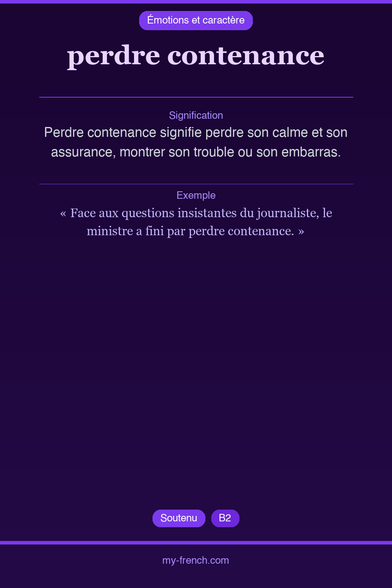
🇫🇷 perdre contenance
Perdre contenance signifie perdre son calme et son assurance, montrer son trouble ou son embarras.
→ https://my-french.com/french_idioms/perdre-contenance
#FrenchLearning #Idiomes #FLE #Soutenu #B2

Zündfunk-Stadtwerke live Aus der Hubertus Stube in Volkach Diese Sendung mit allen Beiträgen und Interviews hören Sie auch in ARD Sounds bei Bayern 2 und unter www.bayern2.de/zuendfunk Der Zündfunk sendet eine Stunde lang live aus Volkach am Main. Dort hat sich in der "Hubertus Stube" in der Altstadt in sympathischer Treffpunkt für alternative Kultur etabliert. Achim Bogdahn spricht mit dem Wirt Hubi Dötsch und mit Menschen, die in der unterfränkischen Weingegend einiges auf die Beine stellen: vom Klassik-Festival Vinoton über Naturwein und Trüffel bis zu Punk im fränkischen Dialekt.
Large-scale flyovers without proper notice are rude–and an insult to avgeeks
The past two days have featured some of the most impressive airshow performances in D.C. skies in years–but I, a card-carrying avgeek, saw almost none of them. I’m blaming that on the Trump administration, and I don’t think I’m wrong.
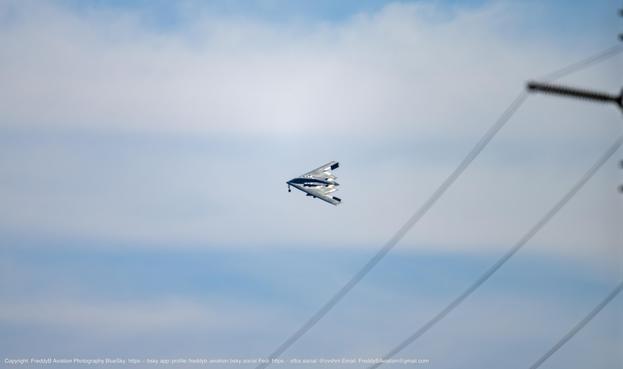
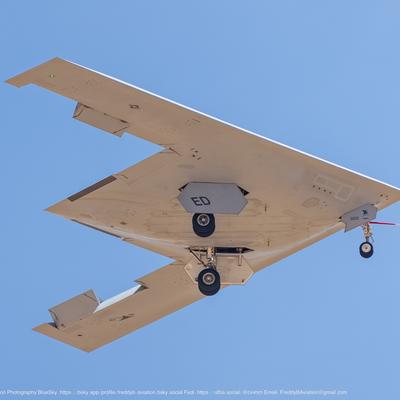
Wednesday night, I missed all but the end of a flyover that concluded with a B-2 bomber accompanied by a formation of F-35 fighters–I heard the roar of the smaller jets as I was exiting a grocery store but only saw one or two reflected in the windows of an office building across the street. Thursday afternoon, I didn’t catch any of an unusual grouping of two B-52s and pairs of F-15s, F/A-18s and F-35s.
I was in the wrong place twice (which is why I’m illustrating this post with a picture of an F-16 formation over Nationals Park before 2025’s home opener) because the organizers of the Freedom 250 series of events on the Malls did not specify flight times in their announcement of these flyovers.
The people running this decidedly partisan event also didn’t use their X account to offer updates on flyover scheduling. I should have instead checked photographer and aviation enthusiast Andrew Leyden, who has been relaying updates there.
(He’s also on Bluesky but not repeating everything that he posts on X, to my dismay.)
From looking at Reddit, I see that I have company in being perplexed by the lack of a heads-up and wondering why there’s no published schedule. It appears that I’ll continue to be left guessing over the remaining days of flyovers–through July 10.
That’s not how this is supposed to work: People on the ground deserve to know when they’ll see their taxpayer dollars in action like this. They don’t have to be total aerospace nerds to appreciate a demonstration of engineering in action–and the piloting skills required to fly so precisely.
And even if folks on the ground somehow have zero interest in aviation, they still might want to know when not to schedule a call to avoid people on the other end thinking they’re about to be on the receiving end of an airstrike.
We know how to do this correctly. I can plan to watch for Arlington National Cemetery flyovers in support of military funerals because I get a text and an e-mail a few days before from the District’s AlertDC system; although those alerts had grown spotty by the time I wrote an explainer about flyovers for Greater Greater Washington in 2023, they’ve been much more reliable recently.
For more involved aerial performances, organizers have even fewer reasons to leave people guessing. The May 8, 2025 “Arsenal of Democracy” flyover that commemorated the 70th anniversary of the end of World War II in Europe had a starting time of 12:10 p.m. published weeks in advance. And six years ago, even in the middle of pandemic-induced chaos, we knew when to step outside to watch the July 4, 2020 flyovers above the Mall that Trump ordered up because those, too, came with a start time published three days before.
This is far from the worst example of the second Trump administration falling below the low standards of the first one, but it belongs somewhere on that list.
#airShow #avgeek #aviation #B2 #B52 #F15 #F35 #FA18 #FA19 #flyover #flyovers #Freedom250 #GreatAmericanStateFair #July4 #militaryAviation #soundOfFreedom

WordPress 0.7-gold on Red Hat 9.0 Shrike – the very first version of WordPress
WordPress made its first appearance as a fork of B2, with version 0.7-gold that was released on May 25th, 2003. It was the very first version of WordPress that was considered to be pre-release before the first major version was revealed to the public, which was version 1.0.0, in January 2004. WordPress has since gained popularity, with version v7.0 being the latest version released and v7.1 already in the works.
WordPress 0.7-gold required a version of MySQL, such as 3.23.54, PHP 4, and Apache Web Server. So, we’ll have to install all of them so that the web blog works. Installation of the dependencies and the web blog itself requires that you have some system administration skills before being able to proceed.
You can download this version of WordPress from SourceForge, but we don’t recommend installing it to production environments, as it has many security vulnerabilities that weren’t issues at the time of the release. Instead, we recommend installing WordPress 7.0.
Installing dependencies
Just like B2, this version of WordPress requires a MySQL server already running, alongside the Apache Web Server and PHP 4 packages. So, to install them on Red Hat 9.0 Shrike, you’ll need to navigate to Red Hat Menu > System Settings > Add or Remove Applications.
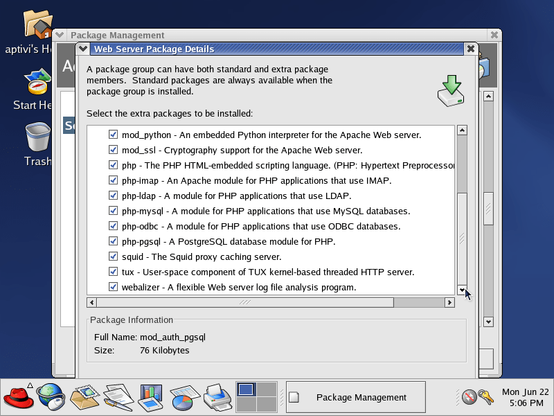
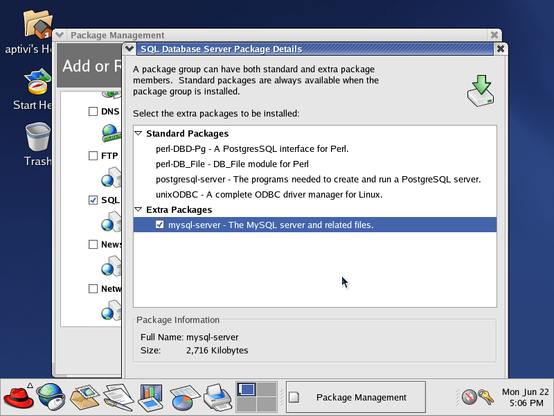
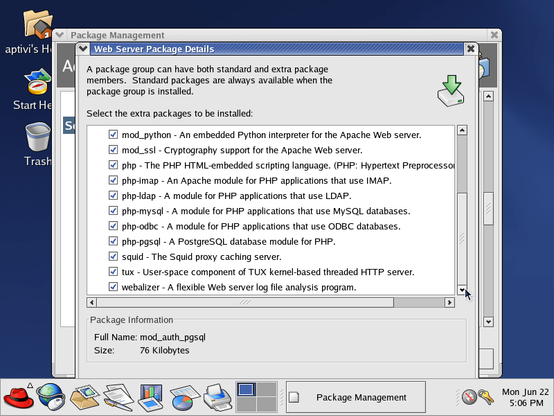
Then, go down to Web Server and SQL Database Server, and select them to be installed. Then, open their details, and tick all the checkboxes in the window that opens.
Afterwards, confirm the changes, and press Update. The below dialog box shows.
Press Continue, and insert the first Red Hat 9.0 disk. After that, let the installation process continue, inserting disks 2 and 3 in the process.
Starting MySQL and Apache
Before continuing, make sure that the Ethernet interface is active. If it’s inactive, try activating it again by opening Red Hat Menu > System Settings > Network, entering your root password you’ve set during the installation.
If everything is going well, start both the MySQL daemon and the Apache web server with the following commands:
$ sudo /etc/init.d/mysqld start $ sudo /etc/init.d/httpd start Afterwards, the below output should look like this:
If you are getting an error saying that your user is not in the sudoers file, log in as root with su -, open visudo, uncomment the line that says %wheel ALL=(ALL) ALL, save the changes, exit the text editor, and log out and log back in to your desktop.
Configuring WordPress
You’ll have to obtain the IP address of your Red Hat 9.0 machine by running /sbin/ifconfig on your terminal. Then, you’ll have to use SSH to copy the wordpress-0.7-gold.tar.gz file to your virtual machine’s home directory from the host.
After that, copy the archive file to the /var/www/html directory, and extract it. It will be extracted to the wordpress folder.
Open vim to the b2config.php file as root, which should look like this:
Afterwards, scroll down to the important variables, such as $siteurl. Edit them, considering that:
$siteurl is supposed to point to your IP address and b2 directory, such as http://<ip>/wordpress$blogfilename needs to be left alone$blogname and $blogdescription can be specified according to your tasteNext, scroll down to the four MySQL variables, where you need to change those variables as the text file tells you. In our example, we’ve changed $dbname, $dbusername, and $dbpassword.
If you want to be able to use images, edit the two variables, called $fileupload_realpath and $fileupload_url. Make sure that the path exists on your machine, and that the URL is correct.
After that, save the changes. Scroll back up to the MySQL configuration section, open a new terminal tab, and enter the MySQL shell as root. Afterwards, execute the following SQL queries: (notice that there is no CREATE USER SQL query here)
CREATE DATABASE dbname;GRANT ALL PRIVILEGES ON *.* TO dbuser@localhost IDENTIFIED BY 'dbpass' WITH GRANT OPTION;FLUSH PRIVILEGES;This is necessary as the required entities for the blog will be created during the installation. For example, the queries are shown for our installation:
Installing WordPress
Open your web browser to the virtual machine. You should be able to access wordpress/readme.html under its IP address in your host machine. We did this for more clarity. Please notice that the differentiation of the IP addresses are the result of network instability issues we’re currently experiencing in the virtual machine due to the usage of the wrong network adapter, which we’ll talk about in a later article.
Now, change the URL to point to b2install.php. The installation wizard should run. Follow the steps on the screen, and let it install everything, including the necessary entities to the database.
Signing in
Go to the login page. Notice that you can’t sign in to the admin account that was created due to broken login code. Luckily, it is less buggy than B2 0.6pre2’s login code.
However, the blog site still works.
The test comment is there, too!
To fix this unexpected login error, clear the cookies browser cookies for this IP address like this before signing in again.
Now, try to sign in as the admin account. The false error should be gone at this point:
The following control panel screens are available:
When you click on My Profile, it opens a small window that shows you the details of your admin account, like this:
Unlike B2 0.6pre2, you can actually create new blog posts! Just go to Post/Edit, and write your blog post, then click on the Blog This! button. For example, if you made a blog post using this version of WordPress then went to the main site, you can see the post.
The design is pretty much minimal and simplistic, unlike the ones that we have in today’s WordPress, which are more modern.
Please note that Jetpack on mobile doesn’t support the first version of WordPress due to it being too old.
#B2 #news #Tech #Technology #update #WordPress #WordPress07 #WordPress07Gold
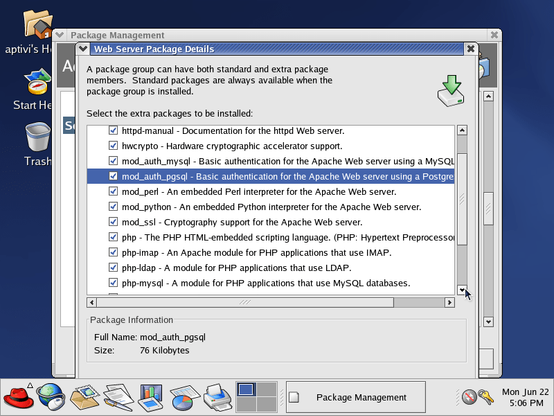
Running B2 0.6pre2, which came before WordPress 0.7-gold, on Red Hat 9.0 Shrike.
#B2 #WordPress #RedHat #RedHatLinux #Linux #Blog #Blogging #Website #TechNews #TechUpdates
https://officialaptivi.wordpress.com/2026/06/23/b2-0-6pre2-on-red-hat-9-0-shrike-before-wordpress/
B2 0.6pre2 on Red Hat 9.0 Shrike – before WordPress
Before WordPress was released, there was another blogging software that initial versions of WordPress were based on, called B2, that provided you with an ability to self-host your web blog, with just PHP, Apache, and MySQL. This software uses the MySQL database software to manage blog posts, comments, and users, along with other configuration.
B2 is also known as Cafelog, and early versions hosted just a blog space and a control panel that allowed you to publish blog posts, manage user accounts, and much more. It’s also customizable, which means that you are able to customize how your web blog looks like.
B2 required a version of MySQL, such as 3.23.54, PHP 4, and Apache Web Server. So, we’ll have to install all of them so that the weblog works. However, since this version of B2 is a pre-release, this means that some things are broken. Installation of the dependencies and the web blog itself requires that you have some system administration skills before being able to proceed.
You can download this version of B2 from SourceForge, but we don’t recommend installing it to production environments, as it has many security vulnerabilities that weren’t issues at the time of the release. Instead, we recommend installing WordPress 7.0.
Installing dependencies
B2 requires a MySQL server already running, alongside the Apache Web Server and PHP 4 packages. So, to install them on Red Hat 9.0 Shrike, you’ll need to navigate to Red Hat Menu > System Settings > Add or Remove Applications.
Then, go down to Web Server and SQL Database Server, and select them to be installed. Then, open their details, and tick all the checkboxes in the window that opens.
Afterwards, confirm the changes, and press Update. The below dialog box shows.
Press Continue, and insert the first Red Hat 9.0 disk. After that, let the installation process continue, inserting disks 2 and 3 in the process.
Starting MySQL and Apache
Before continuing, make sure that the Ethernet interface is active. If it’s inactive, try activating it again by opening Red Hat Menu > System Settings > Network, entering your root password you’ve set during the installation.
If everything is going well, start both the MySQL daemon and the Apache web server with the following commands:
$ sudo /etc/init.d/mysqld start $ sudo /etc/init.d/httpd start Afterwards, the below output should look like this:
If you are getting an error saying that your user is not in the sudoers file, log in as root with su -, open visudo, uncomment the line that says %wheel ALL=(ALL) ALL, save the changes, exit the text editor, and log out and log back in to your desktop.
Configuring B2
You’ll have to obtain the IP address of your Red Hat 9.0 machine by running /sbin/ifconfig on your terminal. Then, you’ll have to use SSH to copy the b2-0.6pre2-20020409.tar.gz file to your virtual machine’s home directory from the host.
After that, make the /var/www/html/b2 directory, copy the archive file to the directory, and extract it.
Open vim to the b2config.php file as root, which should look like this:
Afterwards, scroll down to the important variables, such as $siteurl and other variables all the way down to $pathserver. Edit them, considering that:
$siteurl is supposed to point to your IP address and b2 directory, such as http://<ip>/b2$blogfilename, $cafelogID, and $use_cafelogping need to be left alone$blogname and $blogdescription can be specified according to your taste$pathserver needs to be the same as $siteurlNext, scroll down to the four MySQL variables, where you need to change those variables as the text file tells you. In our example, we’ve changed $dbname, $dbusername, and $dbpassword.
If you want to be able to use images, edit the two variables, called $fileupload_realpath and $fileupload_url. Make sure that the path exists on your machine, and that the URL is correct.
After that, save the changes. Scroll back up to the MySQL configuration section, open a new terminal tab, and enter the MySQL shell as root. Afterwards, execute the following SQL queries: (notice that there is no CREATE USER SQL query here)
CREATE DATABASE dbname;GRANT ALL PRIVILEGES ON *.* TO dbuser@localhost IDENTIFIED BY 'dbpass' WITH GRANT OPTION;FLUSH PRIVILEGES;This is necessary as the required entities for the blog will be created during the installation. For example, the queries are shown for our installation:
Installing B2
Open your web browser to the virtual machine. You should be able to access b2/readme.html under its IP address in your host machine. We did this for more clarity. Please notice that the differentiation of the IP addresses are the result of network instability issues we’re currently experiencing in the virtual machine due to the usage of the wrong network adapter, which we’ll talk about in a later article.
Now, change the URL to point to b2install.php. The installation should run, creating necessary tables in order for B2 to be usable.
Signing in
Go to the login page. Notice that you can’t sign in to the admin account that was created due to broken login code.
However, the blog site still works.
In your SSH client logged in to this machine as root, replace the contents of b2login.php with the snippet below. Make sure to save the changes.
<?php require('b2config.php'); require_once($abspath.$b2inc.'/b2template.functions.php'); require_once($abspath.$b2inc.'/b2functions.php'); if (!function_exists('add_magic_quotes')) { function add_magic_quotes($array) { foreach ($array as $k => $v) { if (is_array($v)) { $array[$k] = add_magic_quotes($v); } else { $array[$k] = addslashes($v); } } return $array; } } if (!get_magic_quotes_gpc()) { $HTTP_GET_VARS = add_magic_quotes($HTTP_GET_VARS); $HTTP_POST_VARS = add_magic_quotes($HTTP_POST_VARS); $HTTP_COOKIE_VARS = add_magic_quotes($HTTP_COOKIE_VARS); } $b2varstoreset = array('action','mode','error','text','popupurl','popuptitle'); for ($i = 0; $i < count($b2varstoreset); $i = $i + 1) { $b2var = $b2varstoreset[$i]; if (!isset($$b2var)) { if (empty($HTTP_POST_VARS["$b2var"])) { if (empty($HTTP_GET_VARS["$b2var"])) { $$b2var = ''; } else { $$b2var = $HTTP_GET_VARS["$b2var"]; } } else { $$b2var = $HTTP_POST_VARS["$b2var"]; } } } /* connecting the db */ $connexion = @mysql_connect($server,$loginsql,$passsql) or die("Can't connect to the database<br>".mysql_error()); mysql_select_db("$base"); switch($action) { case "logout": setcookie("cafeloguser"); setcookie("cafelogpass"); header("Expires: Mon, 26 Jul 1997 05:00:00 GMT"); header("Last-Modified: " . gmdate("D, d M Y H:i:s") . " GMT"); header("Cache-Control: no-cache, must-revalidate"); // for HTTP/1.1 header("Pragma: no-cache"); if ($is_IIS) { header("Refresh: 0;url=b2login.php"); } else { header("Location: b2login.php"); } exit(); break; case "login": if(!empty($HTTP_POST_VARS)) { $log = $HTTP_POST_VARS["log"]; $pwd = $HTTP_POST_VARS["pwd"]; $redirect_to = $HTTP_POST_VARS["redirect_to"]; } function login() { global $server,$loginsql,$passsql,$base,$log,$pwd,$error,$user_ID; global $tableusers, $pass_is_md5; $user_login=$log; $password=$pwd; if (!$user_login) { $error="<b>ERROR</b>: the login field is empty"; return false; } if (!$password) { $error="<b>ERROR</b>: the password field is empty"; return false; } if (substr($password,0,4)=="md5:") { $pass_is_md5 = 1; $password = substr($password,4,strlen($password)); $query = " SELECT ID, user_login, user_pass FROM $tableusers WHERE user_login = '$user_login' AND MD5(user_pass) = '$password' "; } else { $pass_is_md5 = 0; $query = " SELECT ID, user_login, user_pass FROM $tableusers WHERE user_login = '$user_login' AND user_pass = '$password' "; } $result = mysql_query($query) or die("Incorrect Login/Password request: ".mysql_error()); $lines = mysql_num_rows($result); if ($lines<1) { $error="<b>ERROR</b>: wrong login or password"; $pwd=""; return false; } else { $res=mysql_fetch_row($result); $user_ID=$res[0]; if (($pass_is_md5==0 && $res[1]==$user_login && $res[2]==$password) || ($pass_is_md5==1 && $res[1]==$user_login && md5($res[2])==$password)) { return true; } else { $error="<b>ERROR</b>: wrong login or password"; $pwd=""; return false; } } } if (!login()) { header("Expires: Mon, 26 Jul 1997 05:00:00 GMT"); header("Last-Modified: " . gmdate("D, d M Y H:i:s") . " GMT"); header("Cache-Control: no-cache, must-revalidate"); header("Pragma: no-cache"); if ($is_IIS) { header("Refresh: 0;url=b2login.php"); } else { header("Location: b2login.php"); } exit(); } else { $user_login=$log; $user_pass=$pwd; setcookie("cafeloguser",$user_login,time()+31536000); if ($pass_is_md5) { setcookie("cafelogpass",$user_pass,time()+31536000); } else { setcookie("cafelogpass",md5($user_pass),time()+31536000); } if (empty($HTTP_COOKIE_VARS["cafelogblogid"])) { setcookie("cafelogblogid","1",time()+31536000); } header("Expires: Mon, 26 Jul 1997 05:00:00 GMT"); header("Last-Modified: " . gmdate("D, d M Y H:i:s") . " GMT"); header("Cache-Control: no-cache, must-revalidate"); header("Pragma: no-cache"); switch($mode) { case "bookmarklet": $location="b2bookmarklet.php?text=$text&popupurl=$popupurl&popuptitle=$popuptitle"; break; case "sidebar": $location="sidebar.php?text=$text&popupurl=$popupurl&popuptitle=$popuptitle"; break; case "profile": $location="profile.php?text=$text&popupurl=$popupurl&popuptitle=$popuptitle"; break; default: $location="$redirect_to"; break; } if ($is_IIS) { header("Refresh: 0;url=$location"); } else { header("Location: $location"); } } break; case "lostpassword": ?> <!DOCTYPE html PUBLIC "-//W3C//DTD XHTML 1.0 Transitional//EN" "http://www.w3.org/TR/xhtml1/DTD/xhtml1-transitional.dtd"> <html xmlns="http://www.w3.org/1999/xhtml"> <head> <title>WordPress > Lost password ?</title> <meta http-equiv="Content-Type" content="text/html; charset=iso-8859-1" /> <link rel="stylesheet" href="<?php echo $siteurl; ?>/b2.css" type="text/css" /> <style type="text/css"> <!-- <?php if (!preg_match("/Nav/",$HTTP_USER_AGENT)) { ?> textarea, input, select { background-color: #f0f0f0; border-width: 1px; border-color: #cccccc; border-style: solid; padding: 2px; margin: 1px; } <?php } ?> --> </style> </head> <body> <table width="100%" height="100%"> <td align="center" valign="middle"> <div id="login"> <p>Type your login here and click OK. You will receive an email with your password.</p> <?php if ($error) echo "<div align=\"right\" style=\"padding:4px;\"><font color=\"#FF0000\">$error</font><br /> </div>"; ?> <form name="" action="b2login.php" method="post"> <input type="hidden" name="action" value="retrievepassword" /> <label>Login: <input type="text" name="user_login" id="user_login" value="" size="12" /></label> <input type="submit" name="Submit2" value="OK" class="search"> </form> </div> </td> </tr> </table> </body> </html> <?php break; case "retrievepassword": $user_login = $HTTP_POST_VARS["user_login"]; $user_data = get_userdatabylogin($user_login); $user_email = $user_data["user_email"]; $user_pass = $user_data["user_pass"]; $message = "Login: $user_login\r\n"; $message .= "Password: $user_pass\r\n"; $m = mail($user_email, "your weblog's login/password", $message); if ($m == false) { echo "<p>The email could not be sent.<br />\n"; echo "Possible reason: your host may have disabled the mail() function...</p>"; die(); } else { echo "<p>The email was sent successfully to $user_login's email address.<br />\n"; echo "<a href=\"b2login.php\">Click here to login !</a></p>"; die(); } break; default: if((!empty($HTTP_COOKIE_VARS["cafeloguser"])) && (!empty($HTTP_COOKIE_VARS["cafelogpass"]))) { $user_login = $HTTP_COOKIE_VARS["cafeloguser"]; $user_pass_md5 = $HTTP_COOKIE_VARS["cafelogpass"]; } function checklogin() { global $server,$loginsql,$passsql,$base; global $user_login,$user_pass_md5,$user_ID; $userdata = get_userdatabylogin($user_login); if ($user_pass_md5 != md5($userdata["user_pass"])) { return false; } else { return true; } } if ( !(checklogin()) ) { if (!empty($HTTP_COOKIE_VARS["cafeloguser"])) { $error="Error: wrong login/password"; //, or your session has expired."; } } else { header("Expires: Wed, 5 Jun 1979 23:41:00 GMT"); /* private joke: this is my birthdate - though officially it's on the 6th, since I'm GMT+1 :) */ header("Last-Modified: " . gmdate("D, d M Y H:i:s") . " GMT"); /* different all the time */ header("Cache-Control: no-cache, must-revalidate"); /* to cope with HTTP/1.1 */ header("Pragma: no-cache"); header("Location: b2edit.php"); exit(); } ?><!DOCTYPE html PUBLIC "-//W3C//DTD XHTML 1.0 Transitional//EN" "http://www.w3.org/TR/xhtml1/DTD/xhtml1-transitional.dtd"> <html xmlns="http://www.w3.org/1999/xhtml"> <head> <title>WordPress > Login form</title> <meta http-equiv="Content-Type" content="text/html; charset=iso-8859-1"> <link rel="stylesheet" href="<?php echo $siteurl; ?>/b2.css" type="text/css"> <style type="text/css"> <!-- <?php if (!preg_match("/Nav/",$HTTP_USER_AGENT)) { ?> textarea, input, select { background-color: #f0f0f0; border-width: 1px; border-color: #cccccc; border-style: solid; padding: 2px; margin: 1px; } <?php } ?> --> </style> </head> <body> <table width="100%" height="100%"> <td align="center" valign="middle"> <div id="login"> <p><a href="<?php echo $siteurl?>">Back to blog?</a><br /> <?php if ($users_can_register) { ?> <a href="<?php echo $siteurl; ?>/b2register.php">Register?</a><br /> <?php } ?> <a href="<?php echo $siteurl; ?>/b2login.php?action=lostpassword">Lost your password?</a></p> <?php if ($error) echo "<div align=\"right\" style=\"padding:4px;\"><font color=\"#FF0000\">$error</font><br /> </div>"; ?> <form name="" action="<?php echo $path; ?>/b2login.php" method="post"> <?php if ($mode=="bookmarklet") { ?> <input type="hidden" name="mode" value="<?php echo $mode ?>" /> <input type="hidden" name="text" value="<?php echo $text ?>" /> <input type="hidden" name="popupurl" value="<?php echo $popupurl ?>" /> <input type="hidden" name="popuptitle" value="<?php echo $popuptitle ?>" /> <?php } ?> <input type="hidden" name="redirect_to" value="b2edit.php" /> <input type="hidden" name="action" value="login" /> <label>Login: <input type="text" name="log" value="" size="8" /></label><br /> <label>Password: <input type="password" name="pwd" value="" size="8" /></label><br /> <input type="submit" name="Submit2" value="OK" class="search"> </form> </div> </td> </tr> </table> </body> </html> <?php break; } ?> After that, clear the cookies browser cookies for this IP address like this before signing in again.
Now, try to sign in as the admin account. The following control panel screens are available:
When you click on My Profile, it opens a small window that shows you the details of your admin account, like this:
Please note that, although it looks like you can make a new blog post, you can’t actually make a post. This is one of the bugs that made this version unusable according to our tests. However, we had a better experience with a fork of B2, known as WordPress 0.7-gold, which we’ll talk about soon.
#B2 #B206pre2 #news #Tech #Technology #update #WordPress


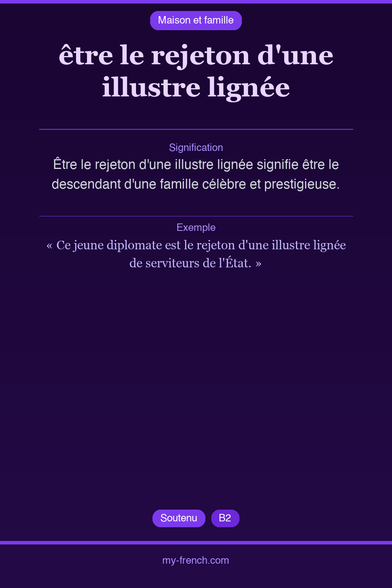
🇫🇷 être le rejeton d'une illustre lignée
Être le rejeton d'une illustre lignée signifie être le descendant d'une famille célèbre et prestigieuse.
→ https://my-french.com/french_idioms/etre-le-rejeton-d-une-illustre-lignee
#FrenchLearning #Idiomes #FLE #Soutenu #B2
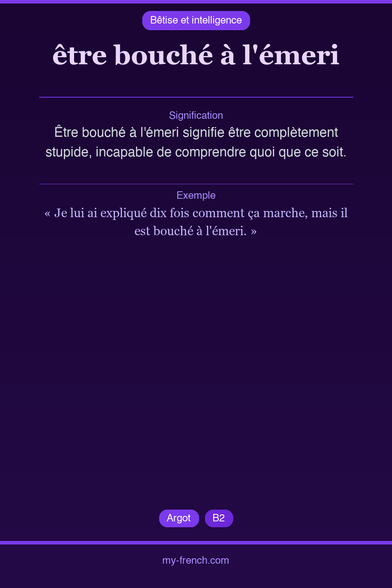
🇫🇷 être bouché à l'émeri
Être bouché à l'émeri signifie être complètement stupide, incapable de comprendre quoi que ce soit.
→ https://my-french.com/french_idioms/etre-bouche-a-l-emeri
#FrenchLearning #Idiomes #FLE #Argot #B2
 FreddyB Aviation Photography
 Marcus Rohrmoser 🌻
 Rob Pegoraro
 Aptivi
 Aptivi