
I made a trans pride flag config for my GhosTTY icon (I was looking for another config setting, and found all the custom MacOS icon settings, and went to town. If you're ALSO a GhosTTY user and would like your very own little trans pride icon, here are the settings to put in your settings file:

macos-icon = custom-style
macos-icon-frame = chrome
macos-icon-ghost-color = #F5A9B8
macos-icon-screen-color = #5BCEFA, #5BCEFA, #F5A9B8, #ffffff, #F5A9B8, #5BCEFA, #5BCEFA
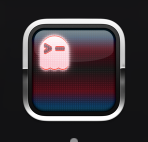

#pride #transpride #ghostty

we have added the ability to set pronouns in the server!

you can set custom pronouns of one color by using

/pronouns set white she/her

for the color you can use any hex color.

for gradients you write gradient first, then the list of colors for the gradient, then your pronouns

/pronouns set gradient #5BCEFA #F5A9B8 #FFFFFF #F5A9B8 #5BCEFA she/her

for trans gradient she/her pronouns

was sick of content warnings being those ugly warning stripes so...

```
.spoiler-input__border, .content-warning::before, .content-warning::after{
background-image: linear-gradient(#5BCEFA 0% 20%, #F5A9B8 20% 40%, #fff 40% 60%, #F5A9B8 60% 80%, #5BCEFA 80% 100%) !important;
}
```

okay I now have written enough of a parser to handle parsing the following Borland Graphics Interface Vector Artwork file:

Rectangle left:0 of 5, right:1 of 5, #5BCEFA
Rectangle left:1 of 5, right:2 of 5, #F6A0C2
Rectangle left:2 of 5, right:3 of 5, white
Rectangle left:3 of 5, right:4 of 5, #F6A0C2
Rectangle left:4 of 5, right:5 of 5, #5BCEFA

CSS trans flag background:

background-image: linear-gradient(180deg,#5bcefa 20%,#f5a9b8 20% 40%,#fff 40% 60%,#f5a9b8 60% 80%,#5bcefa 80%)

Very cool to put as the background for an img tag containing a transparent image