
Tomás Martins

@tfm
104 Followers
170 Following
174 Posts
iOS Developer, hobbyist photographer and a Nintendo kid. Working on AirScrobble
AirScrobblehttps://apps.apple.com/us/app/airscrobble/id1618366994
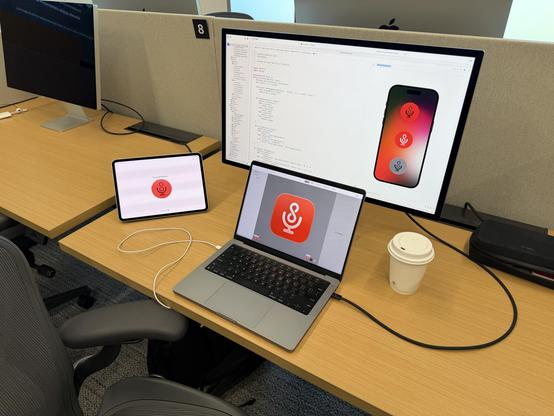
Last week I was fortunate to join Apple’s Liquid Glass workshop at their Developer Center in Cupertino!

I worked on exciting new features and experience improvements for AirScrobble, thanks to the amazing advice from their designers and engineers. Stay tuned for updates soon!

AirScrobble 1.13.0 is now out in the App Store!

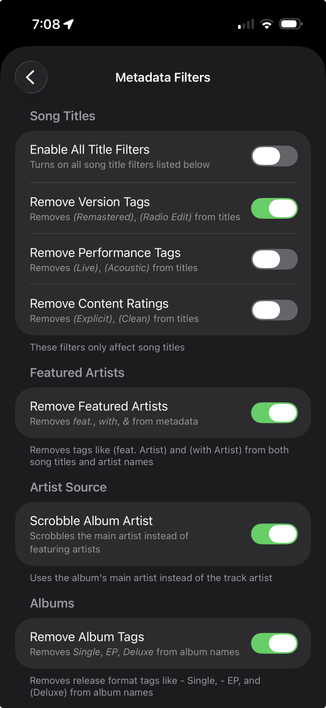
This update includes a new feature: metadata filtering! Clean up song titles, artists and albums when scrobbling by removing tags like "feat.", "Single", "EP", "Remastered" and more. Fine tune your filters in the new "Metadata Filter" section in Settings

This update also fixes:
- Live Activities stacking up when matching one song at a time
- A rare issue where an active subscription would not be recognized

As for the ShazamKit issue, I've found a workaround to get it working in the background again for iOS 18 and 26, but the root issue still hasn't been fixed

I'll be updating my feedback FB15255903 with my latest discoveries and the current workaround I'm using, which will hopefully help get this issue sorted

Also, huuuuuge thanks to @_inside for helping me out figuring out this workaround!

Amid the issue with ShazamKit's background issues still haven't been fixed, I also failed to spare enough time and energy to work on AirScrobble this past year. However, I'm now ready to pour my heart into it again. I've been revisiting my backlog of features and some feedback I've gotten over the past few months to help set the path for the app going forward.

Meanwhile, I'd also love to hear what else you'd like to see getting added to AirScrobble!

Hi everyone, I have some exciting news!

I've released a new update to AirScrobble which *finally* fixes the Auto Match feature while the app is in the background, so you should be able to identify and scrobble songs again while the app is closed or your device is locked

I know this long wait wasn't ideal and I apologize for that and I'm grateful for everyone's patience 🙏

Has anyone tried using SwiftData's custom DataStore with a custom backend?

In the meantime, if you still want to use AirScrobble for songs playing on your headphones, you can toggle the "Prevent Sleep on Auto Match" inside Matching settings to prevent the app from going into the background. As long as the app is open, it should be able to recognize and scrobble songs as usual

I know this isn’t the perfect solution for everything, but I’m doing everything I can to work with Apple and get things back to normal.

Thanks for your patience

3/3

As a workaround, I'm planning to release a new update soon which will bring a new Audio Recognition Mode option, which will allow you to switch to a new "Microphone Only" mode, which works on the background on the latest iOS releases.

However, as the name suggests, it will only recognize audio captured through your device's microphone, so it won't detect songs playing through headphones.

2/3

Hi everyone, just a little update on AirScrobble and iOS 18:

Unfortunately the issue that prevents ShazamKit to work in the background still prevails, even on the latest iOS 18.2. I've been going back and forth with Apple on my feedback but we still haven't figured out an fix. But i'm planning to release a workaround soon

1/3

For Apple folks, I've submitted the bug report on FB15255903

And tor those who are curious about this bug, I've also created a demo project that showcases this bug: https://github.com/tfmart/ShazamKitBackground/tree/main

GitHub - tfmart/ShazamKitBackground: Demo project that demonstrates an bug when attempting to use ShazamKit on an iOS app in the background (FB15255903)

Demo project that demonstrates an bug when attempting to use ShazamKit on an iOS app in the background (FB15255903) - tfmart/ShazamKitBackground

GitHub