@geerlingguy just wanted to follow up about tripod mounts, I decided to swap my Manfrotto quick release to this SunwayFoto MAC-14T that included everything to adapt it to a Manfrotto ball head. Rock solid with either plate.
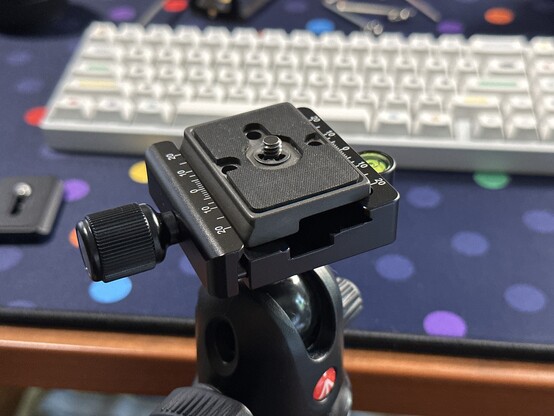
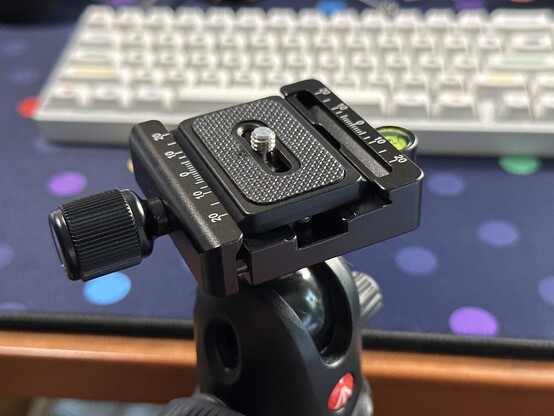
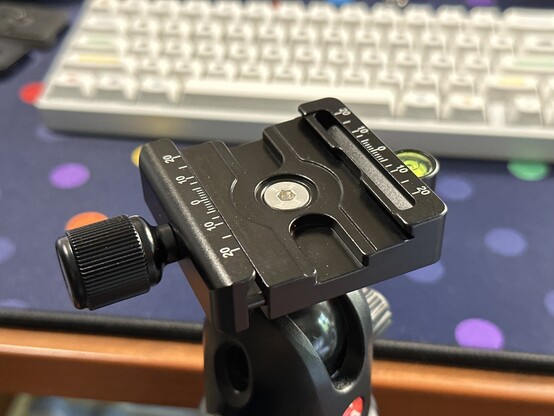

| Website | https://suther.land |
| GitHub | https://github.com/suth |
1990s web experience
- Open site in browser
- Watch framework of site gradually appear
- Start reading site text
- View images once they load
- Click a hyperlink to more information on the thing you're looking for
2020s web experience
- Open site in browser
- Wait for Cloudflare to verify you aren't a bot
- Wait for background movie to load
- Dismiss cookie popup
- Decline to subscribe to their mailing list
- Decline to speak to a chatbot that promises it's a human
- Scroll infinitely looking for the information you want that's probably not there since it's all generated text intended for other robots to read anyway
Arc is a wonderful browser that has become my daily driver thanks to its fresh take on how we use the web, but up until today there was one feature from Chrome that I missed the most - site search. What is site search? Site search gives you an easy way to directly search any website. Just open the command bar with CMD+T then type the shortcut for the site you want to search followed by tab (or space - this can be configured in site search settings) and then the word or phrase you want to search.
 48kRAM