130 Followers
102 Following
546 Posts
Product Engineer/Builder | Engineering Manager | iOS • Swift • SwiftUI | Indie Dev: Glu Sight • CreatorCaps • MIRA • Glyppo | Available for contract work
Release notes for this update:
https://about.glusight.app/release-notes
Glu Sight | Track glucose and insulin on iPhone.

Log glucose and insulin fast, spot patterns sooner, and walk into appointments with clear reports. A privacy-first diabetes app for iPhone.

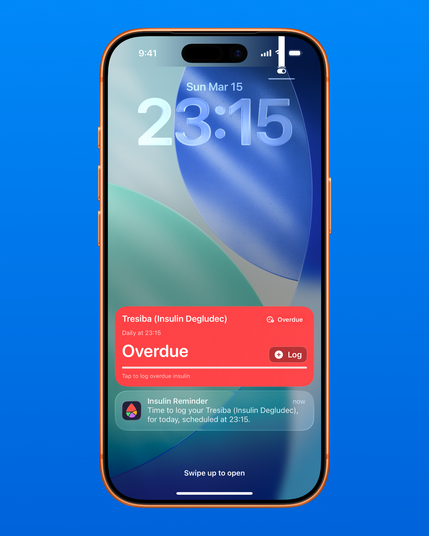
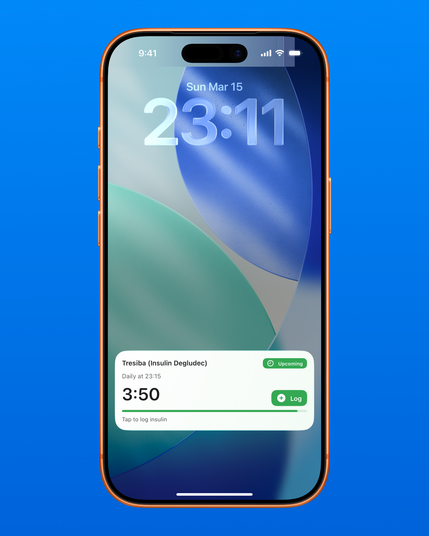
New in Glu Sight: Live Activities for insulin reminders.

Your next insulin dose is now visible right on the Lock Screen.
Upcoming doses show a countdown, and overdue ones are clearly flagged so you can log them quickly.

A change that makes daily #diabetes management easier.
#health #appParaDiabetes #iOS #indiedev

I sometimes download apps that are full of beautiful SwiftUI animations. I love the craft. But a lot of developers don’t think about or test for what happens when the user has Low Power Mode on.

On Low Power Mode, iOS throttles the CPU and GPU to conserve battery. If your animations are still running at full speed, you’re fighting the system.

Worse, users feel it: janky UI, dropped frames, and an app that feels broken right when they need it.

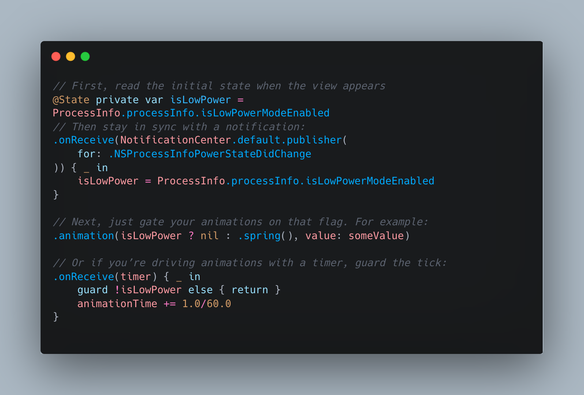
A simple fix. (1/2)
#iOSDev #SwiftUI #SwiftLang

That’s it. Your app now respects the user’s battery choice and keeps feeling smooth.

Small things like this are the difference between an app people keep and one they delete. (2/2)

An easy, no-frills captioning app for videos and shorts: CreatorCaps. https://apple.co/4ruCxYI

#IndieDev #iOS #AutoCaptions

Auto Captions: CreatorCaps App - App Store

Download Auto Captions: CreatorCaps by SEOU B HOUNKANRIN on the App Store. See screenshots, ratings and reviews, user tips, and more apps like Auto Captions:…

App Store

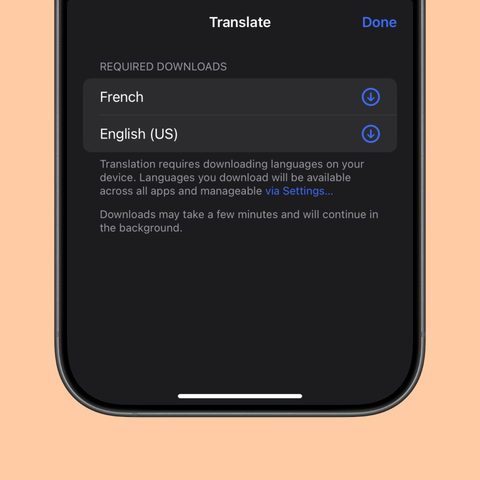
The 26.4 SDK change prevents this screen from appearing when language packs aren’t available or downloaded, creating a frictionless translation experience.

#iosdev https://iosdev.space/@slow_brewed/116225991898253306

highFidelity | Apple Developer Documentation

A translation strategy that provides more fluent translations using Apple Intelligence.

Apple Developer Documentation

- With .highFidelity, translation can start immediately on AI-enabled devices, often without showing language-pack download UI.
- With .lowLatency, you still get the traditional downloadable language-pack flow.

Key takeaway:
This is tied to the SDK you compile with, not your minimum deployment target.
So an app targeting iOS 18 can still exhibit the new behavior if built with a 26.4+ SDK.

Docs:
- LanguageAvailability.init(): https://developer.apple.com/documentation/translation/languageavailability/init() (2/3)

In the iOS 26.4/macOS 26.4 SDK, Apple reduces translation friction and improves Translation framework UX in a big way.

LanguageAvailability() now has SDK-dependent defaults:
- Apps built with 26.4+ SDKs check Apple Intelligence models first (when available).
- Apps built with older SDKs default to traditional translation models.

That change affects real app behavior: (1/3)

If you ever want to build terminal apps without leaving your Swift skillset, TUIkit looks interesting.

It’s a declarative, SwiftUI-like framework for building terminal user interfaces, written in pure Swift and running on macOS and Linux.

Worth a look:
https://tuikit.dev

#SwiftUI #SwiftLang #iOSDev

TUIkit: Terminal UI Framework for Swift

Build terminal apps with SwiftUI-like syntax. Pure Swift, no ncurses.

TUIkit