51 Followers
48 Following
246 Posts
Joyful lessons and resources designed to develop digital drawing abilities, increase technology skills, and cultivate a growth mindset
Websitehttps://shapegrams.com
Twitterhttps://twitter.com/shapegrams
Instagramhttps://instagram.com/shapegrams
Facebookhttps://facebook.com/shapegrams

Dragging an object with the mouse is not the only way to move in Google Slides and Google Drawings.

You can also move a selection by simply pressing the arrow keys on the keyboard.

To make smaller moves, hold down the Shift key while pressing an arrow key.

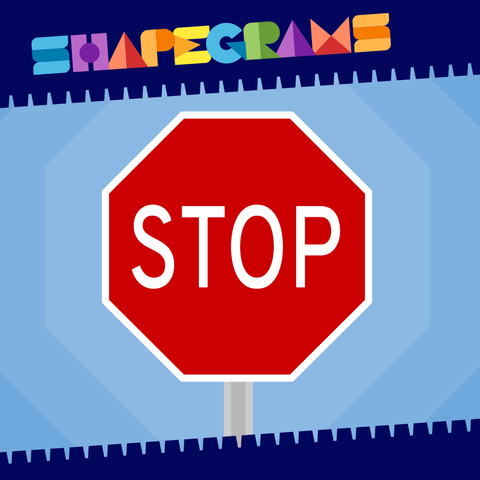
Drawing a stop sign in Google Slides or Google Drawings? Tony suggests using the Overpass font because it closely matches the font used on real stop signs.

The Stop Sign Zipper challenge is free:
http://shapegrams.com/stop

Level = Beginning Blue
🟦⬜️⬜️⬜️⬜️

Stop Sign

🟦⬜️⬜️⬜️⬜️

Shapegrams
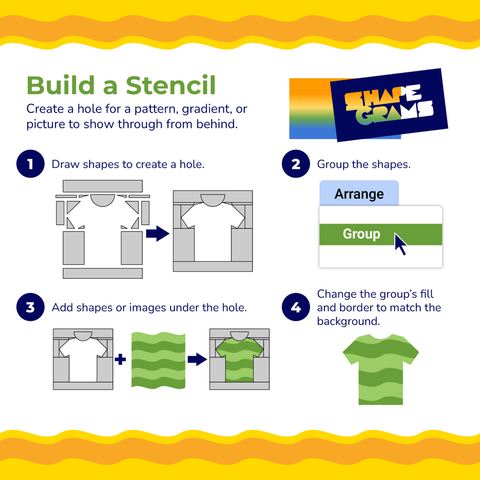
If you want to contain a pattern, gradient, or picture within something you are drawing, the solution could be to create a hole for the design to show through from behind. Think of it as a stencil—drawing shapes around an object, leaving an opening.

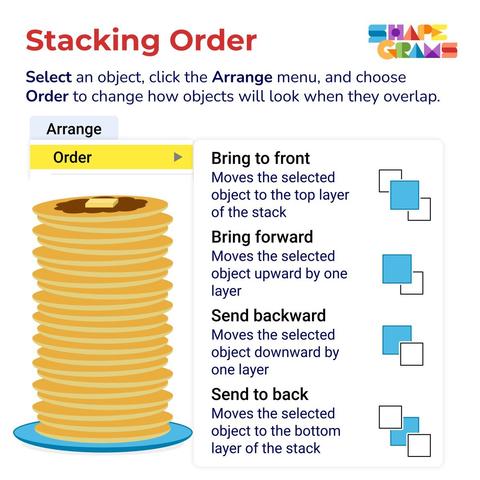
What's the difference between "Send backward" and "Send to back?"

Perhaps the "Stacking Order" poster will help.

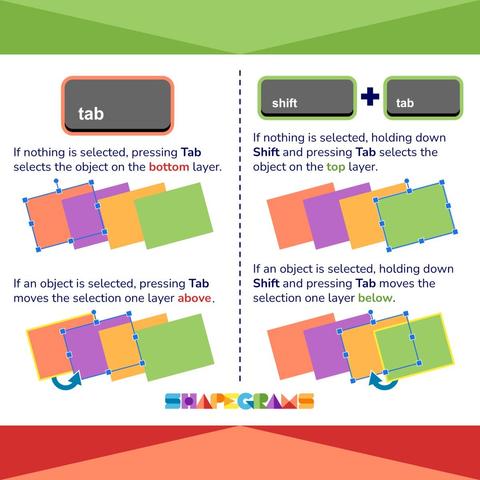
It gets tricky when working with lots of overlapping layers. Use Tab or Shift + Tab to cycle through items on the slide.

Q: What is "Justified" text alignment?

A: Space is added between words so that the text lines up on the left and right sides.

P.S. You can position text in different ways inside a shape.

The video in the Stop Motion Lesson demonstrates 7 digital animation techniques. Students build animations in their own copies of the Google Slides document, using Slide 1 as a reference. #EdTech

https://shapegrams.com/the-stop-motion-lesson/

The Stop Motion Lesson

We can make digital stop motion in Google Slides. Each slide is a frame in the animation. There are no transitions or motion effects applied in stop motion. The animation is all done by making small changes to what’s on each slide.

Shapegrams
This comic was drawn in Google Slides using shapes! #EdTech #Teaching #DigitalArt

The Pie shape and Chord shape allow you to draw part of an oval. Drag the yellow handles to change the size of the missing sector or segment.

😜 Fun fact → You can draw a semicircle using either the Pie or Chord shape.

This new Zipper is striking—it's a thunderstorm cloud.

(Yes, there is indeed a lightning bolt in Shapes menu in Google Slides and Google Drawings!)

Level = Growing Green
⬜️🟩⬜️⬜️⬜️

https://shapegrams.com/thunderstorm/

Thunderstorm

⬜️🟩⬜️⬜️⬜️

Shapegrams
Zooming can make it easier to draw with shapes. There are multiple ways to zoom in and zoom out in Google Slides and Google Drawings. #EdTech