 Aaron A. Reed
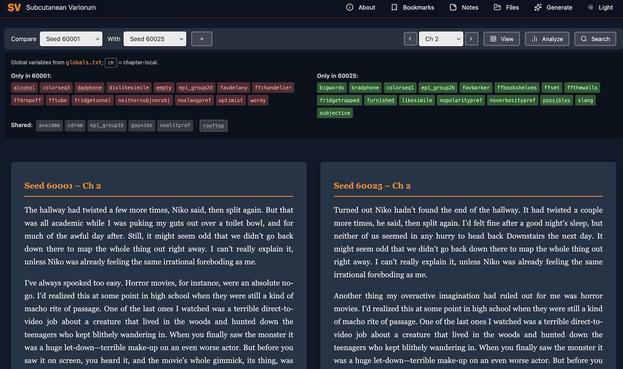
OK, this is incredible. Mad genius Mark Sample has created a web tool for exploring Subcutanean (my novel where each copy is unique) across every axis you can think of: source code, 25 diffed versions, VR projections(!), bubble viz(!!) & a lot more. (1/2)

The Old Gay Gristle Fest
@rmrenner
- 209 Followers
- 187 Following
- 2.5K Posts
To be clear- I did not get off twitter because of finding out about twinks.
 mcc
mcc
I don't know why Tim Robinson shot Charlie Kirk but I trust his instincts
 nash
nashnot my black quartz sphinx, not my vow
 elly
ellychecking whether the C compiler works... no
Understandable, have a nice weekend

They weren't kidding about Pokemon Scarlet/Violet being upgraded for the Switch 2. It seems to run at a higher resolution on the dock now and the higher framerate almost looks uncanny to me. No such luck for Sword/Shield, unfortunately. I haven't tried Legends Arceus yet but presumably it hasn't been touched either
 Miriam's a Menace
Update: Apparently my post has gone so viral that the woman who dug up the research reached out to thank me and ask if I could post her documentary on Brigitte which is so good!!!! Joanna Wallace I am so honored to post this, thank you so much for sharing a story of ours that was lost to history, please watch it if you haven’t 💜

Blue Beat Baby: The Untold Story of Brigitte
 👊🇺🇸🔥
👊🇺🇸🔥@evacide I've already removed Gemini via adb once. I'll do it again if it comes back after this forced opt-in.
I am not going to tell anyone that the Gemini app package is actually called com.google.android.apps.bard. I am also not advising anyone to follow these instructions:
1. Download and install ADB on your computer from the Android SDK Platform-Tools package
2. Enable Developer Options on your Android device:
3. Go to Settings > About phone > Software information
4. Tap "Build Number" seven times
5. Go to Settings > Developer options > USB debugging
6. Connect your Android device to your computer using a USB cable
7. Open Command Prompt or Terminal in the folder where ADB is installed
8. Verify the connection via command prompt or terminal by running the command: adb devices
9. Then run one of the two following commands:
adb uninstall com.google.android.apps.bard
Or
adb shell pm uninstall --user 0 com.google.android.apps.bard
10. Then verify the package has been removed by running: adb shell pm list packages | grep bard

 Volpeon
IT FUCKEN WIMDY