Robert Ladstätter
@rladstaetter
- 26 Followers
- 134 Following
- 9 Posts
I struggled with 68k assembler a long time ago. Now I shout at computers. Literally.
 Simple Camera App
Simple Camera App keeps camera checks local: no account, no analytics, no background service. Just camera discovery, mode inspection, and live previews.
https://simplecamera.app/
https://apps.apple.com/app/simple-camera-app/id6760619879
 LogoRRR
LogoRRR's detached windows feature lets you place log views freely on your screen. Window positions are remembered, so your incident cockpit comes back the way you left it.
https://apps.apple.com/app/logorrr/id1583786769?mt=12
#IncidentResponse #LogAnalysis #DevOps
Feature video: https://www.youtube.com/watch?v=jfnMrNHCgL0&t=35s
A quick creator setup check: confirm the camera works, see the modes it supports, and preview the frame before your recording software or call starts.
https://simplecamera.app/
https://apps.apple.com/app/simple-camera-app/id6760619879
LogoRRR Pro uses the Mac App Store ecosystem - purchase is safe and easy, restore is built in, and log analysis stays local.
https://www.logorrr.app/posts/mac-app-store-freemium/
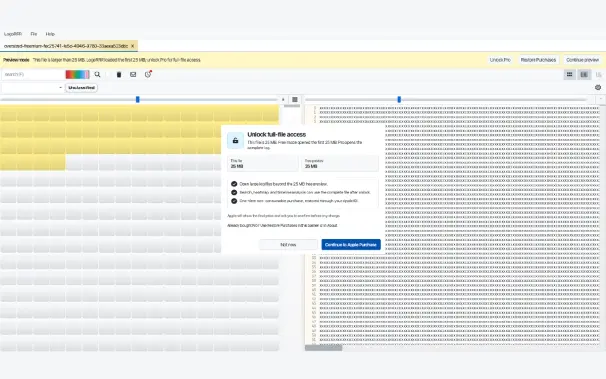
LogoRRR can open huge files - the free version gives a preview for the first 25 MB, the Pro version unlocks the whole file.
https://www.logorrr.app/posts/mac-app-store-freemium/
The free Mac App Store edition is built for real evaluation. Open your own logs, test the workflow, and decide with your own data.
https://www.logorrr.app/posts/mac-app-store-freemium/
LogoRRR 26.7.0 changes the Mac App Store edition to freemium. Try real log analysis for free, with Pro available for large-file work.
https://www.logorrr.app/posts/mac-app-store-freemium/
Open a log in its own window when one view is not enough. Useful for comparing two files while the main workspace stays focused.