
Siri, how many legs does a cat have?




Hi, @viticci & @jsnell & @siracusa & all - I’m hoping the Greater Mac Podcast Metro Area can help me with something. I convinced my wife to update her iPad (Pro) to the latest iOS, and now a use case she’s been relying on is broken.
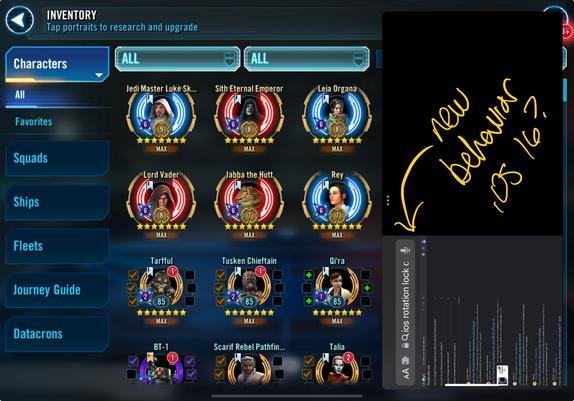
When you’re playing a game in Landscape Mode, but then use Slide Over to pull in Safari or Ivory or anything else, it effectively treats the Slide Over window as if it were in Portrait orientation, right? It’s a long skinny view. If you try this without Rotation Lock on, or Rotation Lock set to Landscape, that’s what you’ll get.
However, my wife has long used her iPad with rotation lock set to Portrait, so she can read full pages without having to worry about what angle she’s holding the iPad at. From some quick web browsing, it looks like this combination of uses was broken by iOS 16. I can reproduce what she’s seeing. Now if I have it locked in Portrait mode in general, but am playing a game in Landscape, all Slide Over content tries to display in what would be the full-screen Portrait orientation, resulting in the garbage below.
This seems clearly broken to me - I can’t imagine a scenario where you’d want Slide Over content to be sideways to the current view and only take up half the space. I don’t want to tell my poor wife that Apple says she can’t use her iPad the way she has for years. The best idea I’ve come across so far is a tip on writing a Shortcut which enables & disables rotation lock for certain applications. I might get that desperate, but is there any other way to solve this?