NGC 1333 - The Embryo Nebula
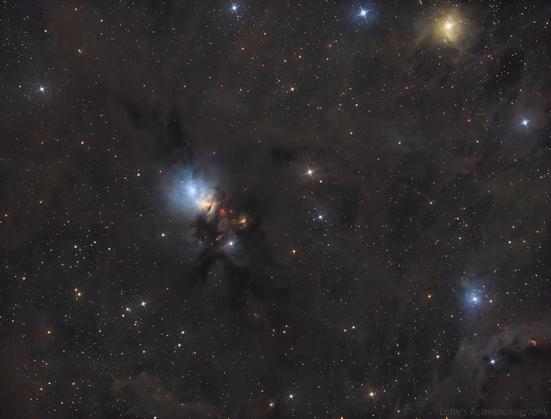
Finally going through my processing backlog! I tried to get some Ha on this from home, but I had too many obstructions to shoot at this declination. Decided to keep this as a wider crop since most the images of this I see are cropped in on just the nebula itself. Captured captured on November 23rd, 2025 from a Bortle 3 zone (deerlick astronomy village).
Places where I host my other images:
TPO 6" F/4 Imaging Newtonian
Orion Sirius EQ-G
ZWO ASI1600MM-Pro
Skywatcher Quattro Coma Corrector
ZWO EFW 8x1.25"/31mm
Astronomik LRGB+CLS Filters- 31mm
Astrodon 31mm Ha 5nm, Oiii 3nm, Sii 5nm
Agena 50mm Deluxe Straight-Through Guide Scope
ZWO ASI-290mc for guiding
Moonlite Autofocuser
Acquisition: 10 hours 12 minutes (Camera at unity gain, -15°C)
L - 97x180"
R - 37x180"
G - 36x180"
B - 34x180"
Darks- 30
Flats- 30 per filter
Capture Software:
PixInsight Preprocessing:
BatchPreProcessing
StarAlignment
Blink
ImageIntegration per channel
The luminance data was split into 3 stacks and combined to use the single channel DeepSNR method
DrizzleIntegration (2x, Var β=1.5)
Dynamic Crop
Luminance linear:
MultiscaleGradientCorrection using MARS Project data
BlurXterminator
StarXterminator to completely remove stars (extracted stars processed separately)
STF applied via HistogramTransformation to stretch nonlinear
RGB Linear:
Channelcombination to make color image from RGB stacks
MultiscaleGradientCorrection
SpectrophotometricColorCalibration
BlurX (correct only mode)
StarX to remove stars (to be used for star addition later)
StarX to extract a stars only image
ArcsinhStretch + HistogramTransformation to stretch nonlinear
Slight curves saturation boost and histogram adjustments
Stars only image:
HSV repair
ArcsinhStretch + HistogramTransformation to stretch nonlinear (less aggressive stretch)
Slight curve adjustments
Nonlinear Processing
LRGBCombination to combine stretched RGB and L images
DeepSNR Noise reduction
Shitloads of curve transformations to adjust luminance, contrast, saturation, etc
More curves
NoiseXTerminator for some small scale chrominance noise reduction
LocalHistogramTransformation
Even more curves
ColorSaturation adjustments (get rid of some background greens)
Pixelmath to add in the stretched stars only image from earlier
This basically re-linearizes the two images, adds them together, and then stretches them back to before. More info on it here)
mtf(.005,
mtf(.995,Stars)+
mtf(.995,Starless))
Resample to 60%
Annotation
Started watching the last season of For All Mankind before season 5 comes out.
Also watched The Last Vampire on Earth for bad movie night last night. It’s best described as “if Tommy Wiseau tried to make Twilight”
Not really an acute thing, but there’s this
We watched Hell Comes to Frogtown for bad movie night last night. It certainly was interesting.
After a worldwide nuclear war, where 68% of the male population was wiped out and virile men becoming a rarity, Sam Hell, a scavenger and a highly virile man, is assigned to help rescue a group of fertile women kidnapped by humanoid frogs.

Introduction # In this tutorial, we will study the pre-processing process of an astro image taken with a digital camera (DSLR), but the processing of images from astronomical cameras is almost identical. Of course, Siril comes with scripts that perform this process automatically. However, in a number of cases, you will need to perform manual processing: You want to understand what the scripts do: the best way is to do manual pre-processing! You want to refine the pre-processing: scripts use default values that can be optimized Your images contain gradients that are difficult to remove during processing. It is very interesting to remove them on raw images: the gradient is simpler and easier to eliminate. You’re missing flats: of course, this is formally discouraged, but photography sessions don’t always go as planned! And many other reasons… that belong to you :-) Files used # For this tutorial, we will assume that you have images of the object, biases, flats, and darks.
