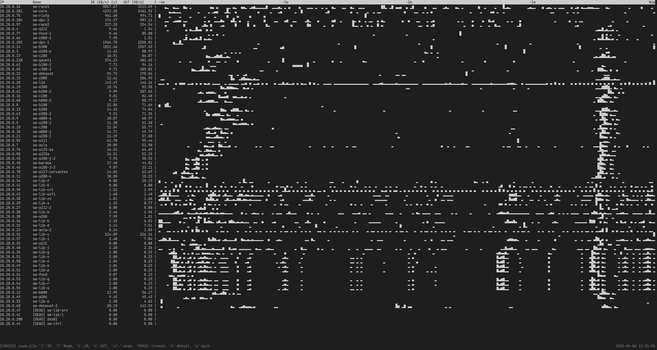
I'm wondering if this small vibe-coded tool which invokes ifstat on all switches and aggregate values using tui might be interesting enough to publish it?

| blog | https://blog.rot13.org/ |
When I started using AI for serious work, I had the same requirements as for any other projects: local backup of my files. To achieve this, I decided to mirror Google AI Studio session files from Google Drive using Rclone.
To view them, I wrote a Google AI Studio HTML viewer. For Gemini CLI, I wrote a similar viewer for .gemini/tmp/*/chats/session*.json session files.
I find having these files locally very useful for searching (Ctrl+F); you might too.
https://blog.rot13.org/2026/01/google-ai-studio-and-gemini-cli-html-viewer.html

When I started using AI for serious work, I had the same requirements as for any other projects: local backup of my files. To achieve this, I decided to mirror Google AI Studio session files from Google Drive using Rclone. To view them, I wrote a Google AI Studio HTML viewer. For Gemini CLI, I wrote a similar viewer for .gemini/tmp/*/chats/session*.json session files. I find having these files locally very useful for searching (Ctrl+F); you might too....

Let's assume that you inherited hundreds of WordPress sites installed over 4 hosts during last 20 years and that from time to time these WordPress installations gets infected by malicious actors who somehow acquired the password of an administrator user on the installation and are using these newly acquired privileges to install additional plugins, create new users and insert spam in Google (using User-Agent to emit spam content to Google and normal content to usual pages). You are also not an administrator on those sites, so your tool of choice is WP-CLI and command-line together with some code snippets which extend it's functionality described here. Logging user logins The first logical question is: how can I know which user logged in into WordPress and infected it? Unfortunately, WordPress doesn't emit any log files. wp-fail2ban Several year ago, I found another plugin which sends logs to syslog WP-Fail2Ban. However, this plugin tries to insert the site name into the syslog tag field which is limited in length, so generated logs are less useful if the site name gets truncated. Newer version are also overly complex, since they include full WordPress interface, with additional tables in each word press installation which we don't want or need. So I decided to keep using an older, simpler version of WP-Fail2Ban before it had any interface, which is simple enough to audit and modified it to produce more useful syslog messages and implement everything in a single PHP file wp-fail2ban-ffzg.php. Logs are then sent to central syslog server, which runs fail2ban and inserts firewall rules, but here we are mostly concerned about log generation for user logins. jeepers-peepers Honorable mention is jeepers-peepers very interesting plugin with very strange php coding style, which does generate logs on disk, but it uses current user to generate files, so logs from web server will be by nobody user, so wp-cli commands from other users won't be able to update logs. Even worse, if you run wp-cli under any other user than nobody first, you will create log files which are not updatable from web server. I really wanted central syslog logging, so this was not suitable solution. It also didn't support multi-site WordPress installations which I also had. mu-plugins This seems good so far, but installing a plugin to hundreds of sites is somewhat involved and I want to minimize modifications which I have to do on each site. WordPress Must Use plugins which are automatically loaded and activated is perfect for such task. Even better, we can have one mu-plugins directory which is then symlinked to all sites making installation nice and simple. Mitigation on infected sites When a site gets infected, WP-CLI can help us find modified files using wp core verify-checksums wp plugin verify-checksums --all Plugin verification works for most plugins, but some paid ones (like WPML) don't have checksums upstream which is a shame. Disabling compromised user When a compromised user is identified, it's good to remove administrator privileges from it (which might be somewhat involved if this is a WordPress Multisite, so wp super-admin list might be useful). wp eval-file disable-user.php login will display current capabilities, reset password, remove all capabilities from the user, list and destroy user sessions, regenerate WordPress salts, iterate over all sites if wordpress is multisite and remove administrator privileges. Salts regeneration with wp config shuffle-salts is useful because all users are forced to login again, thus invalidating saved logins, but for that script has to be run under correct user, owner of wp-config.php, so there is wrapper script wp-disable-user.sh which ensures that. Auditing Logins with Wordfence If you have Wordfence installed, it tracks user logins in user metadata, which can be invaluable for forensics even if you don't have wp-fail2ban logs. You can use wp eval to extract this information across your sites (based on wp-wordfence-login.sh): This snippet lists users who have logged in, showing their username, last login timestamp, and IP address, sorted by last_login descending. Scanning WordPress using Wordfence CLI We have daily backups of all WordPress sites, so an alternative is to check at the backup server which files are changed. However, we can also use wordfence-cli to check if there are exploits using wordfence malware-scan --match-engine=vectorscan -q -a --output-format csv --output-path malware.csv /path/to/wordpress This works well on the backup server (vectorscan engine which is much faster requires SSE capable CPU) but, vuln-scan which checks known vulnerabilities in installed plugins works only on WordPress installation and not on plain backup files. You should really examine all warnings from malware-scan, but gzip fonts will be reported as possible compromise: zamd/cluster/pauk.ffzg.hr/2/www/ffzg.hr/fonet2/eufonija/public_html/wp-content/plugins/easy-digital-downloads/includes/libraries/fpdf/font/c67085188799208adeb5b784b9483ad0_droidserif-italic.z,7741,IOC:ZIP/CompressedZlib.7741,Raw compressed zlib file - occasionally used to store fonts or exports but may be an IOC (Indicator of Compromise), which can be safely ignored. Finding content created in some time range If you want to examine content on site to see if there where any spam content added, you can use: wp eval-file find-modified-content.php 2025-12-05 1025-12-08 syslog geolocation of logins Best way which I found to detect infected sites is to geolocate all logins to wordpress, and send mails for logins which are outside Croatia. Common pattern is to see several logins from different IPs and countries, which is then trigger for closer investigation. For that there is simple script tail-wordpress-accepted.sh which in turn uses geolocate_ips.sh to geolocate IPs using geoiplookup and web API which usually has more precise country, town and ISP data....
Stable ip on usb interface with changing mac #pinephone #postmarketos
https://blog.rot13.org/2025/07/stable-ip-on-usb-interface-with-changing-mac.html
Taming the PinePhone's Fickle USB Ethernet I use my PinePhone with postmarketOS as a mini-modem and SSH target. The goal is simple: plug the phone into my Debian laptop via USB, get a predictable IP address on it, and SSH in. This should be trivial. It was not. If I rebooted the phone while it was plugged in, the interface would die and not come back correctly. The first step is kernel log. # dmesg -w Plugging in the phone revealed the first layer of the problem. It doesn't just connect once. It connects, disconnects, and then connects again about 15-20 seconds later. [Sun Jul 13 15:33:28 2025] usb 1-9: new high-speed USB device number 36 using xhci_hcd [Sun Jul 13 15:33:28 2025] usb 1-9: New USB device found, idVendor=18d1, idProduct=d001 [Sun Jul 13 15:33:28 2025] cdc_ncm 1-9:1.0 enx2e50df0e14da: renamed from eth0 ... [Sun Jul 13 15:33:45 2025] usb 1-9: USB disconnect, device number 36 ... [Sun Jul 13 15:33:46 2025] usb 1-9: new high-speed USB device number 37 using xhci_hcd [Sun Jul 13 15:33:47 2025] usb 1-9: New USB device found, idVendor=18d1, idProduct=d001 [Sun Jul 13 15:33:47 2025] cdc_ncm 1-9:1.0 enxde9ceb943c18: renamed from eth0 Notice two things: The device connects as number 36, then disconnects, then reconnects as number 37. This is the phone's OS re-initializing the USB stack after boot. The kernel first registers a generic eth0, which is then immediately renamed to a "predictable" name like enx2e50df0e14da. And to make matters worse, the MAC address is different on each reconnection. Any static configuration in /etc/network/interfaces based on a MAC address is doomed to fail. The clear solution is to use a udev rule to act when the device appears. The stable identifier we have is the USB vendor and product ID, which lsusb confirms: $ lsusb | grep Google Bus 001 Device 037: ID 18d1:d001 Google Inc. Nexus 4 (fastboot) (It identifies as a Nexus 4 in this mode, which is fine.) My first attempt was a simple udev rule. # /etc/udev/rules.d/99-pmos-network.rules (ATTEMPT 1 - WRONG) ACTION=="add", SUBSYSTEM=="net", ATTRS{idVendor}=="18d1", RUN+="/usr/local/bin/pm-net-configure.sh %k" This failed because of a race condition. The add action fires the moment eth0 is created, but before it's renamed to enx.... My script would be told to configure eth0, which ceased to exist a millisecond later. The key to solving udev timing issues is to stop guessing and start observing. # udevadm monitor --environment --udev Running this while plugging in the phone produces a firehose of information. After the final reconnection, deep in the output, was the golden ticket: UDEV [8215599.005027] move /devices/pci.../net/enxde9ceb943c18 (net) ACTION=move DEVPATH=/devices/pci.../net/enxde9ceb943c18 SUBSYSTEM=net INTERFACE=enxde9ceb943c18 IFINDEX=39 ID_VENDOR_ID=18d1 ID_MODEL_ID=d001 ... The system generates a move event when the interface is renamed. This event is perfect. It only happens after the rename, and it contains both the final interface name (%k or $env{INTERFACE}) and the USB device IDs we need for matching. This leads to the final, correct, and surprisingly simple udev rule. The Final Solution 1. The Udev Rule This single rule triggers at the exact moment the interface is renamed to its stable name. Create /etc/udev/rules.d/99-pmos-network.rules: # Trigger on the network interface "move" (rename) event for the PinePhone. # This avoids all race conditions with initial device naming. ACTION=="move", SUBSYSTEM=="net", ENV{ID_VENDOR_ID}=="18d1", ENV{ID_MODEL_ID}=="d001", RUN+="/usr/local/bin/pm-net-configure.sh %k" 2. The Configuration Script This is the script the udev rule calls. The %k in the rule passes the correct interface name (e.g., enxde9ceb943c18) as the first argument. Create /usr/local/bin/pm-net-configure.sh: #!/bin/sh set -e DEV="$1" IP_ADDR="172.16.42.2/24" PEER_IP="172.16.42.1" LOG_FILE="/tmp/pmos_net_config.log" # Simple logging to know what's happening echo "---" >> "$LOG_FILE" echo "$(date): udev 'move' event on '$DEV'. Configuring." >> "$LOG_FILE" # Give the interface a second to settle, then bring it up and set the IP. sleep 1 ip link set dev "$DEV" up ip addr add "$IP_ADDR" dev "$DEV" echo "$(date): Successfully configured $DEV" >> "$LOG_FILE" And make it executable: # chmod +x /usr/local/bin/pm-net-configure.sh 3. Reload and Test Tell udev to pick up the new rule. # udevadm control --reload Now, reboot the PinePhone. It will do its connect/disconnect dance. After the second connection, the move event will fire our rule. # ip a ... 39: enxde9ceb943c18: <BROADCAST,MULTICAST,UP,LOWER_UP> mtu 1500 qdisc ... link/ether de:9c:eb:94:3c:18 brd ff:ff:ff:ff:ff:ff inet 172.16.42.2/24 scope global enxde9ceb943c18 valid_lft forever preferred_lft forever ... # ping -c 2 172.16.42.1 PING 172.16.42.1 (172.16.42.1) 56(84) bytes of data. 64 bytes from 172.16.42.1: icmp_seq=1 ttl=64 time=0.885 ms 64 bytes from 172.16.42.1: icmp_seq=2 ttl=64 time=0.672 ms It just works. Every time....
I vibe-coded #firefox plugin for Google AI studio to use #Gemini 2.5 pro for free. It took me a week, 200k tokens, it can save files locally to disk, track them in #git and execute python and shell. Good question is are you afraid of AI which executes code on your machine?
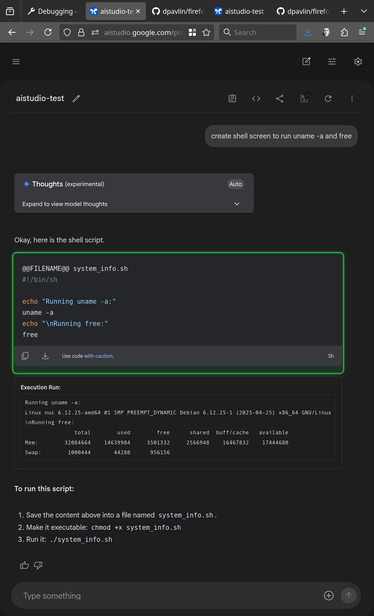

[vibe-coded in a week, 200k tokens, expect churn] Firefox plugin for Google AI Studio integration with local file system - dpavlin/firefox-aistudio-plugin

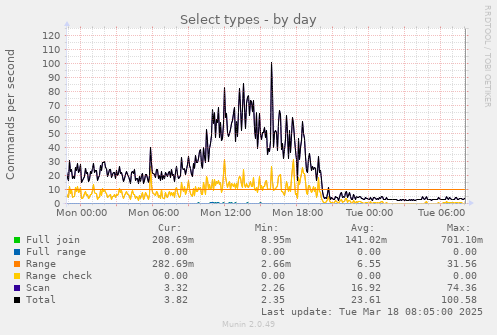
We live in troubling times, as web crawlers have become so prevalent in internet traffic that they can cause denial-of-service attacks on Koha instances. Simplest possible way to prevent this is following rule: <LocationMatch "^/cgi-bin/koha/(opac-search\.pl|opac-shelves\.pl|opac-export\.pl|opac-reserve\.pl)$"> # Block requests without a referer header RewriteEngine On RewriteCond %{HTTP_REFERER} ^$ RewriteRule .* - [F,L] # Optional: Return a 403 Forbidden status code ErrorDocument 403 "Access Forbidden: Direct access to this resource is not allowed." </LocationMatch> This helps to mitigate problems like this:...

 Goran_Mahovlic