ALDR Design Moved Servers ➡️

111 Followers
83 Following
269 Posts

I've moved instances! you can now find me over at @[email protected]

💚

Lights off,

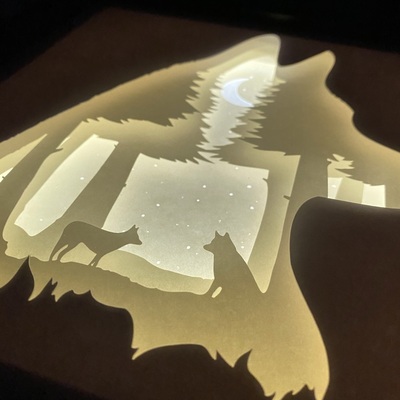
Latest shadowbox done ✅,
this will be a gift.

6 x A4 layers, spaced out and backlit with LED.

Inspired / based on the Tian Tan Buddha statue in Hong Kong, from this photo I took back in 2016:

https://unsplash.com/photos/7GGBA0hXym8

#MastoArt #MastodonArt #Cricut #AffinityPhoto #Papercut #Shadowbox

Photo by Christian Alder on Unsplash

Tian Tan Buddha – Download this photo by Christian Alder on Unsplash

Glue up done for the LED strip in the back panel.

I'm seriously impressed with these LED's from IKEA.

VATTENSTEN: 1m, USB-A low-power, warm white.

3.99€ 🤩

Comes with a built in switch too.

For a quick and easy solution to a shadowbox backlight, these are great.

Note to self, don't leave such tiny gaps (Unless they're clean shapes, like a circle) - this was a PAIN to sort out after the cut, many of the little bits hadn't separated properly.

Know what's worse? The layer I am cutting after this one has even smaller trees! 😂 🌲

I could perhaps let the machine cut with slightly more pressure, but for nearly everything else the machine cuts fine.

Smol shapes are just not a fun time.

I'm going to test this idea out.

I am cutting a slot from the back 3 or 4 layers - this will hopefully let through more light to flood up against the tree layer 🤔

Might look cool, might not - we'll see.

Times like this I really wish I finished my Blender 3D model "prototype" frame. I need to work on that again someday...

Ok, better.

Design stage done! Maybe 🤔

Not too happy with the stars, might tweak those a bit, or I could punch them out manually once the paper cutting is done...

The detail layer on the Buddha statue too - here it doesn't look great. But I am going to be cutting + glueing all from the same white paper - so it won't stand out as much as it does here.

#MastoArt #AffinityDesigner #Cricut

Time to add in some more density.

Sorry for the gross colors, I do my vector work like I do my web dev - I throw in really bold colors that don't match, so I can more easily see the layer I'm working on 🙃

Trying some tree shapes 👀

1. One narrow triangle,

2. Three triangles in increasing size from the top,

3. Curvy wiggles.

Repeat until you get something that looks like a forest I guess?

I'm not trying to make them too fancy, these are supposed to be in the distance and it'll all be getting cut out of paper in the end.

Once this layer is full of trees I'll do a quick pass to remove any erroneous nodes, or points where I think the Cricut might struggle.

#AffinityDesigner #MastoArt #Cricut

It’s been a while since I used this, it’s a Huion Kamvas 16 display tablet. I think I’ll need to go through setting up all the shortcut buttons again too.

I’m mostly doing vector work so I’ll try to get some shortcuts to quickly undo, boolean add, and boolean subtract 🤔

I’m going to take the Buddha from this design and place it into a fresh A4 piece, it’ll eventually get cut out of paper and is intended as a gift.

Let’s see how it goes ☺️

#MastoArt #AffinityDesigner #VectorDesign #Huion