
Chad Mohler

43 Followers
460 Following
19 Posts

Pursuing excellence in philosophy, teaching, and Swift / Objective-C programming

I'm Chair of the Department of Philosophy and Religion at Truman State University, and I'm the developer of the ArguMap argument-mapping app for iPhone, iPad, and Mac. Find out more at https://argumap.app.
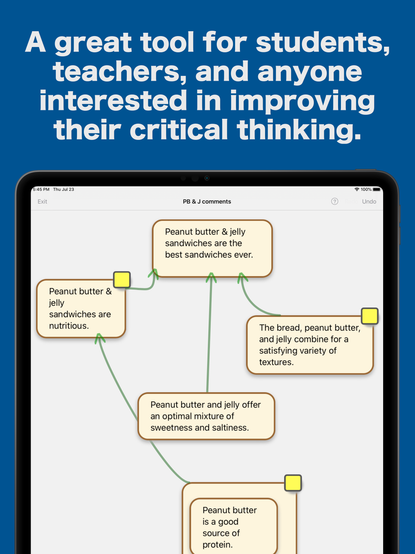
@jessegrosjean Hi, Jesse. I've been working on an argument-mapping app, ArguMap, for iPad / iPhone / Mac. Here's its website: https://argumap.app. And attached is a photo of it.
ArguMap

ArguMap iOS app for constructing argument maps and for argument mapping or diagramming

@cocoawithlove (part 3 of 3) I might have to rework the macOS menu implementation of my app, using buildMenu(with:) in code rather than a storyboard, to see if I can replace the Xcode16-provided open command's implementation with my own. That command's being an instance of _UIImmutableKeyCommand, though, makes me wonder whether its implementation even *can* be replaced.
@cocoawithlove (part 2 of 3) To avoid the above-mentioned key command conflict, I'd like simply to bind my open command implementation to the Xcode 16-provided UIImmutableKeyCommand open command. But without that Xcode16-provided command being visible in my app storyboard (which I'm using to build out the macOS main menu), there is no menu command there to bind my custom @IBAction func open(_ sender: AnyObject?) implementation to.
@cocoawithlove (part 1 of 3) I suspect my problem is different (but perhaps related) to the one you and Steve are addressing. I don't get the shoved-in Open command in my app’s Mac *interface*. Still, Xcode 16 adds the UIImmutableKeyCommand open command to all Catalyst document-based apps, and that command conflicts with my own open command implementation. The Xcode 16-provided UIImmutableKeyCommand open command appears and is functional only on iPad, not Mac.

@cocoawithlove Hi, Matt. Your approach works fine for my Catalyst app on Mac. On iPad, though, it crashes the app with a "duplicate command” error:

"Menu has duplicates --
<_UIImmutableKeyCommand: 0x10496e940> -> Title: Open... Action: open: Input: o + (UIKeyModifierCommand)
<UIKeyCommand: 0x10496fd40> -> Title: Open... Action: open: Input: o + (UIKeyModifierCommand)”

I presume my open: implementation adds the 2nd UIKeyCommand. I can't find a way to remove or override the 1st, though.

@chockenberry Hi again, Craig. I just realized that there are official public identifiers (for the menus I mentioned in my last message): see https://developer.apple.com/documentation/uikit/uimenu/identifier. These (in place of the string identifiers) appear to work to get references to the Apple menu items to be moved around. Cast to UIMenu objects the UIMenuElements in the suggestedActions of textView(_:editMenuForTextIn:suggestedActions:) to make use of these identifiers.
UIMenu.Identifier | Apple Developer Documentation

Constants you use to identify an app’s standard menus.

Apple Developer Documentation
@chockenberry Thanks, Craig— that's good to know. My app just last week got through App Review with the string identifiers in, but I appreciate the heads-up about a potential future problem with App Review.

@chockenberry I’ve had success moving menu items around using the iOS 16+ textView(_:editMenuForTextIn:suggestedActions:) method:

(1) make a mutable array "actions” of suggestedActions
(2) get a reference by UIMenuElement.identifier to the relevant menu UIMenuElement in actions (format menu identifier: “com.apple.menu.format”; edit menu identifier: “com.apple.menu.standard-edit”)
(3) move the referenced UIMenuElement to a different index in actions
(4) return [UIMenu menuWithChildren:actions]

@jlscx Hi, James. The following takes you out of Ivory, but I've found it useful for following users not on my instance. (1) and (2) only have to be done 1x. (1) Install @lapcatsoftware's Homecoming extension for Safari (https://apps.apple.com/us/app/homecoming-for-mastodon/id1666139593). (2) Log in to your own instance in Safari. (3) In Safari, navigate to the profile link of the user you'd like to follow. (4) Tap the Homecoming extension icon in the navigation bar, which will load a page with a "follow" button on it for that user.
Homecoming for Mastodon App - App Store

Download Homecoming for Mastodon by Jeff Johnson on the App Store. See screenshots, ratings and reviews, user tips, and more games like Homecoming for Mastodon.

App Store
@geoffhackworth Hi, Geoff. I just gave the “enormous tip” option on Adaptivity(A). Thanks for a great app— it’s proven useful in my side development work. Hope you are able to get some relief from the health problems soon.