3 Followers
0 Following
3 Posts

There and back again (Big Bend part 1)

Towing with an electric vehicle has worked well over the past couple years. It’s become routine enough that we haven’t been very good about keeping up this journal. But we’ve been limiting ourselves to places within a roughly 300 mile radius of home—basically one big charging stop. This lets us leave Austin around lunchtime and be camped by dinner time. Luckily, Texas has a lot of State Parks within range.

However, we’ve wanted to go to Big Bend National Park for a while, which is quite a bit further. We finally decided to do the trip over Thanksgiving week.

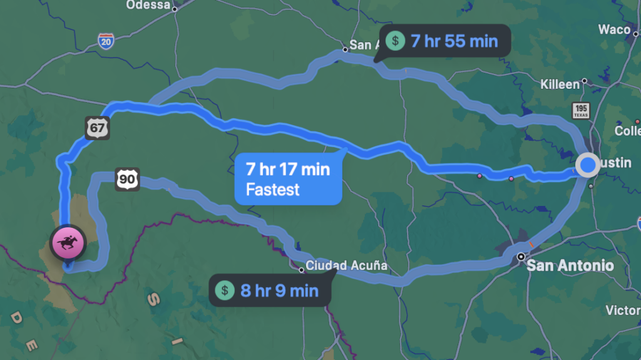
Since most of the campgrounds in the park don’t have power hookups, we decided to stay at an RV park just outside of the park in Terlingua. It would be a bit more than 7 hours of driving (485 mi) along I-10.

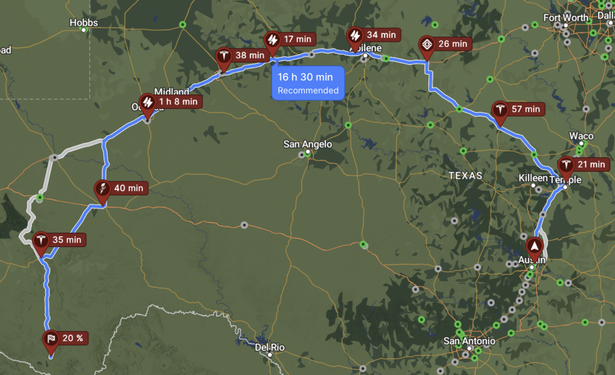
But when we plugged that in to EV charging route planners, they suggested a route along I-20 that was almost 200 miles longer (666 mi 🤘). West Texas doesn’t have many chargers to choose from.

Ouch.

But wait, that map shows some chargers along I-10. How far apart are they actually? It turns out the real sticking point is this segment from Ozona to Fort Stockton:

But it’s only 108 miles. We routinely tow 150 on a charge. What’s going on? Ohh… elevation.

We played around with the settings in the route planner a bunch, trying to figure out how good our miles/kWh would need to be to get us there. Adrienne finally found the control that lets you promise to keep your speed below a certain limit. It said we could make it if we stayed below 65 mph. That might not make us very popular on some of the route, but it seemed reasonable.

We did a little research and decided to aim to spend the night in Ozona and do the sketchy segment in the morning with a full battery.

The first day went basically according to plan. We stopped in Johnson City and Junction, charged a bit more than the planner said we needed to at each stop, and arrived in Ozona only an hour later than we’d estimated. We arrived in the dark, pulled in to our site (a pull-through lane in a dirt/gravel lot), and plugged in. We were tired enough that we didn’t notice the water hookup, so we didn’t use water in the trailer overnight. No big deal, we were tired enough that all we wanted to do was get to sleep.

The next day we woke up to a mostly—but not completely—charged battery. We really wanted the full charge to tackle the next stretch, so we stopped at one of the (three!) fast charging stations in Ozona and topped the battery off. This was a bit of a drag because DC fast chargers are fast when charging towards the bottom of the battery capacity. We can go from 20% to 50% charged in the amount of time it takes to amble to a nearby shop and get a snack. But getting from 90% to 100% is sloooow. AC chargers (like the ones at RV parks) maintain a pretty constant (fairly slow) speed, so they’re best used overnight. If we’d spent even 15 minutes at the fast charger before plugging in at the RV park last night, we would have been on the road straight away.

The stretch from Ozona to Fort Stockton turned out to be just fine. I-10 is two lanes, so we just set the cruise control to 65 and everyone who wanted to go faster (the speed limit is 80) just passed us. We arrived in Fort Stockton with 18% battery. That’s a quite comfortable margin. The charger we used in Fort Stockton was the only one on this trip where we had to unhook the camper, which added a little bit of time.

While we charged at our next stop in Alpine, we had a leisurely lunch and looked around a bit. We happened to be there on Art Walk weekend, so there were a bunch of places hosting live music and displaying the work of local artists.

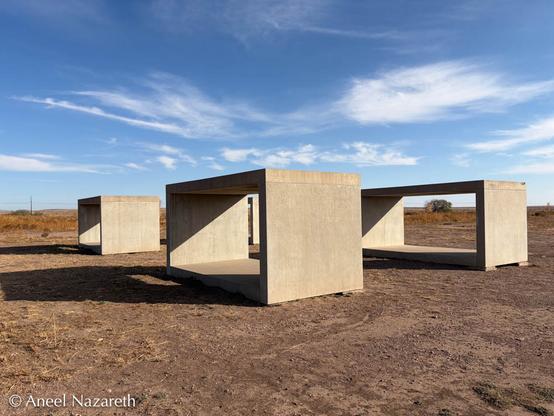
We were making good time, and the charger in Alpine meant that we could do a quick side trip to Marfa and see a little more art before heading on to Terlingua. We stopped at the Chinati Foundation to look at Donald Judd’s outdoor concrete sculptures, and visited Ballroom Marfa to see some recent work by Latinx artists.

15 untitled works in concrete (selection) – Donald JuddCoatzomaki – Ozzie JuarezUntitled (Cubo de tamales Chapines) – Justin Favela

Then it was a quick stop back in Alpine and then off to our campsite for the week. This time, we were comfortably before sunset, so we got to arrange things a little more.

We’ll have a separate post about the time in Big Bend, but the trip back was mostly the same. We made all of the same stops, though we spent longer in Marfa. This time we pre-arranged an actual tour at the Chinati Foundation and got to see some of the indoor artworks, including the 100 untitled works in mill aluminum.

Surprisingly, the trip from Fort Stockton to Ozona was dicier in this direction. We set our cruise control for 65 again, but the Rivian was convinced that we wouldn’t make it to Ozona, so we slowed down to 55 and arrived with our battery in the teens again. So it wasn’t the elevation change that was the problem (Fort Stockton is higher than Ozona). It also didn’t seem to be wind. Watching the grass by the side of the road, it was pretty clear that there wasn’t much to speak of. So I’m not sure what makes that stretch of road particularly draining. It’s comforting to know that if we need to extend our range, just slowing down will work. This time we did pre-charge at the fast charger in Ozona before stopping for the night, and woke up to a full battery.

We stopped for lunch in Johnson City and were home to see the cats before their dinner time.
#BigBend #Charging #NationalPark

We’ve been going to Burning Flipside, a festival a few hours away in Texas, for a number of years. We bought a generator to power a large art project back around 2018. After staying away for a number of years because of the pandemic, we decided to go back this year, and take Tourtoise and Hare with us.

There are no RV power hookups on the land that hosts the festival, so the plan was to use the generator to run the A/C and fridge. We’d never actually run the trailer off of a generator before, so I did an overnight test to make sure our Honda EU2200i could run the A/C overnight, and gauge how much fuel we’d need. That test indicated it would take around 20 gallons to run the A/C full time, so I bought a couple of large fuel containers that fit surprisingly well around the tongue box. They’re “Scepter Flo N’ Go Duramax 14”, if you’re shopping for something similar.

We made sure we could secure them to the front of the trailer. We used ratchet straps around the tongue box and both cans, threaded through the Aluminum tubing on the back of the platform, and also straps through the holes in the deck to hold the cans down and reduce vibration. A quick, ironic, trip to the gas station in an EV, and we were fueled up and ready to go.

We headed out a few days before the festival began to help set up. Adrienne needed to do some work, and we’d gotten a new antenna (Peplink Slim 22G) for the Peplink receiver described in Wireless, so we got the generator up and running and everything was working well.

It was nice and cool the first couple of nights, so we didn’t even worry about running the A/C.

But after a few days it did heat up and we did try to run the A/C. It immediately overloaded the generator! It was frustrating because I’d tested this at home, but maybe the fridge and other things pushed it over the edge. We temporarily traded with one of our campmates for a bigger generator, and that ran fine.

I won’t talk about the festival much, but suffice it to say that a good time was had by all.

When we were packing up to go, we discovered that we had brought way too much gasoline. Of the ~26 gallons we’d brought, we probably used less than 15, and that included filling all of our campmates’ generators as well as our own. Normally, this wouldn’t be a big deal. “Just pour the extra into your car’s gas tank!” Of course our car has no such thing, and our motorcycles don’t get enough use to run through much gas. It was well into August before we finished using it up.

For future generator-powered trips, I’m going to get a “companion” generator for mine that will let us double the power output when we need to. We can use that system to power our house in case of another failure of Texas’s power grid. I’m probably also going to get an “extended run” fueling setup, which runs a hose from the fuel can to the generator so that you don’t need to keep refilling it.

https://tourtoise.quest/2024/09/12/flipside-2024-generation/

#Event

Burning Flipside

Cosmic Critter Carnival

Burning Flipside

It has long been a goal of ours to commemorate our travels with Tourtoise by decorating the trailer. We’ve been picking up stickers and magnets from the various state parks and events we’ve camped at.

Park Stickers

But since we’re nature lovers, one of the most memorable parts of our trips is the wildlife we see. Often, a particular animal captures our interest along the way, whether it’s a bird flying overhead, or a javelina nosing around the campground… or a bird or two nosing around the campground (like the Canada Geese we called Humphrey and Lauren during the first weekend of our recent stay at Inks Lake).

The side of the trailer has a large design of a silhouetted woodland scene. Mountains in the background, trees, and a suggestion of rolling meadows. What better way to remember the critters we’ve seen than to populate that woodland scene?

I recently joined a maker space, to get access to some metalworking tools that I don’t have room for in the garage. But one of the things they have is a large format vinyl cutter…

A few trips to the crafts store and a bunch of vinyl cutting and we have critters!

A lot of these come from an amusing site called Dimensions, which has dimensioned drawings for a vast array of things. Need to know how big a P-5000 power loader is? They’ve got you. What about a date palm? Yup. Tony Hawk? Ofc. But more saliently, they have vector art of many animals. Canada goose, American alligator, Mexican free-tailed bat, …the list goes on.

We added a pond for some of the waterfowl.

For good measure, Tourtoise now has a nametag. This one was the hardest of them all because I’m still a novice at vinyl application. Making sure there are no wrinkles or bubbles on decals that are multiple feet across turns out to be pretty tricky.

https://tourtoise.quest/2024/05/21/critters/

#Decoration #Tourtoise

Asmbly Makerspace - Empowering Austin’s Creative Makers

Asmbly Makerspace is a 501(c)3 nonprofit community makerspace in Austin, TX.

Asmbly Makerspace

One of the challenges about going camping is not losing your Duolingo streak. Sometimes that means climbing to the highest point in a park to get a few bars of reception, or making a trip into town. What if there were an easier way?

As it turns out, people have put a lot of effort into figuring out how to get internet in remote places. Cellular hotspots have done a reasonably good job for us (but not perfect!)

I was originally planning to write this post while we were in Lost Maples but, the hills surrounding the campsite there ruled out cellular internet, so it had to wait for our next trip…

My first try was a Netgear Nighthawk M1, which is a pretty solid consumer-grade wifi hotspot that will take a SIM card from any of the US providers I’ve tried it with. It’s easy to set up, and even without an external antenna, does a pretty good job of pulling in enough signal to work with. Definitely considerably better than our phones on the same network. Adrienne used that to work from the Circuit of the Americas, even with video meetings.

After camping a few times with the Nighthawk, I ran into a few shortcomings:

  • Its wifi range is pretty limited. Great for inside the trailer, but it doesn’t extend very far outside, so it’s not great for sitting around the campfire, learning foreign languages.
  • It only has one SIM card slot, which means that if one of the providers is weak in the area we’re camping, we need to physically switch SIMs.
  • It doesn’t sate my hunger for data.
  • The Ethernet port on it is for uplink only, so the trailer computer needs to connect via wifi.
  • So, after some more research, mostly on RV Mobile Internet.com, I decided to upgrade to a Peplink MAX BR1 Mini. This is the low-end device from a company that makes hotspots for things like city buses.

  • The wifi range is much better on this. I just had Adrienne see how far she could still get signal, and she’s now so deep in the woods that I can’t see her anymore! Apparently that was 110ft. This means that we can set up wifi critter cams around our campsite and see who’s rustlin’ around at night.
  • It has dual SIM slots, so I can put in a pre-paid data card from Red or Blue while using a data SIM from my Pink-MVNO provider. It only uses one at a time, but can be made to switch in complicated patterns (eg. if it’s getting terrible service from one SIM, it can switch to the other.
  • This thing is obviously designed for remote administration, with a robust web interface and things like SNMP support and GPS streaming on a TCP port.
  • There are three Ethernet ports, all of which can be used for downlink, if desired.
  • There are a few ways that the Nighthawk still wins:

  • It has a built-in battery.
  • It is much more compact.
  • I think I’m going to take it with me on international trips and get a local data SIM for it, while the BR1 lives in the trailer.

    In the meantime, the BR1 lets me collect extravagant data, like all kinds of metrics about cellular signal strength.

    Its built-in GPS receiver (with an external antenna) is quite good, so we can capture tracks of where we’ve been easily.

    A map showing a trip from Austin TX to Buescher State Park

    And the ethernet ports let me plug in the mini-computer that I’m running Home Assistant on.

    #data #gps

    https://tourtoise.quest/2023/09/10/wireless/

    Lost Maples – Tourtoise & Hare

    Tortoise Icon - Free PNG & SVG 198561 - Noun Project

    Free vector & PNG tortoise image 198561 by Ed Harrison. Get this royalty free image & millions more free icons from the world's most diverse collection.

    The Noun Project

    We just did a trip to Mother Neff State Park, which we discovered on the way there is the oldest State Park in Texas. Did you know that Texas State Parks were originally envisioned as glorified rest areas for car tourists? That the first Texas State Park was made from land donated by the Governor’s Mom? Ah, Texas, where public spaces have never been a priority…

    There’s been a lot of flood damage to the park in recent years, which has caused them to close the old camping loop and build a brand new one with electric sites with both 50 Amp and 30 Amp connections. After our charging adventure at Purtis Creek State Park, we thought it would be a good idea to test out some in-park charging.

    NEMA Simplified! By Orion Lawlor – Own work, CC BY-SA 3.0

    The Rivian’s mobile charge cable comes with two plug ends, a NEMA 5-15 (standard household 3-prong) and a NEMA 14-50 (the usual plug for large RVs). Our Tab 400’s cable is a TT-30 (the usual plug for small RVs—the TT is for Travel Trailer). As we discovered at Purtis Creek, RV adapters for TT-30 to 14-50 aren’t wired the way EVs expect. So how do we power both?

    The Best Option: 14-50 AND TT-30

    Happily, Mother Neff park had both 14-50 and TT-30 outlets (and a couple of 5-15s) on separate breakers! This makes things simple: plug Hare into the 14-50, plug Tourtoise into the TT-30 (there’s a surge protector shown here). In practice, we got about 30 Amp charging, which at 240 Volts meant 7-8 kW, which is roughly 15 miles of charge per hour using Rivian’s estimates. That would fill the battery from 0% in under 20 hours, or from 30% full in 14 hours. Pretty good for an overnight stop.

    Second Best: 14-50 Y-adapter

    What if we only had a 14-50? Well, we brought a Y-adapter that lets us plug in the Rivian charger to one side of the Y, and use a 14-50P to TT-30R adapter (P is for Plug, R is for Receptacle) to power the trailer. The Power Watchdog Surge Protector lets us monitor how much the trailer is drawing (which is not much, even with the water heater for the shower), so we could set the Rivian’s charge rate accordingly. To keep things safe, we aimed for only using 80% of the rated 50 A for the circuit. Because this is still a 240 V setup, the charge rate is still good: 6-7 kW.

    Third Try: TT-30 Y-adapter

    Okay, what if we only had a TT-30, like at Purtis Creek. We brought a TT-30 Y-adapter for that. In this case, it’s the Rivian that needs the plug adapter: TT-30P to 14-50R, wired for an EV not an RV. Again, we’ll want to make sure the Rivian doesn’t draw too much power. At 120 V we were getting about 3 kW, or around 6 miles of charge per hour. Getting from 30% to full would take around 32 hours. Definitely doable on a multi-day stop.

    TT-30 Y-adapterUh-oh: 5-15

    If the campsite had only had 5-15 outlets, we could have plugged the Rivian into one of them and gotten enough power to limp to a charger… maybe. We didn’t try that in Mother Neff, but at Purtis Creek, that tripped the breaker, no matter how low we set the charging rate on the Rivian.

    Luckily (well, by design), we arrived at the park with enough charge to get Hare (not towing Tourtoise) back to the L3 charger in Waco, if we’d needed to. Making sure we arrive with enough charge to make it out is definitely a priority now that we’ve almost gotten stuck.

    Bonus: Home charging

    At home, I have a 240 V circuit for my welder. It has a 6-50 receptacle, but the circuit is actually only 30A, so we plug in a 6-50P to 14-50R adapter and make sure the Rivian charges slowly enough to not trip the breaker. Pro tip: to make the Rivian always charge at a lower amperage at home, set up a schedule that covers all 24 hours with the desired rate.

    6-50 to 14-50 adapter. Blue to match the welder

    #charging #mother-neff #texas-state-park

    https://tourtoise.quest/2023/05/08/wired/

    Texas State Parks: The First 100 Years

    YouTube

    Hare’s internal range estimates are waaaay off when towing. Roughly off by a factor of 2. Since we’d rather not get stuck because we’ve run out of batteries, we’ve been experimenting with other routing tools. One that comes highly recommended is A Better Route Planner. One key feature is that it lets you plan assuming different settings.

    For our purposes, the most important is the Reference consumption. The Rivian dashboard displays the power consumption in mi/kWh. We found that it was typically around 0.80 while towing Tourtoise at highway speed, so that suggested 1000/0.80 = 1250 Wh/mi. Plugging that into the box resulted in pretty good agreement between what ABRP thought our charge was and what it actually was.

    So. Pretty good estimate. Nice. Blog post over, right?

    Hah.

    The ABRP API

    A Better Route Planner has the ability to use telemetry from your actual vehicle to improve the routing. Sadly, Rivian integration doesn’t exist (yet?). So let’s figure out how to send it data using the Telemetry API! You need to actually email the ABRP folks to get an API key, but they were quite obliging.

    You’ll also want to generate a data token for your vehicle. Because I want to calibrate the consumption separately for Hare alone and Tourtoise and Hare together, I’ve created two vehicles and generated keys for each.

    On the Your vehicles screen tap “Live data”From Live data, tap “Link Generic” and copy the UUID token

    The Rivian API

    Sadly, Rivian doesn’t expose a documented public API. But there is an API, and happily, some enterprising folks have done the work of figuring it out, which lets me import the data into Home Assistant as described in the Data Collection post.

    The Glue

    In Home Assistant’s configuration.yaml file, I added a template sensor to populate the telemetry data:

    sensor: - platform: template sensors: rivian_abrp_telemetry: value_template: > { "utc":{{ utcnow().timestamp() | int}}, "soc":{{ states("sensor.rivian_energy_storage_charger_adjusted_soc") }}, "lat":{{ state_attr('device_tracker.rivian_telematics_gnss_position', 'latitude') }}, "lon":{{ state_attr('device_tracker.rivian_telematics_gnss_position', 'longitude') }}, "is_charging":{{ is_state('binary_sensor.rivian_energy_storage_charger_vehicle_charger_state', 'on') and 1 or 0 }}, "is_parked":{{ is_state('sensor.rivian_dynamics_propulsion_status_prndl', 'Park') and 1 or 0 }}, "odometer":{{ float(states('sensor.rivian_dynamics_odometer_value')) * 1.609 }}, "est_battery_range":{{ float(states('sensor.rivian_energy_storage_vehicle_energy_vehicle_range')) * 1.609 }}, "car_model":"rivian:r1s:20:135:other" }

    And a rest_command to actually post the data, with the right token based on whether it’s in Towing mode or not:

    rest_command: abrp_telemetry: url: https://api.iternio.com/1/tlm/send #url: http://localhost:8000/1/tlm/send method: POST headers: authorization: "APIKEY " content_type: 'application/json; charset=utf-8' payload: > { "tlm":{{ states('sensor.rivian_abrp_telemetry') }}, "token":"{{ is_state('sensor.rivian_dynamics_modes_drive_mode', 'Towing') and '' or '' }}" }

    To test this, I swapped in the localhost url line above and ran this handy little one-liner on my Home Assistant machine that pretended to be an HTTP server:

    while true; do printf 'HTTP/1.1 200 OK\n' | nc -Nl 8000; done

    This let me capture some samples of the data I’d send, which I then tested in Postman to make sure I got a success response.

    Finally, I want to send data whenever Hare is either charging or moving (with a little grace period after it stops), so I set up an automation:

    alias: ABRP Telemetrydescription: "Send Rivian Telemetry to ABRP"trigger: - platform: time_pattern seconds: /5condition: - condition: or conditions: - condition: state entity_id: >- binary_sensor.rivian_energy_storage_charger_status_vehicle_charger_status state: "on" - condition: state entity_id: binary_sensor.rivian_use_state state: "on" - condition: not conditions: - condition: state entity_id: binary_sensor.rivian_use_state state: "off" for: hours: 0 minutes: 1 seconds: 0action: - service: rest_command.abrp_telemetry data: {}mode: singleSuccess!

    #abrp #data #home-assistant #url

    https://tourtoise.quest/2023/04/08/better-range-planning/

    ABRP

    ABetterRouteplanner is the world's most popular consumer EV routeplanner - both for beginner and experienced EV drivers. And of course for anyone curious about EVs.

    I’m an incorrigible data packrat, so when we got the Tourtoise and Hare, I got to work seeing what I could gather. Here’s a little sample…

    I’m using Home Assistant to integrate everything into nice dashboards and send out alerts. It has a lot of built-in plugins, but several of these took some customization.

    Tourtoise has a Raspberry Pi that lives in it and runs off of the 12V power. I originally set it up to run BirdNET-Pi to listen for birds while we’re camping (Notes on my install). This powers the bird photo and name widgets. The trailer is parked at home in Austin right now, so, of course, the latest bird update is our municipal mascot.

    The GPS data is from an Adafruit GPS Hat with an external antenna, so it mostly doesn’t claim that the trailer is in the middle of Africa. Mostly.

    For the temperature, propane, and power data, we have an RV Whisper and various sensors. Because the RV Whisper is also a Raspberry Pi under the hood, I was able to set up a REST API and use that to get the data into Home Assistant.

    On the Hare side, I’ve set up an unofficial Home Assistant plugin so we can see basic data from the SUV. There’s a lot of other data in there, but it didn’t seem very useful to have my wiper fluid status on my home dashboard.

    I’m hoping to get the data about the Hare loaded into A Better Route Planner so that we get better estimates. I’ve had to estimate the power consumption while towing to get reasonable routes, but it should get better when fed with the actual data. I’m waiting on an ABRP Telemetry API key to do that.

    #data #gps

    https://tourtoise.quest/2023/04/02/data-collection/

    Home Assistant

    Open source home automation that puts local control and privacy first. Powered by a worldwide community of tinkerers and DIY enthusiasts. Perfect to run on a Raspberry Pi or a local server.

    Home Assistant

    I’ve always liked roaming around. I’ve crisscrossed the United States (and a bit of Mexico and Canada) on a motorcycle, camping along the way. I’ve driven from London to Ulaan Baatar. I’ve driven a caravan through the Outback on a trip to Australia.

    When I moved to Austin, the two of us drove the contents of my storage unit across the country in a box truck, stopping to camp along the way. Together, we’ve done car camping road trips, hitting a half dozen national and state parks over a few weeks. And we rented a camper van in Iceland to see the sights of the ring road.

    When Covid hit, we realized that RVing was a good way to get out into the world without spending lots of time on planes. For our first few trips, we tried various motorhomes, but quickly came to the conclusion that we didn’t like bringing our whole RV with us when we drove to trailheads. That led us to towable campers, where we could drop off the house part of it and just take the car part with us on outings. We rented a Scamp to visit North Cascades and Olympic National Parks, and visited the Casita factory only to discover that they had an 18 month wait . After doing some more research, and a test trip in a camper we found on Outdoorsy, we decided that the travel trailer that we liked the best was the nuCamp Tab 400.

    Now the next question: what do we tow this thing with? We’d rented pickups for our early towing adventures. They were a mixed bag. We found that rental companies would only let you tow with a 3/4 ton pickup or larger, which meant that they were all enormous. Many of them smelled terrible (because they were diesel or because rental work trucks don’t get treated nicely). The Tab is fairly light, but not light enough to tow with a passenger car or a crossover. I toyed with the idea of buying a Tacoma (which I regret not doing, because I could have sold it for more than I’d paid for it and avoided some rentals).

    Ideally, we’d use an electric vehicle. When we towed with pickups we got startlingly bad gas mileage. With renewable electricity forming a larger and larger share of the electric grid, EVs are becoming more environmentally friendly, so we really wanted something electric.

    In 2020, I put down a deposit on a Rivian R1S. I’d honestly despaired of it being delivered after they pushed the estimated delivery date back and back again. But finally it’s here! It has power to spare for towing, and so far its range has only fallen by about half while pulling Tourtoise.

    #campervan #caravan #history #mobile-home #national-park #texas-state-park #truck

    https://tourtoise.quest/2023/03/26/ev-tv/

    Gulf Coast