brb, telling my boss I have concepts of a plan
| Verified | https://fedified.com |
| Blog | https://nickcraver.com |
| GitHub | https://github.com/NickCraver |
| https://twitter.com/Nick_Craver |

| Verified | https://fedified.com |
| Blog | https://nickcraver.com |
| GitHub | https://github.com/NickCraver |
| https://twitter.com/Nick_Craver |
Small new feature in MSBuild Structured Log Viewer:
`$project height=0`
Finds projects of the given height/depth/tier. height=0 finds all projects with no references. height=1 finds projects that reference them. If you specify `height=max` it also displays what the max is.
E.g. `$project height=0` `$project height=1` ... `$project height=max`
https://github.com/KirillOsenkov/MSBuildStructuredLog/wiki/Search-Syntax#project-heightn
"AnandTech Shuts Down After 27-Year Run"
Damn. I've been reading that for over 20 years. https://m.slashdot.org/story/432544
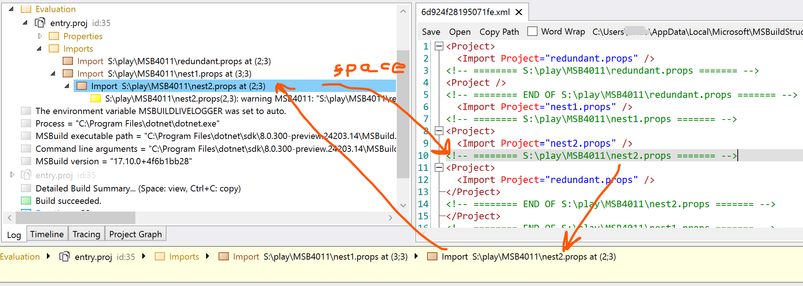
Coming soon: MSBuild binlog viewer will display the import chain at the bottom as you move the caret in the preprocessed text.
You can then click on any import to highlight it in the tree.
Then you can press Space on any import to jump back to the preprocessed text where that file is imported.
https://github.com/KirillOsenkov/MSBuildStructuredLog/wiki/Viewer-UI#preprocessed-projects
 Kirill Osenkov
 Kevin Jones
 Kevin Beaumont
