 Jennifer Moore 😷
From @fifonetworks, a little "solve the mystery" story, useful to know about if your email ever gets hacked!
Bob Young (@[email protected])
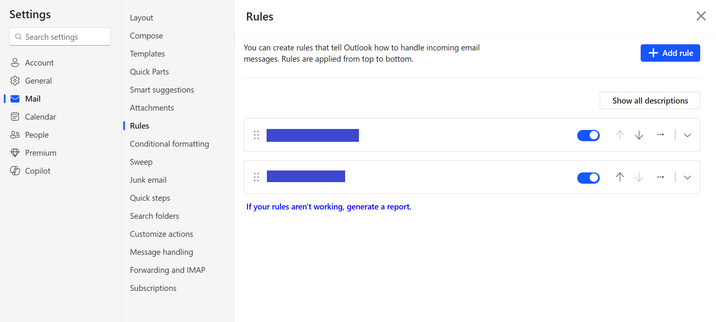
Attached: 1 image “Bob, one of my employees can send email from his iPhone, but he’s not receiving any emails.” Well, that’s backwards – usually I see problems the other way around; they can receive, but not send. I tried working with him on a phone call yesterday morning, but when you can’t see the screen, tech support is more difficult. The client’s main business location is in a town less than an hour from my office, so I went to their location after lunch to work on it in person. Oh, so many details were left out! It turned out that he wasn’t receiving emails on his iPhone, his iPad, or his laptop – but he could send from the phone and the laptop. And... the problem started in March, and was continuous from then until now! Okay. First things first. Let’s log into Outlook on the web and see whether that works. I’m starting to have a hunch that I’ve seen this problem before, with other clients. Outlook on the web looks the same. So I went into the Rules settings, and there was the culprit. The rule was named “....” That’s it, the only rule, and the rule name was just four dots. I clicked the drop-down arrow to expand the rule. And the rule said, on incoming mail, move it to the Deleted Items folder and mark it as read! So he was receiving email all along, he just didn’t know it. I looked in the Deleted Items folder, and there were more than 1,300 messages, including my two test emails from earlier in the day. I moved everything back to the Inbox. Here’s what happened. In March someone had started sending email pretending to be this employee. He changed his email password, and the outbound spam stopped. That’s all the company did. They thought the problem was solved. Well, that locked the cybercriminal out, but it didn’t delete the rule that the cybercriminal had created to cover their activity. That rule didn’t get deleted until yesterday, June 24. THE LESSON If you believe your email has been compromised, after securing your account, log into each device, and especially the web instance, and look for rules you didn’t create. If a device was compromised, the malicious rule may be in Outlook’s rules on the device. This scenario can also happen in other email apps, like Thunderbird, and in other web-based email accounts, like Gmail. Whether it’s web-based or app-based, look for rules or filters that you were unaware of, and delete them. #CallMeIfYouNeedMe #FIFONetworks #email #TechSupport #HelpDesk Cybersecurity - Networks - Wireless – Telecom – VoIP