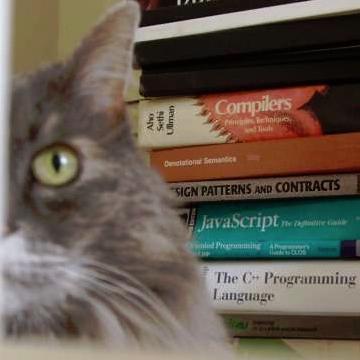
#UNIX is not just an OS; it is arguably the ultimate #IDE for #programmers. Arguably the best written introductory book on UNIX programming is "The UNIX Programming Environment", Kernighan (1983). This book covers UNIX V7, but I used it with 4.2BSD.

There is another jewel of a book of a similar kind, a free one to boot, by Prof. Ballesteros (King Juan Carlos University): "Introduction to Operating Systems Abstractions Using Plan 9 from Bell Labs" (2007). Prof. Ballesteros wrote this book to teach his CS students the fundamentals of good OS design.

Although almost no one uses #Plan9 today, it is alive and kicking. It even runs on Raspberry Pi. Anyone interested in OSs and likes the philosophical underpinnings of UNIX should take a look at Plan 9.

The other must-read book is his "Notes on the Plan 9 3ed Kernel Source" (2007). It is a Lions-style commentary.

Prof. Ballesteros has many Plan 9 related publications in PDF format.

https://lsub.org/books-papers/

PS—Those with a historical bent should also read Organick's "The Multics System: An Examination of Its Structure" (1980). Multix is the mother of UNIX, and Plan 9 is the grown-up UNIX.

Books and papers

These are some publications and books I wrote. They are arranged on sections depending on the system they refer to, or put in the miscellaneous section if they do not refer to a particular system w…

Fran. J. Ballesteros
@AmenZwa agreed. part of The Unix Way, imo, was that any terminal provided a de facto IDE. you just have to learn the various CLI tools and shell patterns and common keystrokes etc. I think the more modern trend of ostensible IDEs made more sense in reaction to what MS Windows and early Mac gave a programmer out of the box. if you can already get what you need they appeal less

@synlogic4242
Of course, it is a bit unfair for us "moderns" to compare UNIX to the likes of NeXTSTEP, Windows, macOS, and such. This comparison came about, because UNIX, starting in the early 1980s, began competing in the PC market, and soon gave birth to the workstation OSs of the time: SunOS, IRIX, Ultrix, AIX, HP/UX, and so on, sporting the X Window System. But despite all those modern accoutrements, UNIX was still very much the 1960s time-sharing OS, not a personal OS. That heritage continues into the modern UNIXen, like FreeBSD, NetBSD, OpenBSD, and Darwin.

Looking upon UNIX in its period-correct context—during the late 1960s and the early 1970s when batch processing on mainframes over the teletype is the fashion of the day—what Thompson and Ritchie achieved in such a short time frame is, frankly, a superhuman achievement.

I do not recall the exact phrase, but I once read something like this in a Bell Labs publication: "UNIX was created by programmers for programmers to do programming". In other words, Thompson created UNIX to make his daily programming activities more efficient, effective, and enjoyable.

UNIX, therefore, is the world's first IDE. By "IDE", I do not refer to modern, surface-indicia of programming, such as buttons, scroll bars, and menus; I mean a unified, coherent system designed, ab initio, to serve as the ultimate software development environment, integrating all programming-related tools that a programmer would need.

In contrast, most popular operating systems (OS/360, VAX/VMS, Windows, macOS, etc.) are designed for non-techie business users.

@AmenZwa
> most popular operating systems (OS/360, VAX/VMS, Windows, macOS, etc.) are designed for non-techie business users.

Abbreviated like that, it is arguable. Expanding the wording:

> most popular operating systems (...) are designed for *applications* aimed at non-techie business users, not at programmers.

...is more bullet-proof, I think.

And it immediately implies the fundamental problem: the app makers are therefore largely not eating their own dogfood. This causes problems that have been widely explored.

@synlogic4242

@dougmerritt
Brilliant, to the heart of the matter!

@synlogic4242

@dougmerritt @AmenZwa @synlogic4242

> And it immediately implies the fundamental problem: the app makers are therefore largely not eating their own dogfood. This causes problems that have been widely explored.

I honestly feel like we have a reverse problem: the app makers don't actually understand computers or user interfaces, and the people who designed the original GUIs and knew the WHY behind everything have left or retired.

Like, I'm an affable guy. I don't like harping on #UIDesign all the time.
But our modern UI Design is absolute dogshit, if you'll forgive a little vulgarity (fairly rare for me).

It's bad enough that everything is created with 23-year-old eyes in mind, but even basic usability has suffered dramatically in the past fifteen years.

If I had a money tree and a fountain of youth, I'd go back to Uni (AGAIN 🤣) actually get my C.S. degree, and major on UI Design and be the most annoying forking UI Gadfly in all the nine realms.

@dougmerritt @AmenZwa @synlogic4242

Regarding modern UIs, I will say that I'm very happy that search has won over hierarchical menus in general*, particularly for launching applications. I love dmenu/rofi/wofi/fuzzel and even KRunner when I'm on my work machine.

When digging through work folders that are synced with the cloud and have hundreds of thousands of files (in well-organized, but still deeply nested directories), I have my own search menu system I came up using just simple old find, grep, and zstd which is actually faster and more reliable (and much, much less resource-intensive) than the search facilities provided by Gnome or KDE and their complicated daemons and databases.

* I don't mean "hamburger menus" vs. hierarchical menus, though. Those are for the birds. 😄

@rl_dane
I've been doing a bit of thinking out loud (very loudly), of late, about TUIs.

Half-jokingly, I have said, the modern user is so habituated to the text-based interaction with the computer, thanks to the almighty LLM, that it is high time for us oldies to sneak in the traditional TUIs into this generation of users's desktops.

The non-joking half is this. Modern TUIs have got so sophisticated that they now have their own unique aesthetics. Yet, they can be programmed in the same way that were done with the 1970s and 1980s TUIs. No remote calls, no async/await, etc. Some of them even have web browser integration.

Most line-of-business web apps today are used by a handful of in-house business experts only; there is absolutely no need for them to use React, Angular, and other massive web GUI frameworks. The only reason these web apps came into existence is the in-house coders wanted to get those frameworks on their resumes, so they can go work at the Big Tech.

@dougmerritt @synlogic4242

@AmenZwa @dougmerritt @synlogic4242

I'm impressed with what creatives can do with web apps, but when I have to use them for work, I cringe.

Like, a JS-heavy thing for creating music or procedural art? GRAVY

A JS-heavy thing for me to check my bank account? "Calgon, take me awaaayayyy..." 😂

I remember using TUI-and TUI-like GUIs (very, very text-heavy GUI database applications where there really wasn't enough room on a 640x480 or even 800x600 screen to waste space on much of anything but TEXT) in the 90s, and they were so efficient.

To this day, I'm still running a nearly decade-old version of an accounting application at work, because I just will NOT muck with the horrid web apps. If you see me using this old desktop program (via VNC, 'cause boyo ain't running windows on his own machine!! 😆), I'm absolutely flying through screens and menus; I have every major screen memorized and know exactly how many times to hit TAB to move from the addressee to the date field, to amount, category, memo, class, then enter, enter and on to the next thing.

If I had to use a web application for that, you'd have to put me on suicide watch. 😂

But I've actually been learning and using ed recently. For all its limitations, there s a very Zen feeling when editing text in ed, which isn't even a TUI. It is (as I'm sure all here know) an editor that would work on a terminal as dumb as the Apple I.

My only complaint with TUIs is that they lack the shared keybinds and consistency of early GUIs. Some are very vi-like or even less-like, but others are more bespoke. Going from vi to less is easy, then less to a web browser like lynx, w3m, or cha. But links/links2? Totally different keybinds, and not configurable. urgh.

Some kind of committee thing to come up with interaction standards for TUIs would be golden. Some are very intuitive, like the fedi client I use, @[email protected]. Others require a bit more learning to get comfortable with, like iamb, the Matrix client.

I often think back to the Apple Macintosh project, and Jef Raskin, who wanted to make it a text-based, and keyboard-driven system. I would have liked to see what his ideas were like, because I think it would've been a neat midpoint between the user-friendliness of modern-ish GUIs, and the sheer power of a nicely-designed interactive Unix program (TUI and not-quite-TUI).

@rl_dane
Right on, brutha! I'm telling ya, we need to retrain the users with the 1970s style TUIs, while this narrow window of opportunity is still open.

@dougmerritt @synlogic4242

@rl_dane I work with the kind of internal web apps you are talking about, and I'm not sure a TUI framework (the Borland one was recently open sourced and ported to Linux, right?) Is better than plain HTML. As said earlier, you dont need JS frameworks like React or Angular, those are really only appropriate for a very narrow use case, but simple HTML forms and CGIs are dead easy to understand the whole stack and pretty easy to make usable/accessible just using the built in elements with a light smattering of plain JS and CSS for interactivity and style.

There was (is) a very influential IBM TUI HIG that most TUI DOS apps comform to, as well as Windows and Motif, but which has largely fallen by the wayside as it isn't taught to new devs and isn't part of the web platform, the web just has raw tools that you can do anything with, but doesn't enforce much. I'm pretty sure you could make a webapp with the same kind of interaction as your TUI, but there isn't a sufficiently influenced force encouraging good, standard UI.

I'm not sure what those guidelines might be or how to encourage it to exist and be adopted..

@AmenZwa @dougmerritt @[email protected]

@raven667
> There was (is) a very influential IBM TUI HIG that most TUI DOS apps comform to, as well as Windows and Motif, but which has largely fallen by the wayside...I'm not sure what those guidelines might be or how to encourage it to exist and be adopted..

That was CUA, IBM Common User Access. Motif had the goal of following it. Windows has a subset of it; Microsoft was gung ho for a while and then wandered off in their own direction.

First published in 1987; perhaps DOS influenced it more than it influenced DOS?

Unix software terminals and shells started earlier and largely were not influenced, I think.

Also "The current major environments, GNOME and KDE, also feature extensive CUA compatibility."

https://en.wikipedia.org/wiki/IBM_Common_User_Access
@rl_dane @AmenZwa

IBM Common User Access - Wikipedia

@dougmerritt @rl_dane @AmenZwa thanks, that's what I was thinking of. That reminds me that the X11 platform has all the same problems as the web, aside from Motif every app and toolkit defines its own UI conventions, some later DEs like GNOME/KDE do have their own unique HIGs, but classic apps just do whatever.

Classic Windows/Win32 has excellent keyboard navigation, better than X11/Wayland, because CUA conventions are baked into the primary toolkit, there are mechanisms _and_ policy.

HTML/CSS/JS have replaced platform toolkits like Win32, Cocoa, GTK or Qt for the vast majority of app development, and is better tech for distributing GUI apps than X11/NeWS, but has mostly mechanism and little policy, the fact that something like React can even be implemented shows that, so how do we define something as influential as the CUA for the 21st Century, and who funds the research needed so its not just a collection of unfounded opinion?

@raven667 @dougmerritt @AmenZwa

> thanks, that's what I was thinking of. That reminds me that the X11 platform has all the same problems as the web, aside from Motif every app and toolkit defines its own UI conventions, some later DEs like GNOME/KDE do have their own unique HIGs, but classic apps just do whatever.

One of the reasons I'm not an anti-Wayland zealot is that I understand that X11 is relegated to just schlepping pixels around from whatever the major toolkits build, so it's not a huge deal to me if it's replaced by a pixel-pusher like Wayland. I do rather wish we'd have actual graphics primitives handled by the fundamental UI framework, rather than having each toolkit render things their own way, but that's where we're at. 🤷‍♂️

Of course, that's not to say Wayland doesn't have other issues in the areas of accessibility and usability. wlroots-based compositors like Sway have all the features I've personally come to expect from X11 WMs, but KDE Plasma's Wayland session is still missing a minor feature or two for my liking, although it's not a show-stopper.

@rl_dane yeah, I've been using Wayland as my default session for 10y or so (on Intel and AMD not nVidia graphics where it has been very reliable) but development only moved at the speed of volunteers and for anything difficult or lacking dev resources the answer was to just use X11 which meant there wasn't strong pressure to complete essential but unsexy features like accessibility. Now that Redhat is shipping RHEL without X11 sessions (just Xwayland) they hired an accessibility expert to maintain the toolkit support that Sun added a long time ago (when Sun Ray terminals with GNOME 2.x had major commercial support) because volunteerism wasn't cutting it

@dougmerritt @AmenZwa @raven667

I'm familiar with the standard, but I never knew the name.

Unix TUIs really need something like this. I think vaguely vi/less-oriented keybinds are a good start, but it really needs to be fleshed out more.

GUIs drive me nuts, though, particularly #GTK. In Plasma, pressing Control+L inside an Open dialog box always gives me a location bar so I can directly input where I'm wanting to go (with useful autocomplete), instead of dragging the dumb rodent around.

In GTK (specifically GIMP 3.x)? I have to make sure the "home" location is selected in the sidebar, rather than "recent," otherwise Control+L does nothing. 🤦‍♂️

And how do I get to the sidebar? Heck if I know. I hit tab like mad, but it seems erratic and I give up and fondle the stupid rodent yet again.

Ugh. XD

@rl_dane @dougmerritt @AmenZwa that sucks. I dont think GIMP uses GTK 4 so maybe the behavior changed and they haven't picked it up yet, but I never learned the keybindings in GNOME to the same level as Windows or MacOSX because they are inconsistent between app ecosystems, GTK, Qt, X11, Web all have different conventions. Ive also flipped between platforms as my daily driver, so I dont get to wedded to any one and can be competently productive if not expert on any platform, but that means not going too deep into memorizing keybindings or making complicated customization (that become a dependency/liability) to any one of them.
@rl_dane @dougmerritt @AmenZwa it'd be nice if there were some cross-platform guidelines that were respected enough that the desktop environments could collaborate and share with the web platform. I think UX on GNOME is already better than Windows even with some incomplete parts, probably as good as macOS, or at least it shows the clear potential, and itd be nice if the effort to learn the interface more deeply paid off rather than feeling lime time wasted because of inconsistent support.

@raven667 @AmenZwa @dougmerritt

Honestly, using firefox extensions like "Vimium C" makes plain HTML a delight to use from just the keyboard.

The thing that's driving me nuts lately is that some framework-built buttons can't be searched for, and some can't be activated by vimium. They have to be found visually, and clicked on with the mouse alone.

It's so ridiculous.

@rl_dane @raven667 @dougmerritt
I once complained bitterly against the misuse of XML as a programming language (with Turing-complete extensions, of course). Then, the father of XML (Jon, who's on Mastodon), politely chimed in, saying XML was never designed to be a programming language. It most certainly was not. The original designers, like Jon, took inspiration from TeX, SGML, HTML, etc., and made something that was perfect for typed data exchange for the web era. But what do web kids do with it? They use it to store a couple of lines of configuration settings, or to create a full-fledged programming language that no human could read.

Then, there is HTML. Just like TeX and SGML before it, it is a marvellous little declarative markup. Tim designed it to share pre-print peer-reviewed papers with his colleagues. The OG arXiv, as it were. What do web kids do? They turned it into a quagmire of a GUI that culminated in Angular, React, Svelte, Elm, Ember, ..., the list that never ends, with at least three or four more JavaScript frameworks coming out every night.

Back in the 1980s, we had two-year major release, one-year minor release, and quarterly fix releases—on just about everything, from compilers to OSs to applications. That was a sustainable release engineering practice. Today's AI-infused CI/CD pipeline is inhumane (and inhuman).

I kept coaching these kids to be simple, short, sweet, and silent (as in think, don't talk; if you must talk, be sweet, short, and simple), when they design systems, both hardware and software. But the first thing they do is get on LinkedIn and either bragged about their work or ask for help. My goodness!🤦‍♂️

@AmenZwa @rl_dane @dougmerritt Alex Russell talks about the lost decade+ of web app development because programmers became enamored with React style SPA at the expense of just using HTML/CSS/JS directly. Plain HTML forms still exist, just like how RSS still exists and TUIs exist or Perl or whatever even if its not the sexy new thing, its still very alive and well supported.

While the originally use case of HTML is document management, which still works very well if you treat it like Markdown, even a grade school child can learn enough HTML to write docs competently, as soon as forms were introduced it became an app platform, first replacing 3270 and vt100 terminal style apps and with "web 2.0" JS/CSS replacing most custom line-of-business desktop apps. BillG saw this early and I think Netscape did as well which is why the browser wars were so bitterly fought, they saw a future where most apps are built in Electron and are cross platform, so the specific desktop environment you use isn't a lynchpin anymore.

HTML for docs and HTML as a GUI description language (compared with the schema for GTK or Cocoa app layout) are almost totally separate things that share tech, making it hard to communicate about when making proclamations that its one or the other. A browser is fundamentally a pixel pushing engine and _everything_ about the output is defined by layers of CSS, built-in to the browser and overrides provided by the user and website. Thats why SPAs work at all, you *can* make an entire GUI out of div and span with entirely specified behavior, even if that works at cross purposes with all the semantic behavior available by default in the browser.

Aside, it's been said long ago that web user interfaces can be viewed as glorified 3270 user interfaces.

@raven667 @AmenZwa @rl_dane @dougmerritt

@vnikolov
Mate, that ain't a burn, that's a high praise—a praise unworthily bestowed upon web UI.😀

@raven667 @rl_dane @dougmerritt

@AmenZwa :
> Then, the father of XML (Jon, who's on Mastodon), politely chimed in, saying XML was never designed to be a programming language. It most certainly was not. The original designers, like Jon, took inspiration from TeX, SGML, HTML, etc., and made something that was perfect for typed data exchange for the web era.

In fact, wikipedia pithily begins its history note with:

"XML is an application profile of SGML (ISO 8879).[32]"

Note that "is".

> They turned [HTML] into a quagmire of a GUI that culminated in Angular, React, Svelte, Elm, Ember

But some of these "kids" are pretty smart, and started recoiling from modern horrid mispractices and created things like htmx, which is lean again, and some things trying to improve on it.

@vnikolov :
> glorified 3270 user interfaces.

@AmenZwa :
> that ain't a burn, that's a high praise

Sure. 3270 was a page-oriented display; it would always refresh the entire page at once, not the pokey character at a time slow rate of more common terminals.

And the mainframes it was attached to were so fast that, for many things, there was no perceptible delay.

This led to confusion. An old friend of mine did some contract work in that environment (they were running some flavor of Unix), and on his first day, complained to the manager that something was wrong, he couldn't get the C Shell to compile.

Manage: "Why do you say that?"
Friend: "Nothing happens when I do "Make", the shell just gives me another prompt.
Manager: "That's because it's doing all the compilations in about 1/10th of a second. The prompt means it's done already."

Instant compute, instant UI.

@AmenZwa @vnikolov @raven667 @rl_dane

It's probably redundant to point out how many things the 3270 can do on its own without exchanging data with the mainframe.

I didn't perceive that comparison of web user interfaces to 3270 user interfaces as either a burn or a praise, merely as a succinct way to express the essence of the way these interfaces operate.

By the way, the _default_ CMS prompt included the return status of the previous command, something I do manually in .bashrc (with PIPESTATUS, of course).
If I recall correctly, that prompt contained the elapsed time as well.

@dougmerritt @AmenZwa @raven667 @rl_dane

@vnikolov
It is not impossible for my friend to have left out some aspects of the story for the sake of storytelling.

Although I also don't know if there was only one Unix-derived OS; I don't recall this "CMS" myself; I think there were others too.

@AmenZwa @raven667 @rl_dane

Oh, I thought this was well-known.
I am sorry.

CMS as Cambridge Monitor System,
later Conversational Monitor System.
The usual ("native"?) shell of VM.

@dougmerritt @AmenZwa @raven667 @rl_dane

@vnikolov
I'm sure it *is* well-known. But
(a) my memory is imperfect, and
(b) I was never hands-on in an IBM environment (although hands-off came up a few times).

You never know what people's backgrounds might be.

@AmenZwa @raven667 @rl_dane

@vnikolov @dougmerritt @AmenZwa @raven667

Oh man, a prompt in bash that could display elapsed time succinctly (particularly if it was over like a second or so) would be pretty amazing.

I don't generally like prompts taking up too much space, but I'd make room for that. 😄

Indeed.

It is at least thinkable that a feature like that has been added since last I went through the documentation.

Since the `time' built-in without arguments prints the total elapsed time, it would be possible to print the difference in each prompt, but in my personal view it wasn't worth the effort.

Obviously, the latter would require a custom format, an auxiliary shell variable to keep state, and a shell function invoked by each prompt to do the computation.

@rl_dane @dougmerritt @AmenZwa @raven667

Here is a "sketch of concept".
I am not satisfied with it, but it may be better than nothing.
(Relying on a DEBUG trap isn't really a good thing here, in my view.)

(1) Example transcript:

$ echo hello
hello
Ready(0); E=0.00 s 10:21:42
$ sleep 1.5
Ready(0); E=1.50 s 10:22:06
$
Ready(0); E=1.50 s 10:22:07
$ false | sleep 3.456
Ready(1 0); E=3.46 s 10:22:47
$
Ready(1 0); E=3.46 s 10:22:50
$ :
Ready(0); E=0.00 s 10:22:55
$
Ready(0); E=0.00 s 10:23:01

(2) Bash source for the above:

### Print the elapsed time for the previous command before each bash prompt.
### Uses a DEBUG trap and the PROMPT_COMMAND variable.

prompt__elapsed_time=""; #Keeping state.

function prompt__print_prompt () {
declare -r s="${PIPESTATUS[*]}";
if [[ "${prompt__elapsed_time}" == "" ]]; then
## The prompt does not change on just pressing Return (no command).
prompt__elapsed_time="$(printf '%s - %s\n' "${EPOCHREALTIME}" "${prompt__start_time}" | bc)";
fi;
## Imitate IBM z/VM's CMS (partly: the latter prints user time and system time):
printf 'Ready(%s); E=%.2f s %s\n' "${s}" "${prompt__elapsed_time}" "$(date +%H:%M:%S)";
}

function prompt__set_time () {
if [[ "${BASH_COMMAND}" != "prompt__print_prompt" ]]; then
prompt__elapsed_time="";
prompt__start_time=${EPOCHREALTIME};
fi;
}

trap prompt__set_time DEBUG;
PROMPT_COMMAND=prompt__print_prompt;

#bash
#UnixShellProgramming

@rl_dane @dougmerritt @AmenZwa @raven667

No one shall expel us from the garden where S/360 Model 67 grows...

@dougmerritt @rl_dane @AmenZwa @raven667

@vnikolov
Did you actually use one of those?

"all the degrees in a circle" or whatever their marketing said.

@rl_dane @AmenZwa @raven667

@vnikolov @dougmerritt @AmenZwa @raven667

That's pretty slick! I'll save a copy and play with it later. :)

@dougmerritt @AmenZwa @vnikolov @raven667

Meanwhile, don't mind me as I spin up three mile island again so I can compile "hello world" with 973 dependencies in that popular ferrous oxide language... ;)

@vnikolov @raven667 @AmenZwa @dougmerritt

I think I'd honestly rather use an actual 3270. XD

@raven667 @AmenZwa @dougmerritt

I was listening to a podcast I love (won't name names 😁), and someone said, "I like that app better, because it doesn't look 20 years old,"
and I'm practically screaming, "HOLY FORKING SHIRTBALLS, GIMME THAT 20-YEAR-OLD APP!"

2006 was such a high-water mark for the web, UIs in general, up until about 2009. Then when mobile started dominating everything (and later, the blasted frameworks), it all got turned into kipple. 😒

kipple - Wiktionary, the free dictionary

Wiktionary

@AmenZwa @rl_dane oh and side note, working with XML is frustrating, XPath 1.0 is a pain and the only thing widely supported, because everyone licenses libxml2 but no one funds the maintenance required to keep up with the relevant standards, so its locked in 1999. CSS selectors do brodly the same thing, select an element nodelist out of a hierarchical data structure, but CSS has been honed in the fires of browser Dev for 30y and is highly efficient.

XSLT is a neat idea but just doesn't work in the way most people think, most people want plaintext templating with string manipulation to build XML or HTML, but XSL is something else as it operates on the node data structure. It'd have been a very different world to ship complex XML data structures to the browser and then use XSLT to render to HTML on the client rather than simpler JSON.

@raven667
Right on! This sort of "standards" that either go out of date in minutes or the ones that no one followed because each person has his own "better" idea has been swirling in software practice, since its birth. I don't rightly see a workable alternative.

But then, we'd all be complaining, if some standard were to be imposed upon us by the gods of industry or politics.

Software practice is not engineering; it is an art form.

Geeks—we can't have nice things.😀

@rl_dane

@AmenZwa @raven667 @dougmerritt

When weekly system updates reach into the gigabytes (compressed) download size, something is seriously fubar.

@rl_dane
I say, aren’t we well past weekly patches, what with AI-driven CI/CD pipelines and such?😆

@raven667 @dougmerritt

@AmenZwa
I don't know about *you*, chum, but *my* software knows how to patch *itself*. While it's running.

@rl_dane @raven667

@dougmerritt
Real Apollo 13 style maverick over here!😆

Kidding aside, every life-critical system designer, both hardware and software, must aim for such just such a capability.👍

@rl_dane @raven667

At 20 W of power consumption.

@dougmerritt @AmenZwa @rl_dane @raven667

@vnikolov @dougmerritt
We can’t have the AI data centres consume all the electrical power; the real-time embedded community has to rise up and take back some of that power. We may well be consuming sub-mW individually, but we are hundreds of billions strong and we’re everywhere.

Come to think of it, if the embedded engineers were to follow the practices of the web world, each “embedded” device would now be the size of a refrigerator, and would consume 100 W or thereabouts.

@rl_dane @raven667

@AmenZwa
You can still get PDP-8s with a hefty 4 KB core memory on the used market.

@vnikolov @rl_dane @raven667

@dougmerritt
😆👍Maverick move—again!

By the way, I heard, years ago, an apocryphal story: it is said that the CSRC staff gave Ken’s old PDP-7 a fitting burial at sea (in the pond in front of the Holmdel HQ building), instead of sending it to the scrap yard. But I didn’t see that in Brian’s UNIX memoir, so it’s probably just that, a legend.

I tell ya mate, I was this close to getting that PiDP-11 replica kits, were it not for my wife’s meaningful look….

@vnikolov @rl_dane @raven667

How deep is the pond?

And I shall have to look it up how heavy a PDP-7 is.

@AmenZwa @dougmerritt @rl_dane @raven667

@vnikolov
Apparently, the pond is deep enough, unlike the shallow ones found at typical tRUMP property, say the Lincoln Memorial Reflecting Pool. So, you’d need my assistance. I claim 49%, including finder’s fee.

We can retire to Mars with the proceeds. I’m imagining throngs of old, long-bearded UNIX geeks trampling over each other’s canes and walkers to get in on the action to possess such a massive (in many senses of the word) piece of the history.

@dougmerritt @rl_dane @raven667

@AmenZwa
> each other's cains

I'm going to insist you mean 'cairns', as in, "over my dead body".

That seemed to me a decent idea up until I found out Musk would be there.

@vnikolov @rl_dane @raven667

I'd leave it in the pond to make future archaeologists happy.

I am a direct witness to the pure joy that a six-thousand-year-old artefact brings when it emerges from the soil!

By the way, also silicon-based.
(Ceramics.)

@AmenZwa @dougmerritt @rl_dane @raven667

@AmenZwa
Tell your wife she's beautiful, rub her tired feet, and order away!

I hope that PDP-7 story is apocryphal, it would be a great museum piece.

Circa 1980 a friend of mine had some random PDP-8 he used as a footrest, occasionally kicking it to break off some more of those whatchamacallit nifty DEC toggle switches.

I had no particular love (nor experience) of the PDP-8, but I was still shocked. 😱

However others I've told that story said that it was no more than the PDP-8 deserved, that it had brought it on itself. 😝

@vnikolov @rl_dane @raven667

@dougmerritt
There was a time, the 80s, when we geeks didn’t see the historical and emotional value of old kits. I distinctly recall an advert in some magazine, showing a sophisticated woman holding a drink, standing regal in front of a gutted VAX-11/780 case that was converted into an oversized liquor cabinet.🤦‍♂️

@vnikolov @rl_dane @raven667

Right!

You all have surely seen this definition:

hardware:
that part of a computer system which can be kicked.

***

Barely tangential, the following doesn't seem apocryphal to me:
at Los Alamos during the Manhattan project they had the most expensive doorstop in the world.

They measured neutron absorption of several different materials.
That included a large piece of gold, which became a doorstop, as it wasn't needed for other scientific or engineering purposes afterwards.

@dougmerritt @AmenZwa @rl_dane @raven667

@vnikolov @dougmerritt @AmenZwa @raven667

> hardware:
> that part of a computer system which can be kicked.

That definition would have helped me a lot as a kid. I asked my dad what the difference between hardware and software was, and he said, "hardware is hard, software is soft." 😂