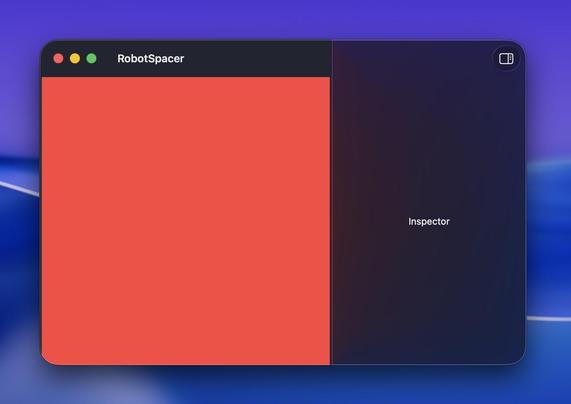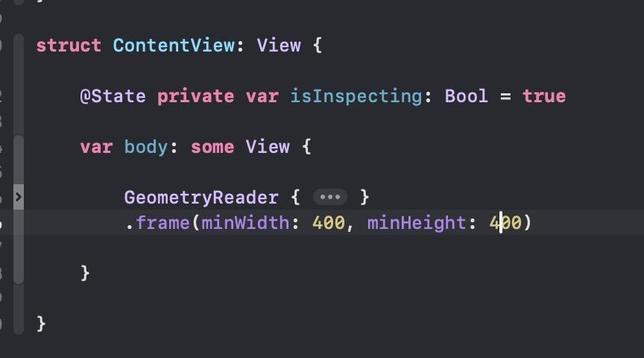
SwiftUI Mac devs: I'm having an issue with window sizing when using an inspector. The minimum window size is larger than expected, so there's a gap at the bottom equal to the height of the title bar. The only solution I can find is to manually subtract 52 pixels, which is better than nothing but not great. Any better ideas? I'm working on macOS 15 but this happens on macOS 26 also. Here's the code, and more detail about the problem: https://gist.github.com/robotspacer/c9d845f67368f7b42de3b74d6cc009c6 #MacDev #SwiftUI
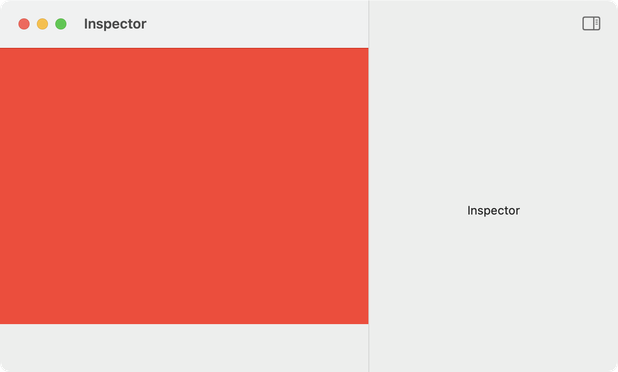
I got a suggestion from @troz to add `.frame(minHeight: 400)` after the inspector block, which fixes the issue. I do still need to set `.frame(minWidth: 400)` on the scroll view in order to get the expected zoom behavior. Feels a little weird to split up the sizing like that, but not a big deal. Unfortunately the window still scoots down if you call zoom repeatedly, but… I can live with it for a hobby project I guess 🤷‍♂️ #MacDev #SwiftUI
@robotspacer putting a GeometryReader at the view root, and applying the min frame size to it, fixes the problem on the vertical, but introduces a new one where the inspector can be clipped. But that might have an independent solution…
@stroughtonsmith I tried some similar ideas, but macOS 15 really doesn't like it when I enclose the inspector in a frame. The worst part is this animation, but there are other issues like often the separator doesn't get drawn. Thanks for the ideas though!
@robotspacer well an inspector is just an NSSplitView column in fancy dress, so if you can access the underlying split view you might be able to adjust the height constraints
@robotspacer I’ve noticed that in most cases the inspector modifier works best when attached to a NavigationStack or NavigationSplitView. Maybe that will help with some of the glitchy behavior your seeing
@JTostitos Unfortunately NavigationStack doesn't change the issue, and NavigationSplitView actually… *doubles* the unwanted space at the bottom? (In addition to adding a leading sidebar I don't need—just thought I'd try it just to see if it helped.) Very strange.
@robotspacer If you add `.frame(minHeight: 400)` after the end of the inspector block, it works as you expect. I notice that the toolbar is inside the inspector block - not sure if that is intentional, but it doesn't stop this fix.
@troz Thank you! The toolbar setup is intentional—this separates the toolbar buttons for the inspector from the buttons for the main view.