I need a break from everything so I'm going to attempt playing #Diablo I or II tonight on #ZorinOS!

Looks like I can't install Battle.net but there is an equivalent "#Lutris" - let's see if that works...

Edit: 2h later, I managed to launch Diablo II (main) and Torment once (a gog game), with some graphics bug and can't figure out how to start them again. The semi-solution that best worked so far was to download their windows installer and then run that in Steam as a "non-steam game" with the compatibility tool Proton.

Edit 2: after looking at this tutorial I understood that 1) every game installed this way in Steam is within its own little environment, some kind of sandboxing? that replicates the structure of Windows and 2) once I've installed the game as a non-steam game I need to update the path in the game properties to where the game launcher actually is.

problem is because of the sandboxing, I can't install Diablo II LOD extension because it needs to recognise the already -installed DII.. unsure how to fix that

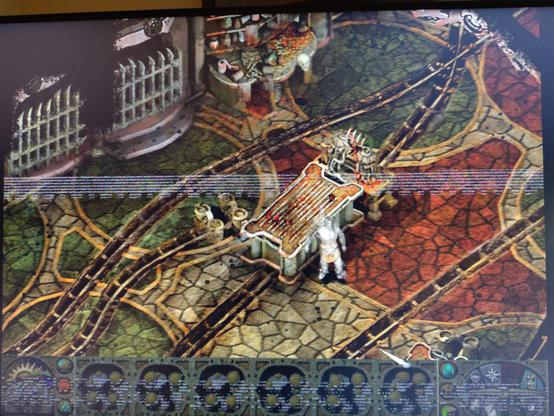
otherwise it seems to be working except that I get scintillating bands in all the games I've installed this way.. yes it's probably a problem of NVIDIA drivers πŸ˜“

#LinuxGaming

How to install Battle.net on Linux, SteamOS and Steam Deck for World of Warcraft and Starcraft

Want to get Battle.net on your Linux system like SteamOS and Steam Deck? Here's a guide giving you the options to play World of Warcraft and Starcraft.

GamingOnLinux
oh great. apparently this is coded with genAI.. quoting @Natanox
https://chaos.social/@Natanox/116222559592865899
Natanox πŸ‡ΊπŸ‡¦πŸ‡΅πŸ‡Έ (@[email protected])

Content warning: Lutris dev crashout, AI, slurs

chaos.social
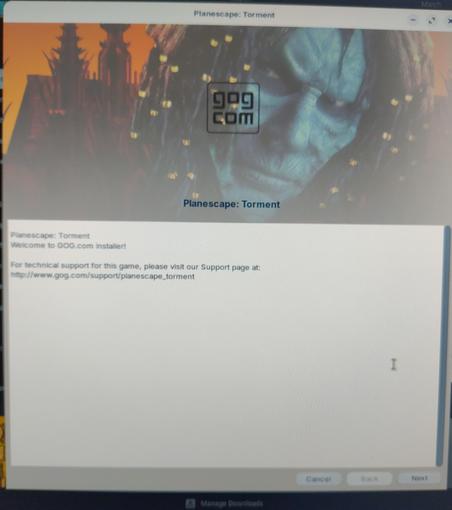
I'm not sure DII will work (downloaded my install files from Battle net and trying to install them through Lutris but it seems really slow) so I'm also trying Torment (from Gog) in parallel! apparently they provide a Ubuntu-compatible version!
gog gave me a ".sh" file for Torment.. Will it "just work" if I double-click it? Nope - it starts an app called "builder" that doesn't seem to do anything and that I can't close.
Hmm..
@elduvelle Not sure what you know - if you've already checked this, disregard: Make sure the executable bit is set (chmod +x ./<script.sh>)
@roknrol I never remember the Linux commands so any help is welcome! Thanks!
I typed that in the command line (replaced "script.sh" by the name of my script) and it did absolutely nothing..

@elduvelle Chmod doesn't give you feedback unless there's an error; try running your script now

Either " <path>/<script.sh>" or if that fails, try "sh <path>/<script.sh>"

@roknrol Ooh I understand! chmod makes it executable?

this seems to be maybe working...

it completed the install.. but then went away.
I found the name in my startup menu and clicked on it.. but it's just showing me a black screen now..

@roknrol So yeah, it made two shortcuts in my start menu and also two on the desktop. none of them work...

@elduvelle There's some troubleshooting that you can do on those to find out where it's hanging, but it starts getting a bit complicated.

If you run them from the command line (instead of double clicking), there will usually be a bunch of messages scrolling across the console. Some will be just notices, but when it crashes out you should have more information in your terminal. That will often indicate what the problem is (and if you do a search on the error message, you'll probably find the solution)

I'm going to have to take off for a little bit here, but I'll try to keep tabs and answer what I can, when I can. There are a LOT of Linux people around though, so I'd frankly be surprised if nobody else pops in.

@roknrol thanks for the help!!
found a gog link that explains a bit what to do (here )
went to where I installed the game and ran it with './start.sh'. it just did the same as when I clicked on the shortcuts, but this time with some errors showing up in the console, basically a bunch of "BadMatch (invalid parameter attributes)" errors...

trying another way: downloading the .exe from gog, and trying to run that with Steam's "Install non-steam games" option.

running it via the proton compatibility option lets me at least install it..

πŸ‘€it's launching! with weird shimmering effects on the screen but still!
Okay this seems to be working except the shimmering..
actually similarly to my problems with DII I am not sure how to start the game again once installed.. the thing I have linked in Steam is the installer so it's just trying to reinstall it

@elduvelle If you can locate the directory that created it you should be able to replace the shortcut with the actual executable.

I'm not sure where the default install location would be, maybe somewhere in .steamapps, but beyond that you'll have to hunt around.

@elduvelle But honestly, it would be more helpful for me to suggest installing "minigalaxy" with all of the pains that might entail. That will connect directly to your GoG account and install the games for you (most games...I've had a couple that didn't work).

https://wijsman.de/minigalaxy/

I recognize as I'm answering your posts that I'm not actually making Linux look "good". There are pains...ngl.

Minigalaxy

A simple GOG client for Linux that lets you download and play your GOG Linux games

Minigalaxy

@roknrol well, to be fair I'm sure if we tried to install on Windows a game that was originally made for Linux it wouldn't be easy either...

I'm trying to follow the instructions in here now that explain who to change the path to a game in Steam after it's installed.
for a while I couldn't figure out where the Steam games installed on Linux but that's because they go to a hidden folder! had to do Ctrl-H to show them and it looks like they are (for me ) in /home/username/.var/app/com.valvesodtware.Steam etc. etc.

How to install Battle.net on Linux, SteamOS and Steam Deck for World of Warcraft and Starcraft

Want to get Battle.net on your Linux system like SteamOS and Steam Deck? Here's a guide giving you the options to play World of Warcraft and Starcraft.

GamingOnLinux

@elduvelle It's one of those things that subtly changes depending on what distribution you're using, and often other settings (I have my steam folder on a separate hard drive, so I have no idea what the defaults are anymore lol). If you're willing to understand the basics (which it sounds like you are, and that's great!) then you'll be able to almost always solve any problems that are likely to come up, and it stops feeling like work after awhile...it's just...another hassle, like Windows forcing an update and not giving you a chance to save your work or something.

I remember when "everyone" was forced to use (and learn) Windows at work. It really wasn't any different...people have just forgotten because it was long enough ago. They had an uncomfortable learning curve then, too.

@roknrol yeah, my problem is that even if I fix something once on Linux, I won't remember the fix the next time I need it. So I try to note everything that seems useful in a document, but that's a bit tedious. obviously it would be great if it "just worked"...

@elduvelle I used to keep such a doc in my home folder, since I always made sure to back that one up during major upgrades or reinstalls.

I've been doing it for a long time though, so most of that stuff I just chance that I can figure it out anymore. It does get frustrating because a lot of things have changed in 30 years, so my head still often looks for the "old" solutions, making me trip over my own brain.