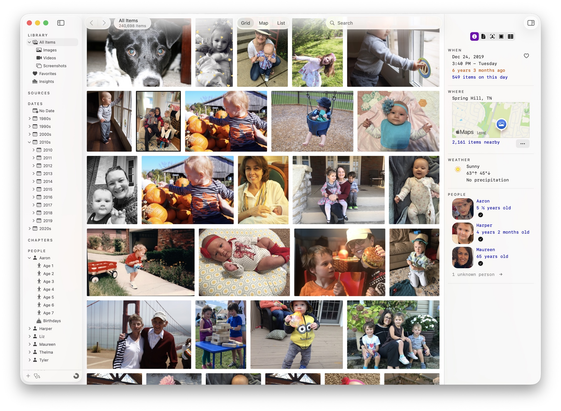
I’m opening 50 TestFlight spots for Iris, a new photo and video library app for Mac. It works with your existing libraries, whether they’re in Apple Photos or folders of images stored locally or on external drives.

https://retina.studio/iris/preview/

Feedback very much appreciated.
@tylerhall I’ve just tried the beta and I love it! I’ve wanting something like this for years. I have a couple of questions:

a) existing image/video metadata (keywords & descriptions) are not imported into Iris. I don’t know if that is a bug or it’s just by design but would be great to be able to preserve that manually input data and use it on search’s

@tylerhall
b) again, maybe a bug or maybe not even possible but when adding a folder as a source that contains iPhone images with Live Photo and/or portrait data, iOS photo library merges all the files into one but on Iris each is a different file (the short video, the normal image and the portrait image). Would be great if those items are merged into one on the library

Anyway… I love the app, congrats!

@squaredpx Iris has half-baked support for merging image with their live photo companion when sourced from Apple Photos. But it doesn't handle that problem well when sourced from a regular folder. I'll add that to my list.
@tylerhall the whole live/portrait files arr a pain in the *** outside the iOS photo library, they are clearly not designed to be managed on a traditional filesystem folder
@squaredpx While working on this app, I learned that photos and their live video files have (undocumented) ID numbers in their EXIF that are supposed to allow matching pairs together.
@squaredpx Good callout. I hadn't considered importing existing keywords. Are you storing these in the file's EXIF data? Or is this coming from your Apple Photos library?
@tylerhall I have them on the file’s EXIF data