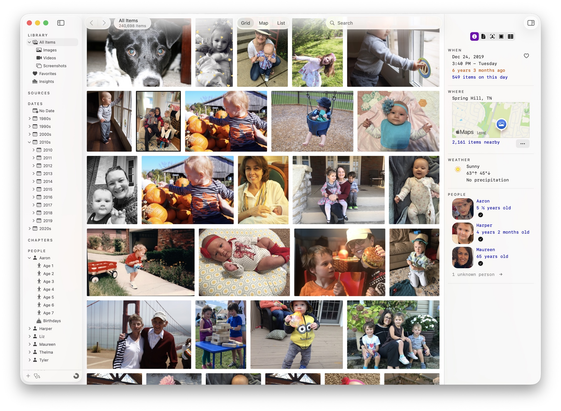
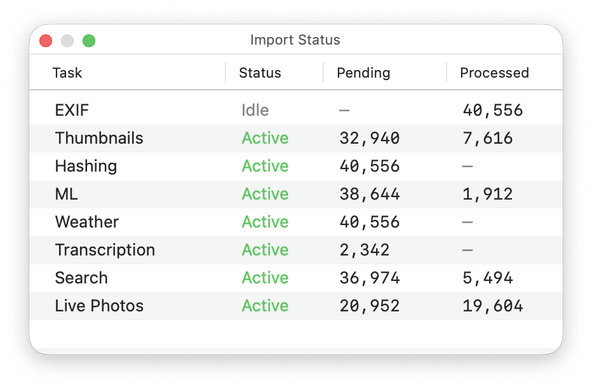
I’m opening 50 TestFlight spots for Iris, a new photo and video library app for Mac. It works with your existing libraries, whether they’re in Apple Photos or folders of images stored locally or on external drives.

https://retina.studio/iris/preview/

Feedback very much appreciated.

@tylerhall Turning Iris loose on my NAS archive drive, excited to see what it pulls up!

(and how long it takes)

@emorydunn @tylerhall

What a great use case. I think I'll do the same!

@jon @emorydunn A very *very* WIP feature...if you have Iris running on a secondary machine (like a Mac mini home server with NAS attached), you can enable the app's built-in API server and browse your library remotely via http://some-ip-address:8490

@emorydunn For my own info...is your NAS connected directly to your Mac or over the network?

My library has ~250,000 items. When importing from an external ssd, a full analysis (which includes all the ML tagging and face detection) will take around 24-36 hours. The initial import (file scanning + EXIF data) is much faster.

Looking forward to hearing how it goes for you.

@tylerhall It's connected through a 10GbE switch at my desk, so as close to direct as possible. I don't have nearly that many items, but it seems to be plugging away nicely.

Doesn't appear to be reading any DNGs from my Leica though, but there are still activities running.

@tylerhall woah, this is very interesting!

Say I have a library stored on an external SSD, does Iris copy over everything to create its library or does it only read the files that are on the external drive?

@nileane Iris never modifies or moves your files. When you add a new source (you can have multiple sources!), the app generates thumbnails and indexes everything it can about your photos and videos.

Once that's done, you're free to eject the drive and go hide it in your attic or bank vault. You can then keep browsing and searching your library with Iris. Only need to re-attach the drive if you want the original files.

It's designed this way for folks (like me!) who don't have enough internal Mac storage for all their photos. It's also super helpful because when you do go looking for a specific photo, Iris can tell you which drive it's on.

@tylerhall Waw that sounds amazing.
@tylerhall I will put this in delicate terms... Items that are marked as "hidden" in my Apple Photos library should be similarly handled in this app, and not just shown freely.
@hoagie You’re absolutely right. I’ve never marked any photos hidden before, so this completely missed my testing. I’ll get it fixed in the next update. Thanks for alerting me!
@tylerhall I'm also just in the scanning phase RN but this seems extremely unlikely to me
@tylerhall looking promising, but... little snitch complains about sentry access. is it necessary, and if so can user be warned?
@sashk Thanks for calling that out. Sentry captures crash logs and helps me fix them and will be optional when Iris ships. The app also checks my web server for available app updates. The final (human readable) privacy policy will list all services that Iris talks to.

@tylerhall sounds good. I read your website about the app before joining Testflight and it listed why it needs network connections and that sounded very clearly spelled out. But when launched seeing these two extra connections were surprising. Understanable, but surprising.

On separate note — when importing from Photos library: do you copy photos to another location, or just going over each photo and collecting info? (Sorry if I missed explanation)

@sashk I should probably starting using "indexing" rather than "importing" in my documentation.

Iris never modifies, moves, or copies your (original) files. It indexes all the data it can about each one and generates a private cache of thumbnails.

@tylerhall

I missed the beta this time round, but can I still just say, the feature to show certain people at specific ages looks amazing. I’m currently creating smart folders to achieve this, but it’s incredibly messy.

I’m looking forward to seeing this come to market.