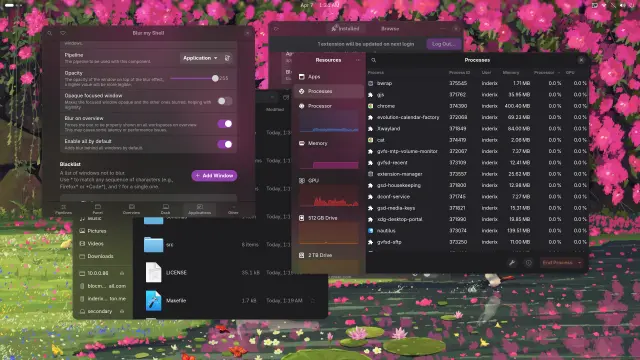
ohhhh shit blur my shell got mica style application blur its so peak...

i need to make some adjustments to my settings but it looks really good.
its in v71 (which doesn't appear to have reached the gnome extension store yet), and the normal application blur is still here too. Of all the wrong things Microsoft has done with Windows, I've really really liked the idea of only blurring the wallpaper to give apps a touch of color without slowing down the system too much, because this so far feels a lot more performant than normal app blur. I'll chuck this onto my PostmarketOS chromebook to test how it is on low end devices too of course.
oh! looks like its appeared on extensions.gnome.org! yay!
@inderix tbh not sure it's much more performant

you don't need to update it when a window behind the current one updates, but you still do when moving the window

so unless it's like above a playing video or similar, it should be comparable
@alice ohhh okok yeah that makes sense ​:spinny_cat_inderix:​ must be placebo for me then
@inderix it's also possible they pre-blurred the entire wallpaper and blit parts of that, but doubt it tbh
@inderix it looks so good! (And I also have that wallpaper)
@inderix what setting lets you blur only the left part of the files and processes? I turned application blur off of everything but console cause it would just blur the while app.
@MagillaGorilla4Sale add the CSS from this gist to your ~/.config/gtk-4.0/gtk.css
https://gist.github.com/albertgoss/1eb63c65af0c7537d80b7bb41b5ea7e2
then in Blur My Shell, set the opacity all the way to 255. "Opaque Focused Window" can be left off or ignored, it wont have an effect.
on line 11 in the gist, you can adjust that to direct how translucent affected portions of the GTK UI are. If you use adw-gtk3 you can copy all of this over to the GTK3 CSS as well.
I personally set it to 0 and then use Blur My Shell's configuration to adjust it to improve readability.

Note that due to how GTK4 and libadwaita work, this will make some apps like Gnome Software become translucent as well. I'm not enough of a CSS guy to guide you on how to fix that if its not your taste unfortunately. If you use DING for desktop icons on Gnome, that will inherit whatever transparency option you set as well, dimming your wallpaper. The change I mentioned of setting the opacity to 0 and adjusting it in blur my shell worked around that however.
Make Gnome applications sidebar semi-transparent, and add blur with Blur My Shell Extension if you want to

Make Gnome applications sidebar semi-transparent, and add blur with Blur My Shell Extension if you want to - gnome-transparent-sidebar.css

Gist

@inderix

What theme are you using? Great looking desktop!

@[email protected] I use mostly the default shell theme, some GTK tweaks from this gist and a flip-flop between the default Adwaita icons and this MacOS tahoe-ish icon theme
Most of the visual heavy lifting here is with extensions like
Blur My Shell to make the top panel transparent and add in the app blur.
Make Gnome applications sidebar semi-transparent, and add blur with Blur My Shell Extension if you want to

Make Gnome applications sidebar semi-transparent, and add blur with Blur My Shell Extension if you want to - gnome-transparent-sidebar.css

Gist