@inderix what setting lets you blur only the left part of the files and processes? I turned application blur off of everything but console cause it would just blur the while app.
@MagillaGorilla4Sale add the CSS from this gist to your ~/.config/gtk-4.0/gtk.css https://gist.github.com/albertgoss/1eb63c65af0c7537d80b7bb41b5ea7e2 then in Blur My Shell, set the opacity all the way to 255. "Opaque Focused Window" can be left off or ignored, it wont have an effect. on line 11 in the gist, you can adjust that to direct how translucent affected portions of the GTK UI are. If you use adw-gtk3 you can copy all of this over to the GTK3 CSS as well. I personally set it to 0 and then use Blur My Shell's configuration to adjust it to improve readability.
Note that due to how GTK4 and libadwaita work, this will make some apps like Gnome Software become translucent as well. I'm not enough of a CSS guy to guide you on how to fix that if its not your taste unfortunately. If you use DING for desktop icons on Gnome, that will inherit whatever transparency option you set as well, dimming your wallpaper. The change I mentioned of setting the opacity to 0 and adjusting it in blur my shell worked around that however.
Make Gnome applications sidebar semi-transparent, and add blur with Blur My Shell Extension if you want to
Make Gnome applications sidebar semi-transparent, and add blur with Blur My Shell Extension if you want to - gnome-transparent-sidebar.css
 Inderix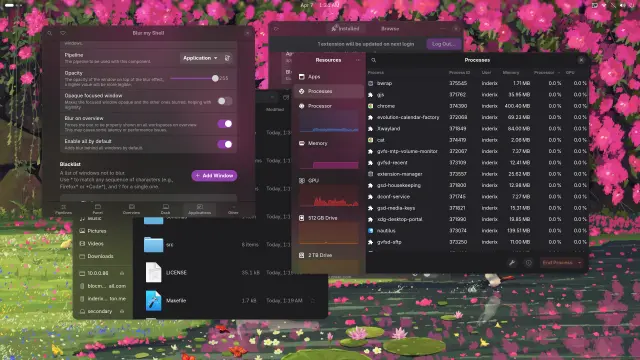
 Magilla Gorilla