We have a git repo that uses git-lfs. We had a scare where we realized the repo was much bigger than the files in it and concluded something large was not in lfs. In fact the problem was the lfs cache was big.

For a minute there, I was considering writing a script that checked every file and its lfs status, and gave you the largest file that is not in lfs and maybe the file extension that contributes most to non-lfs repo weight. But now I wonder: Does a script like that exist already?

It seems like this is seconds to write but then the part that gets a little more complicated is you probably want to also look through the git *history* to spot if there's like a 2GB file that predates you adding lfs to the repo which you've been lugging around the whole time. Off the top of my head, I'm not sure I know how to scrape the entire history like that. You could check out each commit in turn, but theoretically git offers slightly more powerful tools.

@mcc
I've had this problem before, and found out the only solution to my problem was git-filter-repo. The thing is: for me it was a single-user repo. I don't know how that would play on a team repo. Sorry, I hope this somehow helps you find a way.

https://github.com/newren/git-filter-repo

GitHub - newren/git-filter-repo: Quickly rewrite git repository history (filter-branch replacement)

Quickly rewrite git repository history (filter-branch replacement) - newren/git-filter-repo

GitHub

@badnetmask @mcc I have done something similar to this with git-filter-repo on several shared repos.

https://github.com/carpentries/lesson-transition?tab=readme-ov-file#motivation

It's scary AF and you end up in a situation where you have to make sure that everyone working on the repo knows about the change and that they know how to rebase their branches onto the new commit hash that's generated after you remove the bad thing. Luckily, you do get a map of the updated hashes, but it's still nerve wracking.

@zkamvar @badnetmask @mcc this is the way. Massive pain in the ass with an org rep, but often worthwhile.
@mcc You might be able to use git-bisect for this, if you had a script that you could provide it to check the condition. It's an iterative search though. Maybe run the test on each commit from the middle of history with some large step size, moving earlier if it fails and later if it passes, and then apply git-bisect from the first fail to the previous step?
@veviser i think the version where you just check out every version would work it's just disruptive to do checkouts on a working repository. you'd need to clone.

@mcc we did this exercise with DDA a few months ago, I'll look through my chat history and see if there's anything there someone else can use.

We went into it 100% certain it was tileset and/or audio files, but it was 90%+ .pot file updates.

@mcc ok I tracked it down, "a few months ago" was just shy of a year ago (what is time anyway, it's all squishy and wobbly and gross), and also or looks like it was an invocation of git filter-repo --analyze

Someone has probably said so already.

"Analyze repository history and create a report that may be useful in determining what to filter in a subsequent run (or in determining if a previous filtering command did what you wanted). Will not modify your repo."

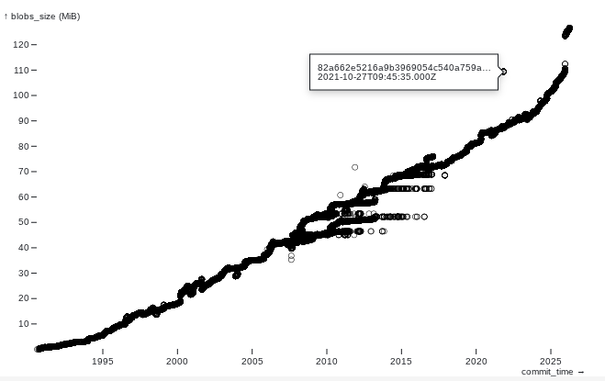
@mcc Using libgit2 (many language bindings) (or gix, rust), I made a graph of commits in cpython as the sum of the uncompressed size of the blobs, recursively, vs the commit date.

This avoids being extremely slow by caching the results for each tree object, so each commit only walks new trees.

@mcc You can list out all the blobs, sort by size, and then reverse-lookup which blobs belong where. I don't think there's a built-in command to do this, though you could tape one together with `git log --find-object`; here's another attempt I banged together using libgit2: https://github.com/passcod/git-large-blobs
@passcod hm. I actually have some experience with Dulwich.