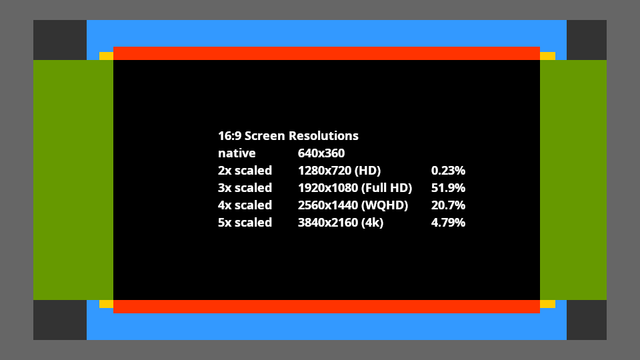
Looking at the most common monitor resolutions at Steam to see what it would take to get a 640x360 UI to upscale without shrinking or distortions, things mostly seem simple enough.
1st, 2nd, and 4th most common resolutions are straight upscaling. A 20 pixel border top and bottom for 16:10 displays (3rd and 7th most common) and a 60 pixel border left and right for 3440x1400 displays (5th most common).

But what in hell are 1366x768 displays?! (6th most common.)
Why does this exist?

#videogames

@yora this was due to the first transition from 4:3 to 16:9. Since the most common 4:3 res back then was 1024x768, they kept the vertical size and just extended to the closest whole number horizontally.
Its an oddity of its time.

@philipdrobar A 60 pixel wide decorative border around a 640x360 UI would look good at 1280x960 and 1920x1440 for 4:3 screens, and on those 3440x1440 screens.
And if it can be neatly clipped at 20 pixels wide, it also works for 16:10 screens.

1366x768 screens will probably have to play at 1280x720 and have to deal with cropped borders on all four sides.

There are so many messed up display resolutions that appear in the Steam user statistics:

1280 x 1024 (0.21%)
1360 x 768 (0.46%)
1366 x 768 (2.49%)
1440 x 900 (0.83%)
1470 x 956 (0.48%)
1512 x 982 (0.34%)

1366 x 768 has a stupid but comprehensible reason.
But the rest... 😨

I might be overthinking this as there could perhaps be technical solutions to take care of that, but to make a 640x360 game work in various screen resolutions without distorted pixels, these are the borders I would have to add to the UI to cover 93% of the used resolutions in the Steam user statistics. (Which somehow only add up to 97% total including "other".)

That's not too bad. But everyone who needs borders beyond that just gets a bare texture with no more details.

#gamedev #UI #uidesign

@yora Wikipedia says it's called WXGA, basically the 4:3 resolution of 1024x768 extended to 16:9.

Apparently used in LCD TVs, budget laptops and netbooks.