 negativenull
Incorrect Password
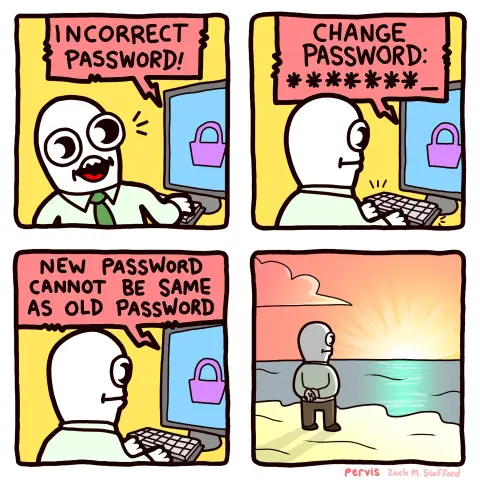
I ran into some app a while back that required 2fa “text you a code” to log in every time.
If you put in the wrong password, it’s still sent you the 2fa… Which it would accept for login.
I’m honestly not sure if it ever even checked the password.
Yes, because among other things this annoys users into just writing down their password on a Post-It and sticking it to the bottom of their keyboard or monitor ripe for any passerby to take.
I have explained this to various management types repeatedly over the decades and nobody seems to get it.
The folks at NIST know what they’re talking about. The US government directed them to develop security policy for government information systems in 2002 (FISMA) - they’ve been thinking about how to do this properly for 24 years.
If you happen to work for a US government agency of any kind, you can basically tell your boss “NIST guidance says we should do X” and compliance is technically required by law (within the context of security policies that apply to your agency’s work area). If you work for a company that does business with the US government, there are similar compliance policies also published by NIST that you should be following (and your company could lose its contracts if it is not compliant).
Yes. I tried my best, but failed miserably.
But then again, failing miserably is my best. So in a sense I succeeded as expected.
Password1
Password2
Password3
Password4
Password5
Password1
Aaaaaaaand repeat.
That one is okay-ish. The one that is going to have me getting in the elevator with my samurai sword to go and have a chat with somebody is “Your password cannot contain any sequence of characters from previous passwords,” or “password cannot be your old password backwards.”
Sure, just admit to me that you’re storing passwords in plain text as carefree as you like.
Companies like Apple say the password has to have a capital lowercase number and 8+ characters. But leave out that your password can’t be something you have used in the last year, can’t contain your name, birthday, or email address. Those errors will come up separately. In this case it would say you can’t reuse your password. It doesn’t say your last password because it wasnt your last password. Some people just don’t use the password daily/weekly, so they forget 6 times a year and have to keep resetting it.
Also the number of people forget their passcode because they use face/touch id all all the time is higher than you’d expect apparently. I knew someone who used to complain about it when they did support for them. Essentially people plug their device in every night, use it daily and never turn it off so it always accepts face or touch. Then they leave automatic updates on … and it restarts for an update and they can’t get back into their device because face/touch doesn’t work on first boot, it is a subsidiary of the passcode and cannot be set up without the passcode.
Then since they forgot their passcode, they have to wipe everything from the phone to bypass it… But of course they don’t know their password so they can’t sign back into their account and it is then activation locked because that’s how they prevent people from using stolen devices.
Then the extreme cases dude was telling me at that point is they changed their phone number at some point, so they can’t reset their password without it, it takes days if not a week to recover the account, all the while their phone is a brick
my favorite is my login for my phone needing me to authenticate i with… the authenticator… on my phone…. which to log into the authenticator…. requires me to verify using the authenticatior…
you call the IT department and i get an AI telling me that all password retrievals are done through the web portal, so it sends the password reset… to my email, accessed by my phone, that needs me to authenticate using the authenticatior…
the real answer it to lie to the AI to talk to a person and ambush them with a password reset and don’t take no for an answer.
i am currently 1 month behind on my required training modules about the importance of network security.
from what people told me who’s had this happen, even with a lost account recovery key it is possible to recover the account, it’s just apple doesn’t advertise it.
Basically it’s the same account recovery process but they nuke the accounts cloud(which is likely a deal breaker) prior to handing the account over. The issue is you can’t start that from a self service portal, it has to be originated from apple support and getting them to actually do it can be a pain because they don’t like to for obvious reasons.
also i believe Not having a method of account recovery that allows you to retain goods that was exchanged for monetary value would be concidered fraud so I would expect they are forced to have some way of retaining purchases as long as you can clearly identify yourself as the buyer
That is not how it works.
They keep a log of the 3 (or more) previously used passwords. If you try to change to any of them, it will give you this error.
So if you changed your password and then forgot. Changing it back to the password before that will tell you not to use previous passwords even if it is not the current password.
There’s a special category reserved for the devs that design their apps to invalidate passwords, but not give a message saying the password is invalidated and needs to be changed.
In my experiences that is usually the cause. Them invalidating the password sending an email (or sometimes not). cue me trying the old password, failing, changing the password, and getting that message. /tableflip
Came here to say this.
Pretty sure most of the time the password is expired or invalidated, as you said, but whoever vibe coded the system was too lazy, too dumb, or too terrified of being blamed for the frustration of changing a password, that they think it is better to put ALL the frustration on the user.
Whatever the reason, I fucking hate them.
“I’ll just gaslight them into thinking they couldn’t remember it”
Fucking assholes.
What the fuck are you expecting from me?
PasswordSpring2026!
 ttyybb
 orca
orca dual_sport_dork 🐧🗡️
 Cyrus Draegur
 CarbonIceDragon
 Seefra 1
 HuudaHarkiten
 edgemaster72
 LogicalDrivel
 WraithGear
 Pika
Pika Rivalarrival