 Stuart Langridge
made the mistake of thinking that I could do with a new keyboard, and so reading stuff online about it. This is useless; everyone who talks about keyboards is a nutter about them. It's like trying to ask about new headphones for your bus trip on audiophile forums or something.
 popey
popey@sil what is wrong with your current keyb? What do you want to see improve with a new one? Size/weight/travel/sound/features? Maybe think on the requirements before trying to whittle down all keyboard options from top down?
@popey the problem is that I don't know. What's wrong with my current keyboard is that it's the one that came with the Acer Aspire One; it's my fallback, after my cheap logitech broke. It lives on my desk always so I don't worry about travel or size or weight, and I don't need features much, I don't think? But I mostly don't know enough about this to even know what I don't know. I have low requirements here, though!
 unattributed 𓂃✍︎
@unattributed @popey I'm not sure. I mean, obviously, having no wire is in general a good thing, because there's less to get tangled up on my desk, but it never goes anywhere other than the desk, and the cheap one I've been using for six months has a wire, so it's not the end of the world. plus you never have to put batteries in
@sil @popey Okay - safe bet is Keychron. Their C2 keyboard is inexpensive, wired, full size, and not all the mumbo jumbo stuff you get with custom keyboards.
https://www.amazon.com/Keychron-Mechanical-Keyboard-Hot-swappable-Backlight/dp/B08CNBBHQ1
@sil @popey Second option I just found: Kisnt KN104. Full size keyboard, has wireless operation, but you can just keep it plugged in.
I own three of the smaller version of this keyboard (KN85), and I am using it right now. It's an amazing keyboard I can't recommend enough. (If I had realized they had a full-sized version of this keyboard I would have recommended it over the Keychron.)
https://www.amazon.com/Wireless-Mechanical-Keyboard-Swappable-Bluetooth/dp/B0FFMRT99D
Amazon.com: Kisnt KN104 Wireless Mechanical Gaming Keyboard, 100% Full Size 104 Keys with Number Pad, Custom RGB Backlit, Creamy Sound, Hot Swappable, Bluetooth/2.4GHz/USB-C for Win/Mac/PC (Carbon Black) : Video Games
Buy Kisnt KN104 Wireless Mechanical Gaming Keyboard, 100% Full Size 104 Keys with Number Pad, Custom RGB Backlit, Creamy Sound, Hot Swappable, Bluetooth/2.4GHz/USB-C for Win/Mac/PC (Carbon Black): Gaming Keyboards - Amazon.com ✓ FREE DELIVERY possible on eligible purchases
@unattributed @popey I appreciate the effort here, don't get me wrong, but a keyboard that costs £70 is pitching it a bit high for me if I'm honest. This one seems to make a big deal of how it does a load of stuff I don't care about (having lights, swappable keycaps, sound deadening?). I'm just not discriminating enough (or invested enough) for stuff like this.
I understand where you are coming from on this. I think the big thing to understand is keyboards have been going through the enshittification process (to borrow Corey Doctorow's term) for over 25 years. Personally, I started using PC's all the way back with the original IBM PC, I remember keyboards like the IBM Model F and Model M, which were amazing keyboards. (Which, by the way, there is a company that produces the successor to those keyboards. Their Model M style keyboard is priced around $200. Which is appropriate given inflation between the 1990's and now.)
Unfortunately, companies like Logitech, Corsair, Microsoft, and Dell have continually made worse and worse products, while maintaining the same prices. This brought companies like Leopold, Das Keyboard, Keychron and others in with keyboards that were being made with similar quality standards to the old IBM keyboards, but at much higher prices.
But, then groups of makers and hobbyists started making keyboards by hand. They started discovering a bunch of things about the designs, and found ways to make keyboards better than the large companies. These keyboards were even more expensive because they used exotic materials, and were completely hand built.
Now things are coming full circle. There are companies like Keychron, Asus, Logitech (somewhat) and SteelSeries, that are learning the lessons that the custom keyboard community learned, and integrating that knowledge into their products. There are also some Chinese companies like Akko, Epomaker, Redragon, Royal Kludge, and Kisnt that are producing keyboards in a lower price range that (to varying degrees) offer higher quality that your standard Logitech keyboard.
What is tripping you up is all the marketing BS that is accompanying these keyboards. It's like all things tech - try to make the best buzzwords, and to make your product sound special with a bunch of psuedo-technical sounding horse manure. Most of that stuff is targeted specifically at non-technical gamer types who think the latest and greatest thing will make them a better gamer. It's the same thing we see with golfers being sold special (and expensive) clubs, or watch collectors buying $100,000 watches.
IMO - the best thing is to find something that is higher quality than the average $20 eWaste keyboard that you'll be able to use for 20-30 years, while not spending more than you need to. I feel that keyboards in the $50-ish range from companies like Keychron and Kisnt offer that kind of quality, usability, and longevity.
And, besides, if you buy the Kisnt and try it, you can return it if you don't like it. But, I'm going to bet that you will like it. :)
@unattributed this is eloquently put. I shall think harder on this. @popey
@popey also sorry, I didn't actually answer the question!
This little keyboard is not great because:
it doesn't have a number pad (Blender uses this)
it turns on numlock on startup which you have to turn off otherwise half your letters are numpad numbers and your password doesn't work
it's *grubby* and I can't make it be clean
it's white, so it shows the dirt a lot
but it's functional; I've been using it for months. So, low ceiling here!
 Anton Piatek
@sil @popey do at least try and find a shop with some mechanical gaming keyboard and some membrane ones and kegwt a feel. Turns out I don't really like typing on mechanical ones (at less the usual MX red). I ended up with a razer membrane keyboard as its softer to type on (I also hate cheap membrane keyboards with a passion)
 Chris Nicolson
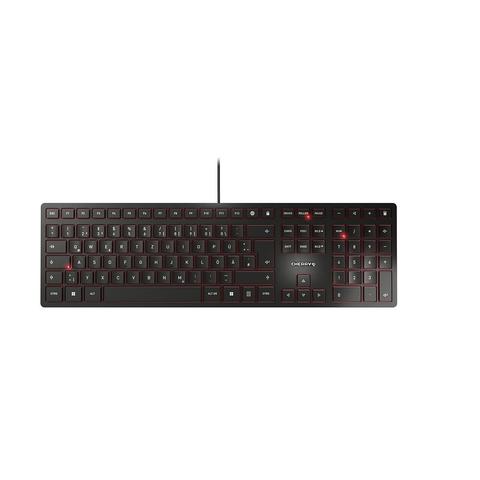
@sil @popey I know nothing about keyboards, but a colleague offered me one of these (he was switching to a different model). It made me realise how mad my big standard one at home was and I had to buy another one for there.
https://www.cherry.de/en-gb/product/kc-6000-slim
https://www.cherry.de/en-gb/product/kc-6000-slim