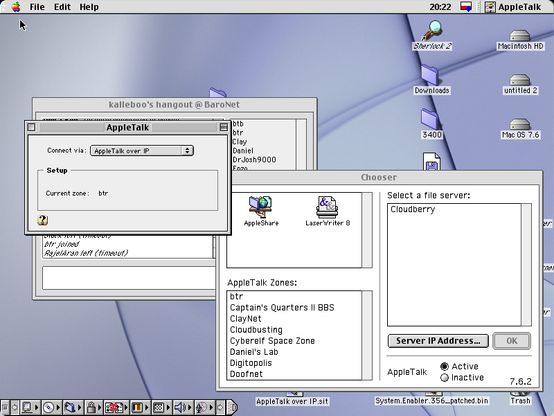
Something I wanted to finish for this #MARCHintosh: ATalkVPN server port for TashRouter.
So far I've managed to get a working PoC. The router crashes sometimes when trying to send broadcast packets, but apart from that it works surprisingly well. It allowed me to connect to #globaltalk in situations when AppleTalk wasn't directly available, e.g. when I was connecting over WiFi or under emulation. I wasn't able to play Bolo, but browsing shares, moving files and using some AppleTalk apps just work.
I've decided to publish it at the current state on GitHub: https://github.com/bartekre/PyATalkVPN (probably will move to Codeberg soon). It's messy and far from finished (at least not until I implement keepalive and timeout handling), but it would be a shame for it to sit forever in some random folder.
@btr Do tell us more. I thought the core concept behind #globaltalk is using Apple Internet Router's (AIR's) IP tunnel feature. Is avpn compatible with AIR's IP tunnel protocol or do you have to run avpn on both ends?
@pitz Technically, it's similar to LToUDP: it simply encapsulates LocalTalk frames within UDP datagrams (with some extra header data), but instead of having multiple nodes on a multicast group, we have a bunch of remote clients connecting to a single server. Initially, Dan and Paul tried to use atalkvpn as GlobalTalk base, but it was too limited.
The original atalkvpn server converted LocalTalk frames to EtherTalk Phase 1, wrote them to a tap device, and was meant to be used with netatalk, which routed them to some physical ports. Since nowadays virtually nothing supports EtherTalk Phase 1 (AFAIK appletalk module for Linux never implemented it), I took a different approach and wrote a TashRouter port. This way we create a dedicated network for atalkvpn and route packets between this network and anything TashRouter supports: TashTalk, LToUDP or EtherTalk.
@pitz In my current setup, I have jrouter, routing GlobalTalk networks to my ethernet, and TashRouter connecting ethernet with LToUDP and ATalkVPN. ATalkVPN is listening on my external IP, so that I can connect from anywhere. If anyone's interested, I can set up an experimental zone with a public ATalkVPN server for tests, though with a word of warning: this is alpha quality, some things aren't implemented and it will most likely freeze your Mac at some point.
@btr I think I get it. With atalkvpn listening on your external IP (standard port-forwarding) and from remotely, you also use atalkvpn to connect to that external IP -- is my understanding correct?
So it's a personal tunnel (atalkvpn) independent of the IP tunnels used by AIR/jrouter. But you're connecting them all with tashrouter so you would still be able to reach GlobalTalk servers from remote.
@pitz correct! atalkvpn client is an Mac OS extension, but I guess you already got this.
@btr @pitz so from an QEMU 7.1 image hosted on a laptop connected back to my home LAN via Tailscale. I could use this to connect the 7.1 VM to TashRouter and get a mobile Globaltalk setup? I can ping the TashRouter machine over Tailscale from the 7.1 VM so it should be straightforward and I shouldn’t have to port forward, right :-)
@btr @pitz I think atalkvpn is running fine as a port for TashRouter (at least there's no errors!). But I cannot connect via the Atalkvpn extension. The server address is stored in STR right and not ADDR?
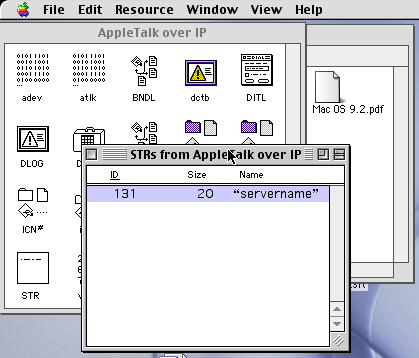
@fergycool @warandpeas that's what I forgot to mention: you need to modify the AppleTalk over IP extension with ResEdit, i.e. the STR resource, ID 131 needs to be set to your public IP / hostname. The extension also stores its prefs in System Folder:Preferences:mac68k.info but changing the STR value in there has no effect (looks like a bug). Username and password fields are completely ignored for now. I have a working password check implementation somewhere, but I haven't pushed it yet, pending some cleanup. Also, since it uses DES, it only gives a false sense of security (-;
The other thing is the ValueError raised by Datagram.as_short_header_bytes(). I haven't yet figured out why it happens and for now I'm just changing line 118 in tashrouter/datagram.py. Instead of:
raise ValueError('Invalid hop count ... ')
I have:
print('WARNING: invalid hop count ...')
CC @smallsco
@btr @warandpeas @smallsco thanks a lot for all that. I will try again. I did put the internal Tailscale address (which I can ping from the 7.1 vm) in the STR resource previously but will check again. I’ve already commented out that line in TashRouter when I tried to get my InageWriter online.
@btr @warandpeas @smallsco I gave it another go, but could not get it to work. I removed Tailscale and just opened up a port on my router. But It’s not getting there! There are no errors/warnings in the log of TashRouter so something is failing in between. I will keep trying though. I did notice that the username/password is also being stored in the STR resource along with the servername.
@fergycool @warandpeas @smallsco yup, if you're getting a timeout on the client side, it definitely sounds like a firewall/port forwarding issue. If you have your log level set at INFO or more verbose (I wouldn't recommend DEBUG though, it significantly slows things down and causes random issues), you should see something like "INFO:atalkvpn.server:Registered new node ...". This message shows if anything comes over UDP, so you can easily check if your server is reachable with netcat, e.g.: nc -zu your.atalkvpn.server.address 1029.
Keep in mind that there's no client timeout mechanism implemented yet, so the client will stay registered until server restart. It shouldn't cause any issues though, it's just a tiny client object instance sitting quietly in server memory.
@btr @warandpeas @smallsco Thanks! Never thought of that. From the Mac laptop hosting the 7.1 VM it seems I can access TashRouter back on my home LAN using nc over a Tailscale connection as the TashRouter log shows: “Apr 07 14:11:25 wolfalice python3[2284]: 2026-04-07 14:11:25,550 DEBUG: Sending data to <AtalkVpnNode None at 100.73.147.127:53770> “. No time to test further now but will do so later.
@btr @warandpeas @smallsco BTW your comments on Tashrouter logging using the DEBUG level causing issues are interesting. TashRouter (with Jrouter) has been very temperamental for me all through this Marchintosh. Whereas it was rock solid in the past. I did change the logging level back in January. Perhaps that is the reason? Anyway changed it to a less verbose level! Thanks!
@fergycool could be. When set to DEBUG, TashRouter logs the payload of each packet, effectively slowing everything down by an order of magnitude. Hope it helps!